What to check when buying
For consumers building and testing game menus on a small desk, settle the balance between editing keys and mouse room before weighing programmable controls or switch settings. A feature is useful here only if it fits the commands and devices you actually use.
| Concern |
Buying check |
Who this matters to |
| Compact editing layout |
Compare the exact position of arrow, navigation and utility controls on the 75% layouts you are considering. |
When I build menus, I need room on the desk without hunting for the keys that move me around the editor. Around 33% of consumers put accessible editing controls first. |
| Mouse room |
Measure the space available beside the keyboard and check which controls a 60% layout moves to shortcut layers. |
If testing gameplay leaves my mouse cramped, I would accept more key combinations to reclaim space. Mouse room is the primary need for around 25% of consumers. |
| Shortcuts and connections |
Check whether the required remaps work with your operating system and whether the offered connection modes suit your devices. |
Repeated editor commands make configurable keys worthwhile to me, especially if I also move between devices. Around 25% of consumers prioritise this workflow flexibility. |
| Profile and key feel |
Compare board height and switch options; assess adjustable actuation against your typing and testing preferences. |
For long stretches of editing mixed with game testing, I care more about a board’s height and key feel than shaving off every centimetre. That is the leading concern for around 17% of consumers. |
Joybuy keyboards for small desks
These choices cover a 75% option for compact editing and smaller 60% options for consumers who give mouse room greater priority. Compare the exact layout and shortcut access for your menu editor before choosing between them.
 No image available
HyperX Alloy Rise 75 Wireless Keyboard UK
Consider this 75-series option if you want a compact board without immediately moving to a 60% layout.
The product name identifies a wireless UK variant. Confirm its physical key layout and legends, including whether the selected variant is UK-ISO, and check the controls you use in your editor.
View on Joybuy
 No image available
Razer Huntsman V3 Pro Mini 60% Keyboard
Consider this compact format when mouse room during game testing outweighs direct access to every editing key.
Razer specifies 0.1–4.0 mm adjustable actuation and Rapid Trigger for the Huntsman V3 Pro Mini. Check the selected physical layout and how its shortcut layers accommodate your editor commands.
View on Joybuy
 No image available
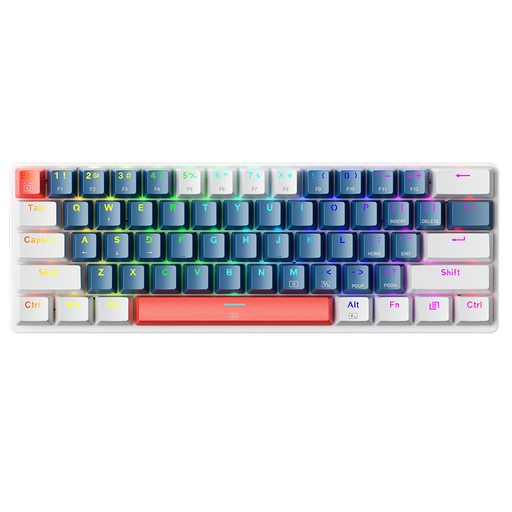
MACHENIKE K500-B61 60% Wired Keyboard, US Layout, Blue Switch
This 60% option is worth considering if desk space takes priority and a US QWERTY layout suits your typing.
Its product name specifies a wired connection and blue switches. If you need UK-ISO placement, compare the stated US layout carefully; also check how the keys you use for editor navigation are accessed.
View on Joybuy
 No image available
AULA WIN60HE 60% Wired Keyboard, Black/Graywood Magnetic Switch
This compact option suits a desk-space-first choice if its physical layout and navigation shortcuts fit your menu editor.
The product name lists hot-swappable magnetic switches, adjustable actuation, Rapid Trigger and an 8000 Hz polling rate. Those gaming-input specifications do not establish an advantage for menu creation; check the key layout separately.
View on Joybuy
 No image available
AULA Hero 68 60% Keyboard, White & Black King Magnetic Switch
Consider this compact board if mouse room matters more to you than choosing a UK-layout keyboard.
The product name specifies a US layout, a cable connection, magnetic switches, adjustable actuation and Rapid Trigger. Check its arrow and navigation shortcuts against your editor before deciding whether the smaller format works for menu creation.
View on Joybuy
Frequently asked questions
Should I choose 60%, 75% or TKL for creating game menus?
Start with 75% if you need to save desk space while keeping frequently used editing controls accessible. Choose 60% if mouse room for testing matters more and its shortcut layers work for you; consider TKL if you prefer a broader key layout or a thin board and can accommodate its footprint.
Do I need a UK-ISO keyboard?
Choose UK-ISO if its physical key placement and legends are important to your typing or shortcuts. Confirm the exact variant rather than inferring it from the brand or keyboard size; Keychron UK, for example, identifies a UK-ISO option for the K2 Max.
Can I return an online keyboard if its layout does not suit me?
For an online purchase in England, Citizens Advice says consumers normally have a 14-day change-of-mind cooling-off period, subject to exceptions. Check the seller’s return instructions and any applicable conditions; a faulty keyboard raises a separate question about remedies, not merely a change-of-mind return.
Does a manufacturer warranty replace my rights if a keyboard develops a fault?
No. Citizens Advice explains that warranties and guarantees add to legal rights rather than replacing them. Keep proof of purchase and check both the warranty terms and the remedies available for the fault.


