What matters when choosing?
Start with the space your mouse and paperwork need, then decide whether number entry justifies a wider keyboard. Check the layout and the devices you use before settling on a connection method.
| Concern |
What to check |
Who this matters to |
| Usable desk space |
Measure the available width for the keyboard and mouse; check the exact dimensions and retained keys. |
I need space to spread out questionnaires and use a mouse without moving everything aside. Around 33% of consumers may put desk space first. |
| Number entry |
Check for an integrated numeric keypad and whether its extra width fits your desk. |
Entering response totals and spreadsheet figures is a regular task, so I would rather keep number keys close at hand. For around 27% of consumers, number entry may be the primary concern. |
| Device switching |
Confirm supported operating systems and pairing capacity; check whether you need Bluetooth, a receiver or a wired connection. |
I prepare forms on one device and review responses on another, so changing between them needs to fit my workflow. Switching between devices may come first for around 20% of consumers. |
| Extended drafting |
Check key layout, the maker’s noise description and any software needed for remapping. |
Writing questions and summaries takes substantial typing, and key feel or shortcuts matter more to me than a particular connection type. Around 20% of consumers may prioritise the typing experience or customisation. |
Joybuy keyboard choices
These keyboards offer compact layouts or a foldable design relevant to a small survey-planning desk. Several listed variants use a US key layout, so check the keys you need as well as desk fit and connection requirements.
 No image available
Rapoo E9050L 75% wireless membrane keyboard, white
Consider this compact layout if the keyboard must share a small desk with survey paperwork. The listed variant has 78 keys, a QWERTY US layout, and 2.4 GHz and Bluetooth 5.0/4.0 connection options; check its physical dimensions and whether its keys suit your number-entry work.
View on Joybuy
 No image available
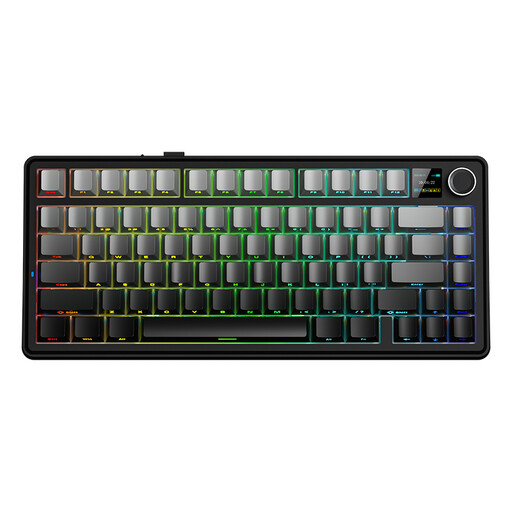
AULA F75 MAX 75% keyboard, Gradient Grey, Reaper Switch
This is a compact mechanical option if you want a choice of wired and wireless connections. The listed variant has a QWERTY US layout, side-engraved keycaps, and wired, Bluetooth and 2.4 GHz modes; check its dimensions and compatibility with your devices.
View on Joybuy
 No image available
Lofree OE907 65% keyboard, Jellyfish Switches
Consider its 68-key layout where desk width is limited and you want both wireless and wired connection options. The listed variant has a QWERTY US layout, Bluetooth 5.1 and a wired mode; check the key arrangement for survey data entry and confirm switching behaviour if you use several devices.
View on Joybuy
 No image available
MACHENIKE KG87 80% keyboard, Latte Switch, pink
This compact mechanical layout may suit survey drafting if you prefer its key arrangement to a smaller board. The listed variant has a QWERTY US layout and a gasket mount; check its dimensions, device compatibility and whether its layout retains the keys you use most.
View on Joybuy
 No image available
VoxorAI BOX1 Bluetooth keyboard, black
Consider this option if storing the keyboard away between survey-planning sessions matters to you. The listed keyboard uses Bluetooth and names computers, laptops, iPads and smartphones as compatible device types; confirm your specific device and key layout before ordering.
View on Joybuy
Questions about choosing a keyboard
Do I need a numeric keypad for community-survey work?
A numeric keypad is worth considering if you frequently enter response totals, dates, budgets or spreadsheet figures. HP specifies a full keypad on its compact 475; if numbers are only an occasional part of your work, compare that extra width with the desk space a narrower keyboard leaves free.
Should I choose Bluetooth, a USB receiver or a wired connection?
Choose a connection your actual devices and workplace permit. HP lists pairing with up to three Bluetooth devices for its 350, while Keychron lists Bluetooth and wired connections for the K3 Version 3; check operating-system support, available ports and any restrictions on wireless peripherals before buying.
Will a compact keyboard make long planning sessions comfortable?
Keyboard size alone cannot determine whether a workstation is suitable. The Health and Safety Executive advises looking at display-screen work and the wider workstation; consider the screen, chair, mouse and working patterns alongside the keyboard, and follow any applicable workplace assessment process.
What should I do with an old keyboard in the UK?
Check your local authority’s electrical-equipment collection options or a retailer’s current take-back arrangements. UK government guidance on waste electrical and electronic equipment encourages recovery, reuse and recycling; the available route depends on the collection service you use.
What details should I confirm for the exact keyboard variant?
Confirm its key layout, dimensions, connection requirements, included accessories and the seller’s return and warranty terms. Feature compatibility can also be variant-specific: Apple says its cited Touch ID keyboard requires an Apple-silicon Mac running macOS 15.1 or later, while Keychron offers different K3 layout and switch choices.


