Fete treasurer with limited desk space
You need room for a keyboard, receipts and a calculator alongside the spreadsheet. Check the monitor and stand dimensions, particularly if you plan to use a separate mount.


For village-fete spreadsheets on a small desk, start by considering a 23.8-inch or 24-inch Full HD monitor, then check its actual width and stand depth rather than relying on screen size alone. If several people will use the desk, or a fixed stand puts the screen at an awkward height, consider an adjustable stand or a suitable mount. Confirm the connection to your laptop before choosing a model.
The right monitor depends on what must share the desk with it and how often you will work through the fete accounts.
You need room for a keyboard, receipts and a calculator alongside the spreadsheet. Check the monitor and stand dimensions, particularly if you plan to use a separate mount.
You spend repeated sessions entering expenses, ticket sales or supplier details. Readable text and a screen position you can maintain comfortably matter more than display modes alone.
You connect a laptop for committee work and want more space for documents. Identify the laptop’s video output, then check the monitor’s input and the cable you will need.
Measure the working area with your paperwork and keyboard in place; then decide how you will position the screen and connect your laptop.
| Concern | What to check | Who this matters to |
|---|---|---|
| Desk fit | Compare the monitor’s full width and stand depth with the clear desk area. If considering a mount, check the pattern and whether the desk can accommodate it. | I need to keep receipts and a calculator beside my keyboard, so the monitor cannot take over the work surface. Around 33% of consumers put desk fit first. |
| Reading position | Check the screen resolution and whether the stand offers the adjustment you need. The Health and Safety Executive advises placing the top of the screen around eye level, about an arm’s length away. | When I work through rows of figures for an extended session, I need to read them without sitting awkwardly. For around 27% of consumers, screen readability and position are the primary concern. |
| Laptop connection | Match the laptop’s video output to the exact monitor’s inputs, and check whether you need a cable or adaptor. Confirm audio provision separately if you need it. | I want to connect my existing laptop for committee tasks without discovering that the ports do not match. Connection compatibility comes first for around 20% of consumers. |
| Support and end of use | Check the exact model’s warranty and the seller’s terms. If replacing a monitor, plan an appropriate electrical-equipment recycling route. | I want to know what support comes with the monitor and what to do with the old one. Around 20% of consumers make those considerations their primary concern. |
Two monitors in the same size class can occupy different amounts of desk space once their stands are included. The diagonal also tells you nothing about height adjustment.
Measure the clear width and depth with your usual paperwork in place, then compare them with the manufacturer’s dimensions including the stand.
If the supplied stand does not fit or position the screen well, you may need a suitable riser or monitor arm.
Manufacturer-described reading or flicker-related modes do not replace sensible screen placement. The Health and Safety Executive’s workstation guidance addresses screen height and viewing distance.
Position the display directly in front of you, with its top around eye level and the screen about an arm’s length away; treat display modes as settings you can try.
Ports and audio features vary by exact model. ASUS lists one HDMI input and no speakers for the VA24EHF, for instance.
Check your laptop’s output, the monitor’s inputs, cable inclusion and your audio needs against the full model name.
Depending on the setup, you may need an adaptor, a different cable or separate audio equipment.
These examples show how stand adjustment, connections and mounting can differ among compact monitors; check the exact variant before ordering.
Dell’s 23.8-inch Full HD IPS S2425HSM is worth examining if several people use the budgeting desk or you need to adjust screen height.
BenQ’s GW2490 is a 23.8-inch Full HD IPS option for a compact laptop-and-document setup.
LG’s 24MR400-B is a 23.8-inch IPS Full HD model to consider for straightforward HDMI-connected work.
ASUS’s 23.8-inch Full HD IPS VA24EHF is relevant if you intend to check a separate mounting arrangement.
These monitors offer different ways to set up a screen for fete spreadsheets, from compact Full HD models to options with other display formats or connection features. Compare each one with your desk measurements and laptop before choosing.
 No image available
For regular spreadsheet work, check whether its stand and screen position suit your available desk space.
24-inch class; Full HD; 16:9.
Check the required laptop connection and cable before ordering.
 No image available
Consider this model if the way you position the monitor matters on your small desk; check the space required by your intended arrangement.
IPS display; USB-C connection named for this variant. Confirm that your laptop supports the video connection you intend to use.
 No image available
If you expect extended admin sessions, compare its screen position and desk footprint with a simpler monitor before deciding.
IPS display; WUXGA format. Confirm the video connection required by your laptop.
 No image available
For a laptop-led budgeting setup, check the exact model’s stand dimensions and whether its screen height will work at your desk.
Match the laptop’s video output to the monitor’s stated inputs before choosing a cable.
 No image available
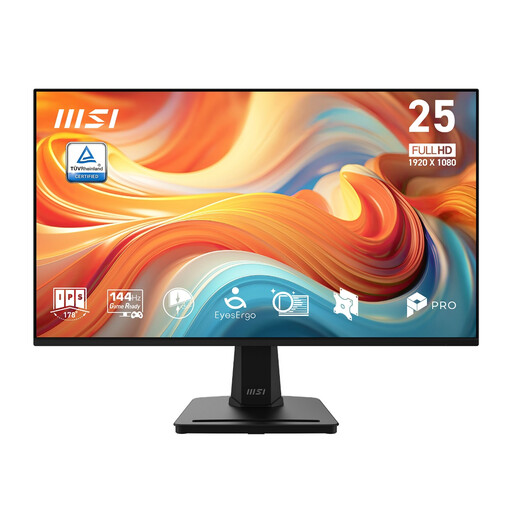
Its 24.5-inch screen is larger than the compact starting size, so compare the complete monitor and stand dimensions with the space left for paperwork.
1920 × 1080 resolution; IPS; 144 Hz. Check screen positioning and laptop connection separately.
A 23.8-inch or 24-inch Full HD monitor is a useful starting category, but its diagonal does not establish desk fit. Compare the exact model’s width and stand depth with the space you need for your keyboard, mouse and receipts.
You need a way to set a comfortable screen height, which may be the supplied stand, a suitable riser or a compatible mount. The Health and Safety Executive advises positioning the top of the screen around eye level and the display about an arm’s length away; check whether a tilt-only stand lets you do that at your desk.
No: check the laptop’s video output against the exact monitor’s inputs. LG lists HDMI for the 24MR400-B, while ASUS lists one HDMI input for the VA24EHF; depending on your laptop, you may need a suitable adaptor or cable.
Use an appropriate electrical-equipment reuse or recycling route rather than putting an old monitor in ordinary household rubbish. UK waste electrical and electronic equipment guidance supports recovery, reuse and recycling; check the collection options available from your local authority or retailer.