Small-desk inventory reviewers
If the monitor must share a desk with a keyboard and paperwork, check its complete width and stand depth rather than judging fit from the screen diagonal.


A 23.8- to 24-inch monitor is a useful starting point for reviewing household-inventory lists on a small desk, provided its complete stand fits the space. Full HD suits ordinary lists; QHD offers more pixel detail at a similar screen size for dense spreadsheets, though text scaling may matter. If you want a one-cable laptop setup, check both USB-C video support and the monitor’s charging output before choosing it for that feature.
If the monitor must share a desk with a keyboard and paperwork, check its complete width and stand depth rather than judging fit from the screen diagonal.
If you regularly compare item descriptions, quantities, codes or several spreadsheet columns, a compact QHD screen is worth considering alongside the text size you find comfortable.
If you move your laptop between rooms and want fewer desk cables, check whether its USB-C port carries video and whether a monitor’s charging output meets its needs.
Start with the usable desk area and screen position, then decide how much list detail you need. Consider laptop charging only after checking compatibility.
| Concern | What to check | Who this matters to |
|---|---|---|
| Desk footprint | Measure usable width and depth, then compare them with the exact monitor’s dimensions with its stand. | I need room for my keyboard and paperwork without pushing the screen too close; around 27% of consumers put desk fit first. |
| List detail | Compare Full HD with QHD at the intended screen size, and check computer output and comfortable text scaling. | When I compare small item codes or several columns, keeping more detail visible matters most; roughly 27% of consumers prioritise list detail. |
| Screen position | Check height and tilt adjustment against your desk and chair. The Health and Safety Executive advises placing the screen directly ahead, with its top around eye level and the display about an arm’s length away. | For longer review sessions, I need to place the screen at a workable height rather than adapt my posture to a fixed stand; around 26% of consumers make positioning their primary concern. |
| Laptop connection | Confirm USB-C video support on the laptop and compare its charging requirement with the monitor’s stated power delivery. | I move my laptop between tasks and want fewer cables to reconnect at the desk; about 20% of consumers put laptop connectivity first. |
A compact panel can still have a base that takes up substantial desk depth. BenQ specifies a 184.9 mm stand depth for the GW2486TC, illustrating why panel size and desk footprint are different measurements.
Allow space for the keyboard and mouse, then compare the remaining area with the exact model’s dimensions with its supplied stand.
If the base does not suit the desk, an arm or riser would be a separate item to assess for compatibility.
Dell describes the P2425H’s USB-C port as downstream data-only, while BenQ specifies USB-C video input and 65 W power delivery for the GW2486TC. The port’s shape alone does not establish what it can do.
Check the monitor’s video and charging specifications alongside the laptop’s USB-C video support and charging requirement.
A separate laptop charger or video connection may still be needed.
QHD provides more pixel detail than Full HD at a similar 23.8-inch screen size, but the text size you find readable may depend on display scaling.
Confirm that your computer and intended connection support 2560 × 1440, and check how your usual inventory files look at a comfortable scaling setting.
Display feature labels do not tell you whether a stand can place the screen appropriately on your desk. The Health and Safety Executive advises a screen directly in front of you, with its top around eye level and the display about an arm’s length away.
Check the stand’s adjustment range and the available viewing distance before treating other display features as deciding factors.
Dell’s P2425H and P2425D illustrate Full HD and QHD choices in the 23.8-inch class.
The 23.8-inch GW2486TC is a Full HD option for a compatible USB-C laptop setup.
AOC’s Q24V4EA provides a compact QHD option for reviewing dense lists.
These monitors offer Full HD, WUXGA and QHD options for household-inventory work. Compare each model’s screen detail, stand arrangement and connection needs against the space on your desk.
 No image available
Consider this WUXGA model if you want to compare inventory fields on a compact screen. Measure the space available for its complete stand before buying.
 No image available
This 24-inch Full HD model is a choice for ordinary inventory lists. Check whether that resolution gives you enough room for the spreadsheet columns you use, and compare its complete stand footprint with your desk.
 No image available
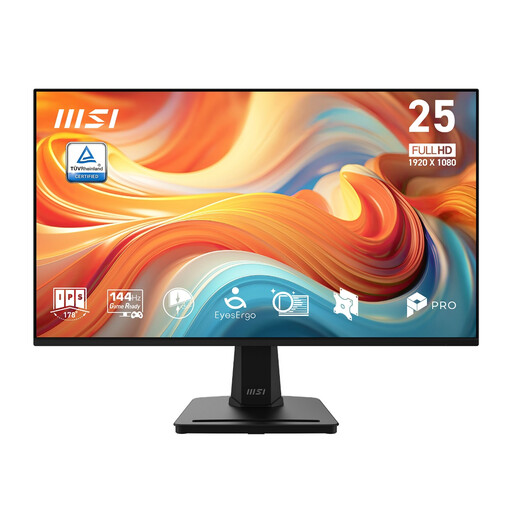
This Full HD option has a 24.5-inch screen, so check its width and viewing distance particularly carefully against a small desk. Its title specifies a 144 Hz refresh rate; that figure alone does not establish how much desk space the monitor needs.
 No image available
Consider this QHD model when reading dense inventory fields is the priority. Confirm that your computer supports the intended resolution and check comfortable text scaling, as well as the monitor’s complete dimensions with its stand.
 No image available
This 23.8-inch model suits ordinary inventory lists when stand adjustment matters: Dell specifies height, tilt, swivel and pivot adjustment. Check its complete stand dimensions for your desk. Dell describes its USB-C port as downstream data-only, not a laptop-charging input.
A 23.8- to 24-inch screen is a practical starting point, but the complete stand determines whether it fits your desk. For instance, BenQ specifies a 184.9 mm stand depth for the GW2486TC; measure your usable space and check the dimensions of the exact model you choose.
Full HD can suit ordinary lists when you do not need many fields visible at once. If retaining more pixel detail on a similarly sized screen matters more, compare it with a 23.8-inch QHD model such as Dell’s P2425D or AOC’s Q24V4EA, and check your preferred text scaling.
Only if the monitor offers the required USB-C video and power-delivery functions and your laptop supports them. BenQ specifies USB-C video input and 65 W power delivery for the GW2486TC; compare that output with your laptop’s charging requirement rather than relying on the presence of a USB-C socket.
Place the screen directly in front of you, with its top around eye level and the display about an arm’s length away, following Health and Safety Executive guidance. If the supplied stand cannot achieve that on your desk, check an adjustable stand or a compatible mounting arrangement.