Start with a compact, adjustable monitor if the stand must share a small desk with your keyboard, notes or laptop. A 27-inch QHD screen is worth considering when seeing more race-result columns at once matters more and you have measured room for it; prioritise USB-C connectivity only if your laptop supports video through that port and the monitor meets its charging needs.
Who these choices suit
Results analysts short on desk space
If a keyboard, notes or laptop already occupy the desk, check the monitor’s dimensions with its stand before deciding by screen size. An adjustable compact display is a sensible starting point when both fit and positioning matter.
Readers of wide results tables
If you compare several timing columns or keep multiple windows open, a 27-inch QHD display may give you more room to arrange them. Check that the screen, stand and your preferred viewing position fit the desk before choosing that route.
Analysts working from a USB-C laptop
If you want the monitor to serve as a desk connection point, check the laptop’s USB-C video output and charging requirements. A monitor’s USB-C socket alone does not establish that one cable will handle your setup.
What matters when choosing
Decide whether desk fit or visible spreadsheet space is the tighter constraint, then check screen adjustment and the connection your computer needs.
| Concern |
What to check |
Who this matters to |
| Desk fit |
Measure usable desk width and depth against the monitor’s dimensions with its stand. Check whether its adjustment or mounting options suit your setup. |
When my keyboard and notes need to stay within reach, the stand must not take their space; roughly 31% of consumers put desk fit first. |
| Visible data |
Compare resolution as well as screen size, then check that text remains comfortable at your preferred scaling and viewing distance. |
If I regularly compare wide timing tables, I want more columns in view without losing readable text; around 31% of consumers prioritise data workspace. |
| Long-session positioning |
Check height and tilt adjustment, alongside the position of documents and any glare at the desk. |
For extended analysis, I need to position the display without repeatedly twisting towards my notes; roughly 23% of consumers make workable positioning their primary concern. |
| Laptop connection |
Confirm USB-C video support on the exact laptop and compare its charging requirement with the monitor’s stated power delivery. |
When I move a laptop on and off a crowded desk, fewer separate connections matter most; about 15% of consumers put laptop integration first. |
Buying pitfalls
-
Choosing by diagonal size alone
A compact panel can still have a stand that crowds a keyboard or paperwork.
Measure the usable desktop and compare it with the full dimensions including the stand. BenQ lists its 23.8-inch GW2490T at 540 × 241 mm in landscape orientation, giving you a concrete size to check against your desk.
-
Assuming a larger screen always helps
QHD provides more pixels for arranging columns, but a 27-inch display also needs a workable physical position. Text scaling can affect how much of that workspace is comfortable to use.
Choose the larger route for a specific need to see more data, then check the stand dimensions, viewing distance and your usual spreadsheet text size.
-
Relying on display comfort labels
Display features do not resolve poor monitor height, glare or an awkward arrangement of documents. The Health and Safety Executive advises looking at the whole workstation, including equipment, furniture and working conditions.
Prioritise a workable screen position and desk layout; treat comfort modes as supplementary features.
-
Expecting every USB-C connection to work with one cable
A USB-C monitor will not provide the intended display-and-charging setup unless the laptop supports video through its port and can use the monitor’s available power delivery.
Check the laptop manual for video-output support and compare its charging requirement with the monitor specification before buying.
Brands to consider
These models illustrate different ways to balance desk fit, data space and laptop connectivity; their specifications should not be taken as claims about every monitor from the same brand.
BenQ
The GW2490T is a compact, adjustable Full HD example for a desk where physical fit comes first.
- BenQ specifies a 23.8-inch 1920 × 1080 IPS panel, 110 mm height adjustment, pivot and 100 × 100 mm VESA mounting for the GW2490T.
- Its Full HD resolution provides fewer pixels for arranging wide tables than a 2560 × 1440 QHD display.
Dell
The UltraSharp U2724D illustrates the 27-inch QHD route when seeing more columns is the main constraint.
- Dell specifies a 2560 × 1440 IPS Black panel with 150 mm height adjustment, tilt, swivel and pivot for the U2724D.
- Measure the space needed for its 27-inch format and check your preferred text scaling before committing to it for a small desk.
LG
The 24BA850 illustrates a compact Full HD route for a compatible USB-C laptop desk.
- LG specifies a 23.8-inch IPS display, an adjustable stand, RJ45 and USB-C charging of up to 90 W for the 24BA850.
- Confirm that your laptop supports video over USB-C and that the available charging power meets its requirements; this remains a Full HD rather than a QHD workspace.
Joybuy monitor options
These options include compact displays for a crowded desk and a WQHD option to assess if spreadsheet space takes priority. Compare each model’s installed footprint and connections with your own setup rather than choosing by panel size alone.
 No image available
ASUS ProArt PA248CNV IPS WUXGA monitor
Consider this model if a compact desk setup and a WUXGA display suit the way you arrange result tables. Check its complete installed footprint and your laptop’s connection requirements before choosing it.
View on Joybuy
 No image available
ASUS ZenScreen MB249C IPS USB-C monitor
Assess this USB-C model if laptop connection and flexible placement matter on your desk. Confirm the footprint of the mounting arrangement you intend to use, along with the laptop’s video and charging compatibility.
View on Joybuy
 No image available
ASUS ProArt PA278CV IPS WQHD monitor
Consider this WQHD model if arranging wider race-result tables is your priority. Check its dimensions with the stand, your viewing distance and comfortable text scaling before choosing it for a small desk.
View on Joybuy
 No image available
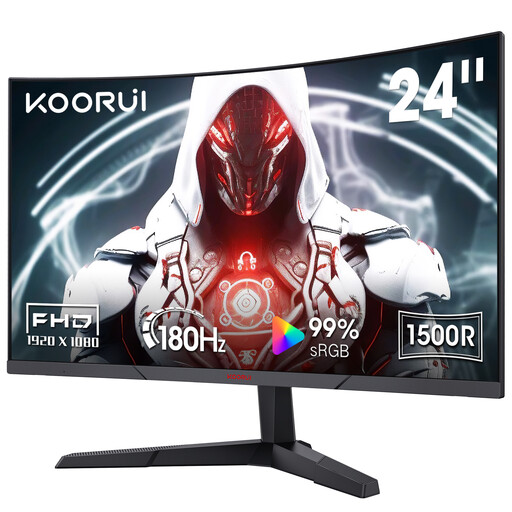
KOORUI MG24A12FV2 24-inch curved Full HD VA monitor
Consider this 24-inch model if a compact screen is the starting point for your results desk. Its stated features include a 1500R curve, 180 Hz refresh rate, tilt adjustment and VESA compatibility; check the installed stand footprint and whether the available positioning suits your desk.
View on Joybuy
 No image available
ASUS ProArt PA24ACRV IPS monitor
Assess this model if you want an IPS display for a compact workstation. Confirm the exact SKU’s resolution before judging how much table space it will provide, then check its dimensions with the stand and your laptop’s USB-C compatibility.
View on Joybuy
Common questions
Should I choose a compact Full HD monitor or a 27-inch QHD monitor?
Choose the compact route when the desk and stand footprint are the limiting factors; consider 27-inch QHD when fitting more result columns or windows on screen matters more and the larger setup fits comfortably. BenQ’s GW2490T is a 23.8-inch 1920 × 1080 example, while Dell’s U2724D is a 27-inch 2560 × 1440 example.
Is a height-adjustable stand worth prioritising?
It is worth prioritising if a fixed-height screen would be awkward to position alongside your keyboard and notes. The Health and Safety Executive advises assessing the whole workstation, not the monitor alone; a compatible monitor arm may be another option if it can be installed appropriately at your desk.
Will USB-C carry video and charge my laptop through one cable?
It can if the laptop’s USB-C port supports video output and the monitor supplies suitable charging power. LG states that the 24BA850 can carry display and data and provide up to 90 W of charging through USB-C, but you should check those requirements against your exact laptop.


