What matters when choosing?
Measure the desk and establish a comfortable screen position before deciding how much pixel workspace you need. Then check the connections and reading features against the way you build your recipe index.
| Concern |
What to check |
Who this matters to |
| Desk fit and positioning |
Measure usable width and depth against the monitor and stand. Check height adjustment or compatible mounting if a fixed stand will not put the screen at the right height. |
With notes and a keyboard sharing my desk, I need the screen in front of me without pushing it too close; around 33% of consumers put desk fit and positioning first. |
| Workspace and readable text |
Compare native resolution and consider whether your preferred text scaling leaves enough room for the index and source pages. |
When I cross-reference recipe fields, tabs and images, I want enough room to work without making text uncomfortable to read; roughly 27% of consumers prioritise workspace and text readability. |
| Laptop connection |
Confirm the laptop's video output and the monitor's input. If charging matters, compare the stated Power Delivery wattage with your laptop's requirements. |
I move my laptop to and from the desk and want a straightforward display connection, but still need to know whether I must use its charger; around 20% of consumers make laptop connectivity their primary concern. |
| Reading comfort |
Set screen height and distance first, then consider anti-glare finishes or reading modes as preferences rather than substitutes for workstation setup. |
Long sessions of checking recipe text make a comfortable, straightforward setup more important to me than features I will not use; roughly 20% of consumers put reading comfort and value first. |
Joybuy monitor choices
These monitors offer different ways to approach recipe-index work on a small desk, from a 22-inch Full HD screen to QHD models. Check each model's actual footprint and positioning options against your workspace before choosing.
 No image available
ASUS ProArt PA248CNV IPS WUXGA
Consider this WUXGA IPS model for recipe-index work where desk fit and screen positioning are priorities.
Check its stand dimensions and adjustments against your desk. If connecting a laptop by USB-C, confirm video compatibility, charging requirements and package contents.
View on Joybuy
 No image available
ASUS ProArt PA24ACRV IPS QHD
This QHD IPS model is worth considering if you want more native pixels for recipe fields and reference pages without choosing solely by diagonal size.
Measure its footprint and check the screen adjustments. For a laptop setup, confirm USB-C video compatibility, charging needs and whether the cable is included.
View on Joybuy
 No image available
ASUS ZenScreen MB249C IPS USB-C
This IPS USB-C model may suit a recipe-index desk where the way the screen is mounted matters as much as its connection.
Check that the mounting arrangement fits your desk edge and clearance. Confirm that your laptop supports video over its USB-C port and compare any charging capability with its requirements.
View on Joybuy
 No image available
ASUS ProArt PA278CFRV IPS QHD 100Hz
Consider this QHD IPS model if space for recipe columns and source windows matters and your desk can accommodate the screen at a comfortable distance.
Check the stand footprint before buying. If USB-C is important, confirm the exact regional port configuration rather than assuming it is included.
View on Joybuy
 No image available
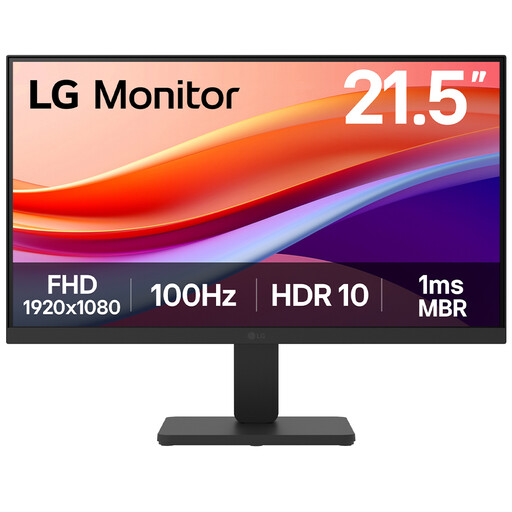
LG 22U401A-B 22-inch VA Full HD 100Hz Monitor with HDMI
This 22-inch Full HD model is an option to assess when desk width is particularly limited and you usually work with fewer recipe-index windows.
Compare its actual stand footprint with your desk. Check whether the available screen adjustment will put it at a suitable height, or whether a compatible mounting arrangement is needed.
View on Joybuy
Common questions
Is a 27-inch monitor better for organising recipes?
Not automatically: a 27-inch QHD monitor provides more native pixels for index fields and source pages, but it must also fit at a comfortable viewing distance. The Health and Safety Executive advises positioning the screen about an arm's length away, so a compact adjustable monitor may be more practical on a shallow desk.
Will a USB-C monitor charge my laptop?
Only if it supports Power Delivery at a wattage suitable for your laptop. BenQ says the GW2490C does not support Power Delivery; LG specifies up to 15 W for the 27U631A-B and says its USB-C cable is sold separately. Check your laptop's charging requirements and video compatibility before buying.
How should I position a monitor on a small desk?
Place the screen directly in front of you, with its top around eye level and the screen about an arm's length away, following Health and Safety Executive guidance. If the supplied stand cannot achieve that position, check whether a compatible arm, riser or other workstation adjustment will work with your desk.
Does UK display-screen guidance specify which monitor to buy for a recipe index?
No particular monitor model follows from the Health and Safety Executive's positioning guidance for a personal recipe-index setup; use it to assess how you can place and use the screen. The Health and Safety Executive says the UK Display Screen Equipment Regulations apply to workers who use display-screen equipment daily for continuous periods of an hour or more, a distinct question from choosing a monitor for private use.


