Small-desk weather-data users
You plot observations in spreadsheets or charting tools and need space for a keyboard, notebook and weather records. Compare the footprint of a compact mouse with the movement space a trackball could save.


For weather-record spreadsheets and charts on a small desk, start by comparing compact conventional mice that leave room beside the keyboard while giving you controllable pointer movement and scrolling. A trackball is worth considering when there is too little room to move a mouse; a vertical mouse addresses a different priority—hand fit during longer sessions—and still needs space on the desk. Check the connection your computer supports and how each shape fits your working position before buying.
You plot observations in spreadsheets or charting tools and need space for a keyboard, notebook and weather records. Compare the footprint of a compact mouse with the movement space a trackball could save.
You often select small chart controls or navigate long tables. Adjustable pointer speed, tracking on your desk surface and scrolling that you can control matter more than a headline DPI figure.
You enter or review observations for extended periods. Hand fit and mouse placement matter alongside desk size: the Health and Safety Executive advises keeping a mouse within easy reach so it can be used with a straight wrist.
Decide whether pointer control, free desk area or comfort over longer sessions is your first priority. Then check the mouse shape and connection against the space and computer you actually use.
| Concern | What to check | Who this matters to |
|---|---|---|
| Pointer and scroll control | Check adjustable pointer speed and the wheel controls you need for chart tools and long spreadsheets. Check tracking claims against your desk surface. | When I am selecting chart elements and moving through rows of observations, I want movement I can control without repeatedly repositioning the mouse. Around 42% of consumers put that control first. |
| Usable desk space | Check both the mouse footprint and the room needed to move it. If sideways clearance is tight, consider a stationary trackball. | With a keyboard and weather notes beside me, I need enough clear area to work without moving papers each time I use the pointer. Keeping that space free comes first for around 33% of consumers. |
| Comfort in regular use | Check hand fit and whether the mouse can sit within easy reach. The Health and Safety Executive advises using it with a straight wrist. | If I spend long periods entering records, I need a shape and position I can use without stretching or gripping tightly. Around 25% of consumers make that fit their primary concern. |
A slim mouse takes less space to store, but it still needs room to move and its shape may not suit a long session. The Health and Safety Executive advises placing a mouse within easy reach for straight-wrist use.
Check movement space as well as body size. If sideways movement is the problem, compare a trackball before choosing an especially flat mouse.
A DPI specification describes sensitivity capability, not whether a mouse will feel controllable in your charting software or track well on your surface.
Check whether you can set a comfortable pointer speed and whether the wheel lets you navigate records as you need.
Bluetooth and receiver-based wireless connections have different requirements. For example, HP lists Bluetooth and a 2.4 GHz USB-A receiver for the Z3700 Dual Mode, while Logitech says the compatible Logi Bolt receiver for MX Anywhere 3S is not included.
Check your computer’s Bluetooth support, available ports and the contents of the exact product listing before ordering.
Choosing a receiver connection may mean obtaining a separate compatible receiver.
A vertical shape may suit your grip, but mouse position remains important. The Health and Safety Executive advises keeping the mouse within easy reach and using it with a straight wrist.
Place the mouse where you can use it without stretching. For discomfort during regular workplace screen use, raise the workstation setup with your employer rather than relying on a product change alone.
Its range offers different shapes relevant to this decision: slim compact mice, a compact mouse with additional tracking and scroll controls, vertical mice and trackballs.
The Z3700 Dual Mode is a compact conventional-mouse option for consumers choosing between Bluetooth and a USB receiver.
The Arc Mouse illustrates a portable shape for consumers who store their mouse between sessions.
The Orochi V2 is relevant if you want a compact mouse with Bluetooth and 2.4 GHz wireless options as well as programmable controls.
These mice offer conventional and vertical shapes for weather-record work. Compare their stated connection methods and controls first, then check desk clearance and hand fit for the particular model.
 No image available
Consider this conventional mouse if you want a connection choice for a small-desk setup.
The title specifies adjustable DPI and a single AA battery. If you scroll through long weather records, confirm the wheel controls on the exact listing before buying.
 No image available
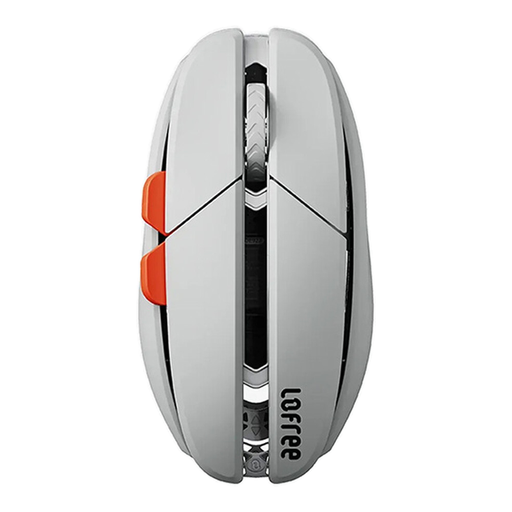
Consider this model if connection choice and adjustable pointer sensitivity matter for your charting setup.
Its title lists Bluetooth, 2.4G wireless and wired modes, a PAW3950 sensor, and a magnesium-alloy frame with a PC shell. Check its dimensions and scrolling behaviour against your desk and workflow.
 No image available
Consider this conventional mouse if you want to adjust pointer speed while working through charts and records.
The title specifies Bluetooth and 2.4G connections, five DPI levels and an 800 mAh battery. Check the mouse dimensions and hand fit before relying on it for a restricted desk area.
 No image available
Consider its vertical shape if hand position is a greater priority than having a slim mouse.
The title specifies Bluetooth and 2.4 GHz wireless connections, six buttons and adjustable sensitivity up to 1600 DPI. Check that the grip fits your hand and that the body leaves enough desk clearance.
 No image available
Consider this conventional mouse if a receiver connection suits your computer and you want an ambidextrous shape.
The title lists a 2.4 GHz nano receiver, four buttons and a 1600 DPI optical sensor. Confirm that you have a suitable USB port and check the wheel controls if you regularly scroll through spreadsheets.
Yes, if there is too little sideways room to move a conventional mouse. Logitech describes trackballs as suitable for tighter desk space because the device can stay in place, although controlling the pointer with a ball will feel different from moving a mouse.
No: a small footprint does not settle whether the shape fits your hand or the mouse sits in a comfortable position. The Health and Safety Executive advises keeping the mouse within easy reach so you can use it with a straight wrist.
Match the exact model’s connection method to your computer’s Bluetooth capability and available ports. HP lists Bluetooth 5.0+ or a 2.4 GHz USB-A receiver for the Z3700 Dual Mode; Logitech lists Bluetooth for MX Anywhere 3S and says its compatible Logi Bolt receiver is not included.
If you regularly use display screen equipment for significant periods at work, consider the whole workstation rather than changing only the mouse. The Health and Safety Executive says employers must assess workstations when screen use is part of normal work daily for continuous periods of an hour or more; report pain or discomfort so the setup can be reviewed.