PS5 players interested in supported feedback
If PS5 is your main platform, DualSense gives you access to haptic feedback and adaptive triggers where the game supports them. PlayStation says those features may require a USB connection.


Choose a controller that supports your platform and game before comparing extra features. DualSense is the native PS5 option if you want its game-supported feedback; the standard Xbox Wireless Controller suits Xbox and Windows play, while the 8BitDo Ultimate 2C Wireless offers wired or receiver-based play on Windows. At a small desk, check what each connection and power arrangement will add to your cables, ports and storage.
If PS5 is your main platform, DualSense gives you access to haptic feedback and adaptive triggers where the game supports them. PlayStation says those features may require a USB connection.
If you move between an Xbox console and a Windows PC, the standard Xbox Wireless Controller is listed for both. Xbox also lists Bluetooth connectivity and a 3.5 mm headset jack; check the connection your devices and headset require.
If your crowded desk has room for a cable or USB receiver, the 8BitDo Ultimate 2C Wireless offers those connection options for Windows. Check that a suitable port is free; 8BitDo lists this model for Windows and Android, not PS5 or Xbox consoles.
Settle platform and game support first, then choose the connection, controls and power arrangement that fit the space around your keyboard or screen.
Choose when: You play on PS5 and want the feedback features supported by your game.
Bear in mind: PlayStation says haptic feedback and adaptive triggers depend on the game and may require USB.
Choose when: You want the standard controller for Xbox and Windows, with Bluetooth available for compatible devices.
Bear in mind: Xbox says the standard model uses AA batteries or a rechargeable battery pack, so plan where that power supply will go.
Choose when: You play on Windows and prefer a wired connection or a 2.4G USB receiver.
Bear in mind: Its stated platforms are Windows and Android, and the Windows receiver needs a free USB-A port.
| Concern | What to check | Who this matters to |
|---|---|---|
| Platform and game support | Match the exact console or operating system, then check the survival-horror game’s controller-support information. | If my controller pairs with a device but the game does not support the controls I need, desk fit will not help. Around 36% of consumers put platform and game compatibility first. |
| Desk connections | Check whether play needs Bluetooth, a USB receiver or a cable, and whether the required port is free. | With little clear space, I want to know where the receiver or cable will go before choosing a controller. Roughly 29% of consumers prioritise a simpler desk setup. |
| Game-supported controls | Check the game and connection conditions for haptics, adaptive triggers or extra button assignments. | If feedback or remappable controls are my reason for buying, I need them to work in the game I intend to play. Around 21% of consumers make supported control features their main concern. |
| Power during play | Check the battery type, charging arrangement and whether you will need to keep a cable nearby. | I do not want a flat controller to interrupt a session or charging accessories to occupy the desk. Approximately 14% of consumers put power arrangements first. |
PlayStation says DualSense haptic feedback and adaptive triggers depend on game support and may require USB. Buying for those features could therefore add a cable without delivering the effect you wanted in a particular game.
Check the game’s controller-support information and PlayStation’s connection conditions before making those features your deciding factor.
A wireless setup may still need a USB receiver, batteries or charging access. A wired setup avoids those power decisions during play but leaves a cable to route.
Check your free ports and decide where the receiver, cable and charging equipment would sit.
8BitDo lists the Ultimate 2C Wireless for Windows and Android; its familiar layout does not establish PS5 or Xbox-console compatibility.
Use the exact model’s stated platform list as your starting point, then check support for your game.
GOV.UK advises that electrical products and batteries should go to appropriate recycling collection points rather than household rubbish.
Use an electrical-waste collection point for the controller and a suitable battery collection point for removable batteries.
DualSense is the native PS5 route and is also listed by PlayStation for PC, Mac and mobile-device use.
The standard Xbox Wireless Controller is a route for Xbox and Windows players who may also connect to compatible mobile devices.
The Ultimate 2C Wireless is a Windows- and Android-focused option with different connection methods for each platform.
These models offer choices for PS5, Xbox or Windows play, depending on the controller. Compare their stated platforms first, then consider how wired play, charging equipment or spare parts would fit your desk.
 No image available
A PS5 choice if your survival-horror game supports the DualSense feedback features you want. PlayStation says haptic feedback and adaptive triggers may require USB; confirm whether this package includes a suitable cable.
 No image available
Consider this model if configurable controls are a priority for your Xbox or PC setup. Check compatibility with your exact device and game, and allow storage space for its listed dock, case and interchangeable parts.
 No image available
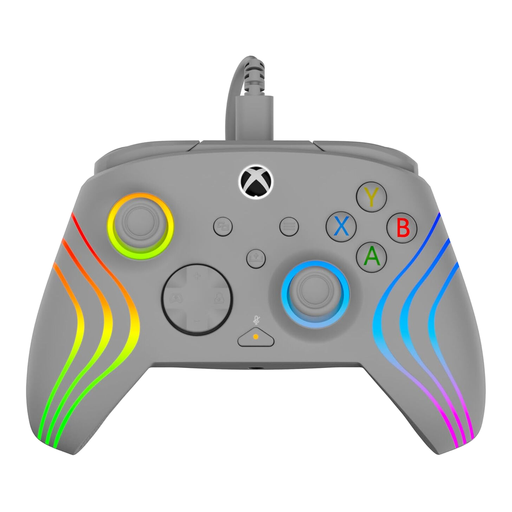
A wired option if you would rather plan a cable route than a wireless power arrangement. Its listed 10 ft cable needs somewhere to run; check compatibility with your particular game and device.
 No image available
The standard Xbox Wireless Controller suits players choosing between Xbox and Windows use. Xbox lists AA batteries or a rechargeable battery pack as its power options, so decide which arrangement fits your desk and sessions.
 No image available
Consider this Xbox or Windows model if you want to tailor the controls. Its interchangeable parts need storage space; check the connection and port required for your setup, as well as support in your game.
No: pairing with the PC does not establish support in a particular game. PlayStation advises checking the game’s Steam listing for full or partial controller support and notes that controller features vary by title.
No. PlayStation says those DualSense features are available when supported by the game and may require a USB connection. Check both the title and the connection method if those features are your reason for choosing it.
GOV.UK says online customers can cancel an order for a limited time even when the item is not faulty. Check the applicable cancellation steps and deadlines; changing your mind is distinct from seeking a remedy for faulty or misdescribed goods.
In the UK, take electrical products and batteries to appropriate recycling collection points rather than putting them in household rubbish, as GOV.UK advises. Check your local collection options for the controller and any removable batteries.