Small-room design-review teams
When several colleagues join remote participants to discuss one brief, the camera needs to frame the local group and the microphones need to pick up speech from their seats.


Choose a front-of-room USB video bar when several people around the table need to be seen and heard through one device. A desktop webcam is a more focused option for a presenter showing sketches or samples, but its microphone reach needs checking before it serves a group. For discussion around all sides of a table, consider a 360° camera if central placement and its stated pickup range suit the room.
When several colleagues join remote participants to discuss one brief, the camera needs to frame the local group and the microphones need to pick up speech from their seats.
A designer or project lead presenting from a desk may need to show both their face and physical sketches, samples or work in progress.
When conversation moves between people on different sides of the table, remote attendees may need an all-around view rather than a fixed front-facing shot.
Choose when: Several local participants need a camera, microphones and speaker in one recurring room setup.
Trade-off: Its fixed front position must suit the table layout and the computer or room system used for calls.
Choose when: One presenter leads the review and showing nearby sketches or samples matters more than covering the whole table.
Trade-off: A personal webcam may need separate room audio when colleagues speak from farther away.
Choose when: Discussion moves around the table and remote attendees need to see participants on every side.
Trade-off: The table must allow central placement, with seats inside the device’s stated video and audio pickup ranges.
For a small-room design-brief call, start with the seats and materials that remote colleagues must see and hear, then check how the equipment will connect and be managed.
| Concern | What to check | Who this matters to |
|---|---|---|
| Group framing | Compare the stated viewing angle with the proposed camera position and the nearest and farthest seats. Check whether framing can be adjusted. | If colleagues sit near both ends of the table, I need everyone visible without asking them to lean towards the camera. Around 36% of consumers put group coverage first. |
| Speech pickup | Check microphone reach from each seat and listen for echoes during a call in the room. | When different colleagues explain or challenge a design decision, I do not want remote participants to miss quieter voices. Speech pickup is the primary need for around 29% of consumers. |
| Sketches and samples | Check whether the camera can point at desk materials, whether any document-view feature works on the intended computer, and whether lighting causes glare. | If I present drawings or physical samples, remote colleagues need to see the material as well as me. Around 21% of consumers prioritise showing visual detail. |
| Shared-room operation | Confirm computer and meeting-platform compatibility, mounting and connections, then review camera privacy controls and recording arrangements. | In a room used by different teams, I need a setup people can connect and manage without confusion over recordings. Straightforward operation and privacy control come first for around 14% of consumers. |
A detailed picture does not ensure that remote colleagues can hear everyone around the table; microphone reach is a separate consideration.
Map the distance from each seat to the proposed microphone. For regular group calls, compare a video bar or separate speakerphone with a webcam-only setup.
A separate speakerphone or microphone may also need space and a connection in the room.
A wider shot can include more participants but make faces and physical drawings appear smaller, while showing more of the background.
Mark the intended camera position and seating layout, then assess both a group discussion and a presenter showing materials.
Manufacturer noise-processing and framing features do not remove the effects of participant distance, hard surfaces or poor lighting.
Make a test call from the usual seats with a remote colleague listening, and check speech, echoes, framing and the visibility of shared sketches.
Changing microphone position or addressing room echoes can add setup work.
A shutter blocks the lens when used, but it does not control access to recordings, transcripts or files shared through the conferencing service.
Decide whether design-review meetings will be recorded and follow the organisation’s approved conferencing and data-handling processes. The National Cyber Security Centre advises organisations to protect calls and associated data.
Logitech has desktop webcams such as Brio 4K and Brio 505, alongside MeetUp cameras intended for smaller meeting rooms.
Yealink positions the UVC34 USB video bar for small and huddle rooms.
Meeting Owl 3 is a central-table option for discussions involving people seated around the room.
These USB webcams offer different ways to frame a small-room design discussion. Check where each would sit and whether its audio reaches the people who will speak.
 No image available
Consider this for a compact discussion where one device needs to provide the camera, microphones and speakers; confirm pickup from the farthest seat.
The product name specifies a 4K camera, Sony sensor, four-microphone array, two speakers, fixed focus and a 98° adjustable field of view. Check that the mounting position and fixed focus suit the room.
 No image available
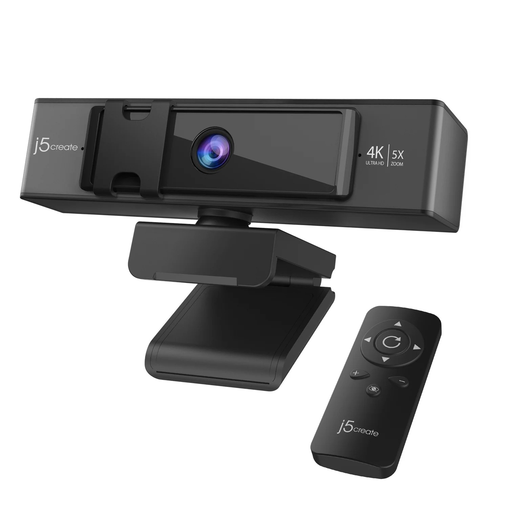
Consider this when a presenter wants to adjust the camera view during a design discussion; check that its position frames the intended seats and materials.
The product name specifies 4K video, 5x digital zoom and a remote control. Confirm microphone reach and whether the camera can be positioned to show sketches if those tasks matter.
A desktop webcam can suit a presenter or a very small group close to it, particularly when showing nearby materials is the main task. If several people speak from different seats, check microphone reach separately rather than assuming the webcam will cover the table.
Choose an angle that includes the intended seats from the proposed camera position without making people or drawings too small to follow. Logitech lists selectable 90°/78°/65° diagonal views for Brio 4K, while Yealink specifies a 120° lens for the front-of-room UVC34; their positions and purposes differ, so check the composition in your room.
Use a camera that can be positioned to show the desk, or consider a separate document camera when materials need a sustained view. Logitech says Brio 505 Show Mode displays physical items by tilting the webcam down; check the software and computer requirements before relying on it.
No. A shutter controls the camera lens, not how identifiable video or recordings are handled. In the UK, the UK GDPR and Data Protection Act 2018 govern personal-data processing; review recording access, retention and the conferencing service through your organisation’s data-protection and security processes.