
24/7 Customer Support

Free returns

Same-day & Next-day Delivery

Quality Guaranteed

Unlock Your Welcome Offers: FREE Delivery | Up to 80% OFF | Free 30-day JoyPlus trial
Download the APP
A smart baby monitor can provide live video, remote access and useful alerts when you are in another room or away from home. However, product pages often use similar phrases for very different capabilities. A “smart” camera may be a dedicated baby monitor, an indoor security camera or a pet monitor camera adapted for nursery use.
The right choice depends on how you intend to monitor your child, the reliability of your home Wi-Fi and whether you need a parent unit, app access, recording or sleep information. Before buying, watch for these common pitfalls.
An HD baby monitor may advertise 1080p, 2K or 4MP video, but resolution is only one part of image quality. Night vision range, lens angle, lighting and digital zoom also affect what you can see. A high-resolution camera with a narrow view may show less of the cot than a 1080p camera with a wide-angle lens or overhead mount.
Check whether the stated resolution applies in both daylight and low light. Also look for practical details such as infrared night vision, colour night vision and the camera’s viewing angle.
Some cameras offer cloud recording, but storage may require a recurring subscription. Others support a microSD card for local recording, although the card may not be included. A product with free live viewing may still charge for playback, extended history or advanced alerts.
Before purchasing, confirm:
Motion, sound, person and baby-cry detection can reduce the need to watch a live feed constantly. Yet alerts may be affected by Wi-Fi interruptions, room noise, lighting or camera positioning. Sleep-tracking baby monitor features can organise information about rest patterns, but they should not be treated as medical guidance or a replacement for direct supervision.
For most nurseries, 1080p Full HD provides a practical level of detail for checking a sleeping child. Higher resolutions, such as 2K, 2.5K or 3K, can make digital zoom and playback clearer, but they may use more bandwidth and storage.
A baby monitor with night vision should specify the technology used. Infrared night vision normally produces a monochrome image in darkness, while full-colour night vision may use additional lighting. Consider whether an illuminated scene could disturb sleep.
A Wi-Fi baby monitor is convenient for viewing from a smartphone, but it relies on the strength and stability of your home network. 2.4GHz Wi-Fi generally travels further through walls, while 5GHz Wi-Fi can offer faster transmission over a shorter range. Dual-band support may be useful in larger UK homes or flats with several connected devices.
A monitor with a separate parent unit can continue to provide local viewing without requiring a phone. This can be useful for grandparents, babysitters or night-time checks when you do not want to use a smartphone.
A baby monitor with two-way audio lets you speak through the camera, although it should not replace attending to a distressed child. Check whether the unit is desk-mounted, wall-mounted or compatible with a cot mount.
For corded devices, follow the supplied instructions carefully. Keep the camera and power cable at least one metre from the cot, secure loose cables and keep adapters and small mounting parts away from children. Indoor security cameras used as baby monitors should be positioned with the same care.
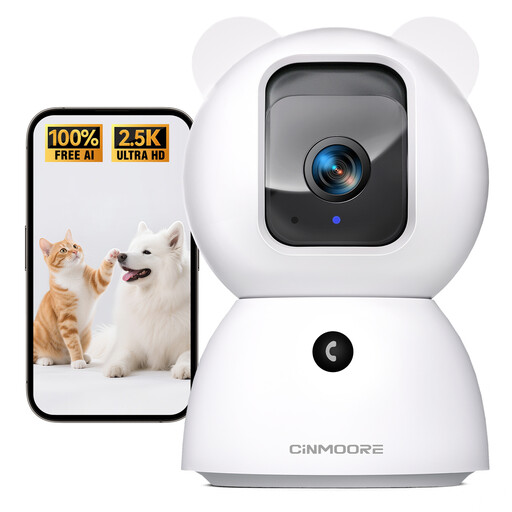
Why This Fits Their Persona: A practical option for new parents wanting app-based indoor monitoring without making a dedicated parent screen essential. It can also work as a pet monitor camera in a shared household.
The listing specifies local AI detection for people, pets and baby crying without a subscription fee for that feature. Cloud storage is separate and chargeable, so check the storage terms before relying on it.
2.5K video, pan-and-tilt viewing, full-duplex two-way audio and microSD support up to 256GB.
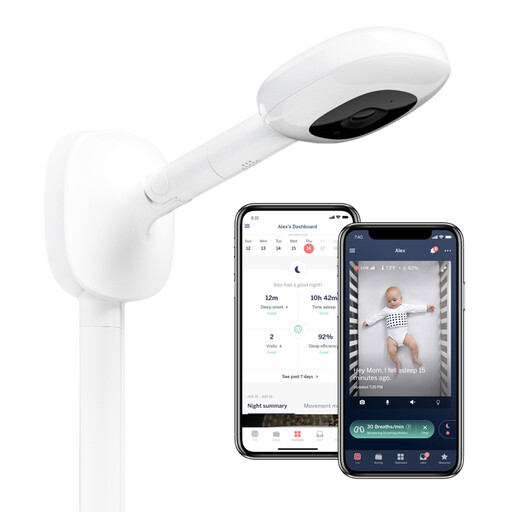
Why This Fits Their Persona: Suits parents who want a dedicated nursery setup with an overhead view and app-based sleep information for a child aged 0+.
The included wall mount is designed for an aerial cot view, helping avoid blind spots caused by a low shelf position. The camera must be securely mounted and cables managed safely.
1080p day-and-night video, app-based split view for two cameras and personalised sleep-tracking information.
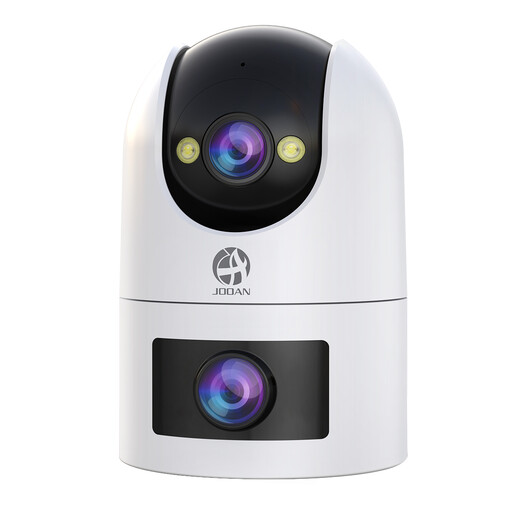
Why This Fits Their Persona: Appropriate for households that want one flexible camera for a nursery, pets or wider indoor and outdoor monitoring, subject to safe installation and privacy considerations.
It supports both 2.4GHz and 5GHz Wi-Fi, local microSD recording and optional paid cloud storage. This gives heavier users a choice, but the app and subscription terms should be checked first.
Dual-lens viewing, 360° PTZ monitoring, baby-cry and motion detection, two-way audio and support for up to 256GB microSD storage.

Why This Fits Their Persona: A useful match for families who prefer a large parent screen at home while retaining free live remote access through a smartphone app.
It does not make app viewing the only monitoring method: the 5-inch parent unit provides a local viewing option. The cord must remain more than one metre from the cot.
5-inch HD parent screen, infrared night vision, 10x digital zoom, temperature sensor and two-way talk.
We have compiled a complete, real-time list of products that fully satisfy these strict selection criteria and UK safety regulations.
Before placing the camera in a nursery:
It can be, provided your router and internet connection are stable. A phone-only system may be less convenient during overnight checks, and remote access normally depends on internet availability. A model with a dedicated parent unit offers a local alternative.
Not always. Some products support live viewing and microSD recording without a monthly fee, while cloud recording or certain advanced features may require payment. Confirm exactly which functions are free before buying.
It can provide useful video, night vision, motion detection and two-way audio, but it may not include nursery-specific features such as a parent unit, cot mounting, temperature monitoring or sleep information. Choose based on the features you will use every day rather than the longest feature list.