Existing-ecosystem household
You want the new device to work with your current phone, network, account and home controls, without discovering that an additional controller is needed.


Choose a smart device for the task you want it to do, then check its exact app, account, phone or tablet and network requirements against what your household already has. For consumer devices covered by the UK product-security regime, manufacturers must state a minimum security-update period; check the commitment for the specific model rather than relying on its ecosystem label or recent software updates.
You want the new device to work with your current phone, network, account and home controls, without discovering that an additional controller is needed.
You intend to keep a connected device in use and want to identify its minimum security-update commitment before buying.
You want a particular viewing or monitoring function and need to distinguish basic operation from recordings, subscriptions and display requirements.
Start with the job the device needs to do, then confirm that your household can set it up and manage it. For a consumer smart device covered by the UK product-security regime, the manufacturer must state the minimum security-update period; UK government guidance explains the requirement.
| Concern | What to check | Who this matters to |
|---|---|---|
| Setup and compatibility | Check the exact model’s app, account, phone or tablet requirements, network needs and any controller required for the features you want. | If I want a new device to fit the phones, accounts and home controls I already use, setup comes first; around 28% of consumers put compatibility first. |
| Security-update commitment | Find the manufacturer’s statement for the precise model or generation, and check whether the commitment is a date or a conditional period. | If I plan to keep a connected device in use, I want a clear minimum update commitment for that exact model; around 28% of consumers prioritise support duration. |
| Fit for the task | Match the product’s stated functions and connections to the specific job, such as a compatible television input or a required phone pairing. | When I have a particular household, entertainment or wearable function in mind, I want the device to suit that task; around 17% of consumers put function first. |
| Ongoing service and storage | Separate live functions from saved recordings or paid services, and check which storage options apply to the exact model. | If I expect to revisit recordings or use a continuing service, I want to understand the ongoing commitment before choosing; around 16% of consumers prioritise running costs. |
| Privacy and control | Review the model’s privacy controls, account access and recording arrangements before deciding how it will be used. | When I add a camera or another connected device, I want to manage access and recording choices; around 11% of consumers put privacy controls first. |
Compatible devices can still use different setup paths. Philips Hue describes both Bridge-based and direct setup for particular lights, so a general compatibility label does not confirm which equipment your chosen model and features need.
Check the exact model, the functions you want and the controllers already in your home before buying.
Recorded video may require a subscription or separately obtained local storage, depending on the device.
A recent update shows that software has been released; it does not tell you the manufacturer’s minimum future security-update commitment for that model.
Look for the model-specific support statement and read any conditions attached to the date or period.
Roku says a compatible television is needed to display 4K or HDR from its Streaming Stick 4K. Some television USB ports may also provide insufficient power.
Check your television’s HDMI input and display capabilities, then follow the exact stick’s power instructions.
A suitable power outlet or a different power arrangement may be needed.
Connected lighting with different setup routes for Bridge installations and certain Matter-enabled lights.
Video doorbells and cameras for households choosing between live viewing and retaining recordings.
Connected cameras, including the Tapo C210 V2.2, for buyers comparing local and cloud storage.
Streaming devices for adding services to a television with a suitable HDMI input.
Apple Watch wearables for buyers checking compatibility with their existing iPhone.
An app and compatibility ecosystem to consider when adding supported home devices or connected appliances.
These Joybuy choices cover wearables, cameras, a home hub, a smart plug and a streaming stick. Check each exact model’s setup requirements and security-update commitment against your household’s devices and intended use.
 No image available
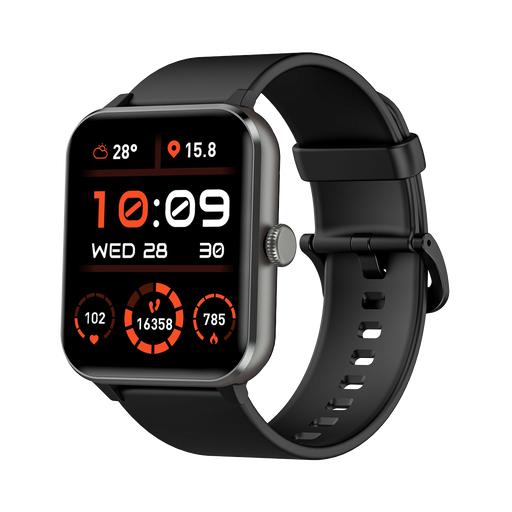
For a wearable setup, check the stated phone compatibility against the device you plan to pair. The product information lists Android and iOS compatibility, Bluetooth calling, heart-rate and sleep monitoring, more than 100 sports modes, a 1.85-inch screen and 25-day battery life.
 No image available
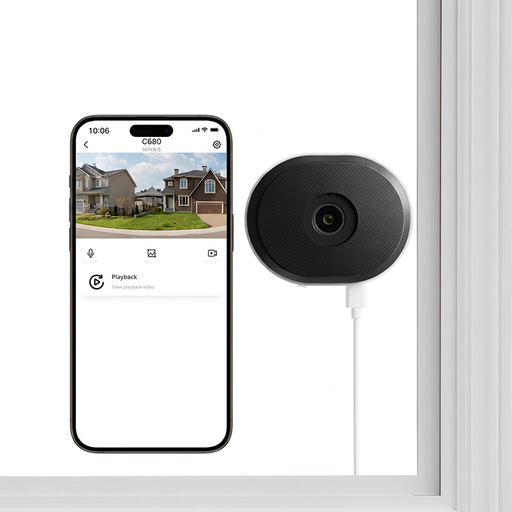
For a camera setup, check the recording method and the support commitment for the exact device. The product information lists through-glass monitoring, 2.4/5GHz Wi-Fi, microSD support up to 256GB, and local, cloud and NVR recording options. The microSD card is not included.
 No image available
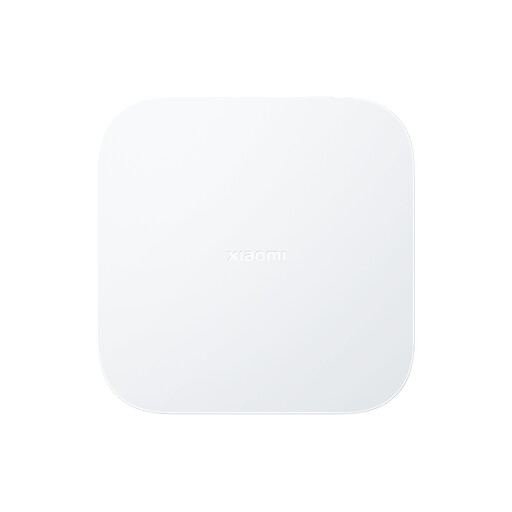
For coordinating compatible devices, check that the hub works with the specific products and controls you want to use. Its product information lists Wi-Fi, Bluetooth Mesh and Zigbee 3.0 connectivity, and describes use with Xiaomi and Mijia devices.
 No image available
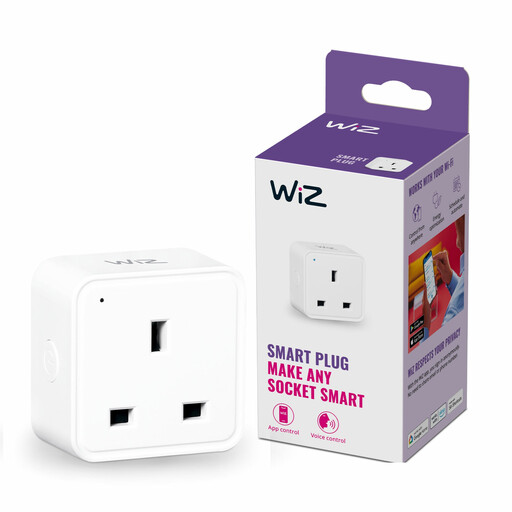
For scheduled or phone-based control of a suitable appliance, check the plug’s stated setup and use conditions. The product information lists Wi-Fi, smartphone control and schedules, and says no additional hub or gateway is needed for its stated setup. It is specified for dry environments.
 No image available
For adding streaming services to a television, check that it has a suitable HDMI input and can display the formats you want. The product information lists Wi-Fi, streaming apps and channels, 4K, Dolby Vision and HDR10+ support. A compatible television is needed to display 4K or HDR.
It applies to relevant consumer products that connect to the internet or a network, rather than automatically covering every connected product. The UK regime began on 29 April 2024; check government guidance for the scope that applies to the specific product.
Look for the manufacturer’s published statement for the exact model or generation and read its conditions. For example, Philips Hue’s Bridge policy describes a minimum total of three years of required security, quality and interoperability updates from purchase through an authorised reseller, subject to its terms and the Bridge version. A recent firmware release is not a substitute for that commitment.
Not by itself; the setup depends on the particular light and the controller in your home. Philips Hue describes direct setup for certain Matter-enabled lights and specifies a suitable Matter controller and Thread border router, so check the instructions for the exact model.
That depends on the product and the recording function you need. Ring says a subscription is required to review recorded video from its cameras and doorbells, although live viewing is available without one. TP-Link lists microSD and cloud storage for the Tapo C210 V2.2; check the exact version and whether storage must be obtained separately.
Follow the exact model’s app and account instructions, then install updates offered for the device. UK government guidance on the product-security regime also addresses easily discovered shared default passwords and requires a manufacturer contact for reporting security issues; you still need to manage your own account and device settings.