Who this guide is for

Existing-network upgrader

You want a speaker, plug or light to work with the network and controls you already use. Check the exact model’s setup requirements before buying; the National Cyber Security Centre advises checking the minimum requirements for managing a smart device.

Long-use planner

You expect to keep a connected device for years and want to compare its stated security-update end date with your plans. Amazon publishes model- and generation-specific Echo update information; a stated update period is not a guarantee of hardware life.

Heating or appliance replacer

You need the heating or appliance function to suit your home before connected features come into play. Check installation compatibility or physical fit as well; tado° and LG describe requirements for particular products, not every model in their ranges.

What to check before buying

Smart speaker

Choose when: Voice control or audio is the main job and the required account, app and Wi-Fi setup suits your household.

Trade-off: Account and internet requirements matter alongside the exact model’s published support period.

Smart plug or lighting

Choose when: You want to control a suitable existing electrical item or manage lighting.

Trade-off: Check the plug’s electrical requirements or whether a lighting system needs an additional component; monitoring a plug does not itself demonstrate lower bills.

Smart thermostat

Choose when: You want heating controls and the specific kit suits your existing system.

Trade-off: Compatibility, installation and any bridge requirements need checking; advertised savings are not a prediction for your home.

Connected appliance

Choose when: You need to replace the appliance itself and its ordinary functions suit your needs.

Trade-off: Check dimensions and appliance requirements separately from app features.

Smart display or streaming device

Choose when: An on-screen interface or streaming is the primary task.

Trade-off: Check the full model and generation for its own setup, account and support details; information for one product does not establish requirements for another.

Concern What to check when buying Who this matters to
Security updates Find the exact model’s stated minimum update end date and any purchase-channel conditions; compare it with your intended use period. If I plan to keep a connected device for years, I want its stated update period to fit that plan; about 31% of consumers put long-term support first.
Network fit Check the model’s connection method and router requirements, plus whether a bridge is required or included. If I am adding a device to my existing home network, I want to know it can be set up with the equipment I have; about 31% of consumers prioritise network fit.
Accounts and apps Check the required account, setup app, supported phone software and how household access is managed. If I need to set up or share control of a device, I want its app and account requirements to work for the people who will manage it; about 23% of consumers put account and app management first.
Primary task and fit Check the plug and connected load, heating compatibility, or appliance dimensions and functions, as relevant. If I am choosing a plug, heating control or replacement appliance, I want it to suit the underlying job before considering connected features; about 15% of consumers prioritise task and installation fit.

Buying pitfalls

  • Treating a security-update statement as a lifetime guarantee

    A published minimum update period concerns security updates, not how long the hardware will last. The National Cyber Security Centre warns about using devices that no longer receive security support.

    Record the exact model’s stated end date and compare it with the period you expect to use the device.

  • Assuming similarly named plugs or bundles are identical

    A different model or pack can have different functions or contents. For example, TP-Link’s UK P110 material lists energy monitoring, while a separate Joybuy listing identifies a P100 four-pack.

    Match the complete model name, variant, pack contents and required feature on the product page.

  • Choosing an appliance or heating device for its app first

    A connected feature does not establish that an appliance fits your space or that a thermostat suits your heating system. Those checks are specific to the product and installation.

    Check the appliance’s dimensions and ordinary functions, or the existing heating arrangement, before assessing connectivity.

Relevant brands to consider

Amazon

Echo speakers and displays are relevant when voice or screen-based interaction is the main task.

  • Amazon publishes update information for specified Echo models and generations, and setup instructions for the Echo Dot (5th Generation).
  • The stated update commitment has purchase conditions and does not guarantee hardware life; check the exact model and seller conditions.

TP-Link Tapo

The UK Tapo P110 is an example of a smart plug for switching and monitoring a suitable connected load.

  • TP-Link lists energy monitoring, scheduling and Tapo-app control for the P110.
  • Those functions do not establish lower bills or the model’s remaining security-support period. Check the exact variant and electrical requirements.

tado°

The UK Wired Smart Thermostat X starter kit illustrates a heating-control option.

  • For the specified kit, tado° lists Relay or OpenTherm control and an included Bridge X.
  • Compatibility depends on the existing heating installation. Advertised energy savings are not a household-specific outcome.

LG

The UK F6V1010WTSE illustrates a washing-machine purchase where connectivity is one feature.

  • LG lists ThinQ Wi-Fi and remote functions for this particular model.
  • Its product information does not establish connectivity across every LG appliance or a security-update end date for this model.

Philips Hue

The UK Hue Bridge illustrates a lighting system that uses a coordinating component.

  • Philips Hue describes app-guided Bridge setup and connections to its lights and sensors.
  • The Bridge product information does not establish that every Hue purchase needs one or state a model-specific security-update end date.

Joybuy product choices

These choices cover connected washing-machine replacements, a Wi-Fi plug and a TV streaming stick. Check the exact product’s installation, network and app requirements against your intended setup.
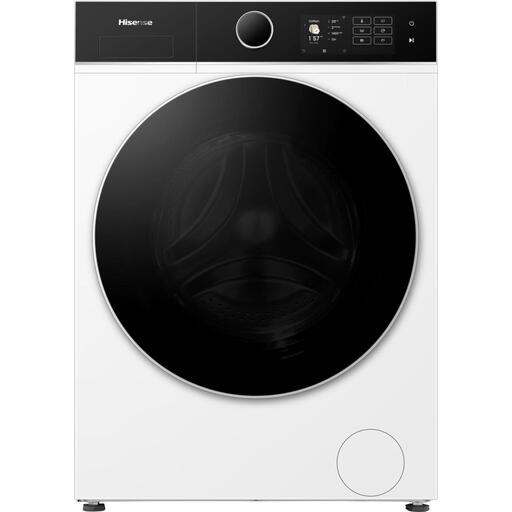
Hisense KitchenFit 5i Series WF5I1245BWR washing machine, 12kg, 1400rpm, Wi-Fi, white

Hisense KitchenFit 5i Series WF5I1245BWR Washing Machine, 12kg, 1400rpm, Wi-Fi, White

For replacing a washing machine while adding app-connected controls; check the space and plumbing requirements before choosing.

The listing describes a 12kg capacity, 1400rpm spin speed, automatic dosing, 18 programmes and ConnectLife app monitoring and control. It is described as freestanding and requires suitable plumbing and installation clearances.

Joybuy
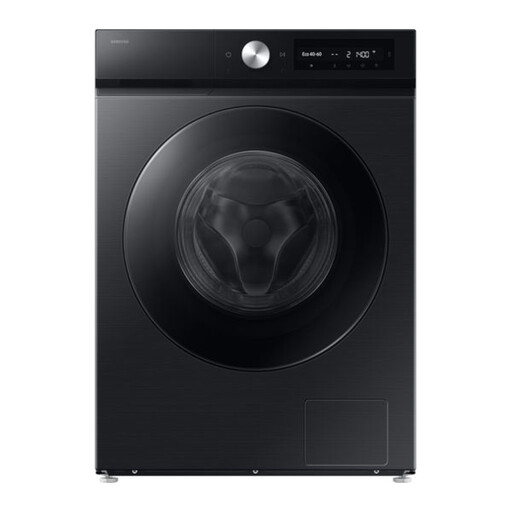
Samsung Series 7 AI Energy + SpaceMax WW11DB7B94GBU1 washing machine, Wi-Fi, 11kg, 1400 spin, black

Samsung Series 7 AI Energy + SpaceMax WW11DB7B94GBU1 Wi-Fi Washing Machine, 11kg, 1400 Spin, Black

For a washing-machine replacement where app control and laundry features both matter; check the appliance dimensions and your phone setup.

The listing describes an 11kg capacity, 1400rpm spin speed, Auto Dose, Hygiene Steam and Wi-Fi with SmartThings control, monitoring and scheduling. App use requires Wi-Fi and a Samsung account.

Joybuy
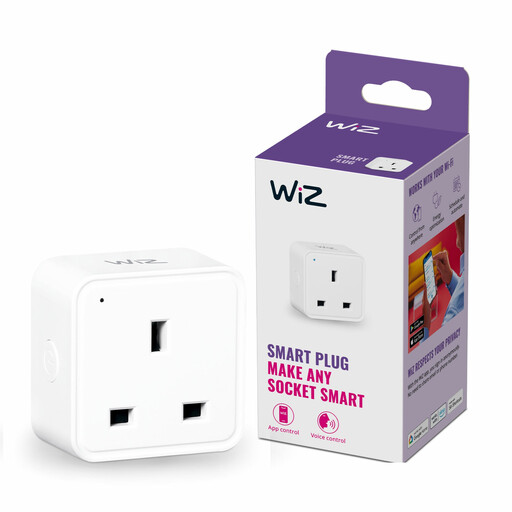
WiZ Smart Plug, white

WiZ Smart Plug, White

For adding app-based switching and schedules to a suitable plug-in household device.

The listing describes direct Wi-Fi connection without an additional hub or gateway, smartphone control and daily or weekly scheduling. It is specified for dry environments.

Joybuy

Roku Streaming Stick 4K Doly Vision

Roku Streaming Stick 4K Doly Vision

For adding streaming apps to a TV with an HDMI connection; check your home Wi-Fi and the controls you intend to use.

The listing describes 4K streaming, Wi-Fi, an HDMI connection and support for AirPlay, Alexa, Google Assistant and HomeKit. Setup uses the TV’s HDMI port and Wi-Fi for streaming.

Joybuy
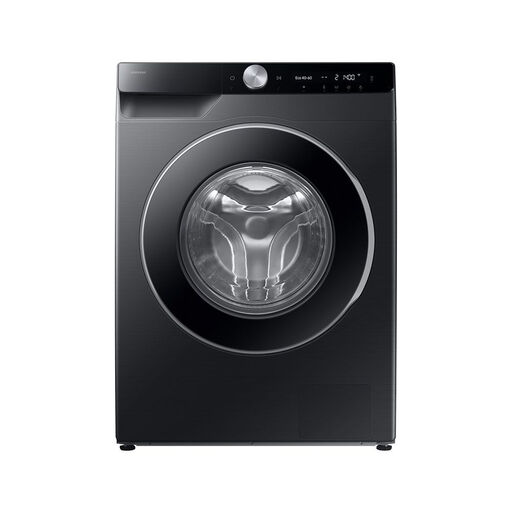
Samsung WW90DG6U25LBU1 Series 6 AI Energy washing machine, 9kg, 1400rpm, black

Samsung WW90DG6U25LBU1 Series 6 AI Energy Washing Machine, 9kg, 1400rpm, Black

For a washing-machine replacement where SmartThings-connected controls are part of the intended setup.

The listing describes a 9kg capacity, 1400rpm spin speed, Hygiene Steam, a Super Speed cycle and Wi-Fi with SmartThings control, monitoring and scheduling. Check the product dimensions and app requirements for your setup.

Joybuy

Smart-device buying FAQs

How can I check whether a connected device is covered by UK product-security rules?

Start by checking whether the product connects to the internet or a network, then check the relevant exclusions and where it is supplied. UK government guidance says the regime applies to relevant consumer connectable products and addresses manufacturer requirements including passwords, vulnerability reporting and a stated minimum security-update period. A “smart” label alone does not establish an individual product’s compliance.

Are the product-security requirements the same in Northern Ireland and Great Britain?

Do not assume they are identical. UK government guidance excludes certain products supplied in Northern Ireland where specified legislation applies, and additional cybersecurity requirements have applied to certain radio equipment made available in Northern Ireland since 1 August 2025. Check the exact product and supply territory against current government guidance.

What should I do after setting up a smart device?

Follow the manufacturer’s setup instructions, review the device and account settings, and keep the device and app software updated. The National Cyber Security Centre explains that missing security fixes can increase risk; the specific controls and update method depend on the model.

Does a published security-update date mean the device will keep working until then?

No. A stated minimum security-update period is not a guarantee of physical lifespan or continued operation of every app feature. Amazon makes this distinction in its information about Echo security updates.

Could setup require an extra component or a particular phone?

Yes, depending on the product and kit. For example, tado° lists a Bridge X in its wired Smart Thermostat X starter kit and specifies minimum phone operating-system versions for installation. Check the contents and setup requirements for the exact variant rather than assuming all thermostats use the same arrangement.