Choose a connected device for a specific repeated task, such as spoken reminders, lighting schedules, appliance switching, heating control or status notifications. Before settling on a model, check that it works with your existing devices and network, how household members can access its controls, what information its app uses and the manufacturer’s stated security-update period.
Who might find connected household devices useful?
Households coordinating daily tasks
If timers, reminders, lighting or appliance-status checks are part of your routine, a connected device may help bring a particular task into one control or notification flow. Ofcom’s qualitative UK research documented household uses of smart speakers such as timers, alarms and reminders.
Households extending existing controls
If you already use connected devices or heating controls, check how a new product fits the equipment and setup you have. Philips Hue, tado° and Samsung each describe model- or system-specific compatibility considerations.
Privacy-conscious shared homes
When several people share a space or device, consider who can access its controls and what information may be collected or shared. The Information Commissioner’s Office highlights privacy and security considerations for consumer smart products.
What should you check before buying a smart device?
Start with the repeated task and the people who need to manage it. Then look for a device route that supports that task, rather than choosing connectivity without a clear use for it.
| Concern |
What to check when buying |
Who this matters to |
| Repeated household task |
Match the model to the task, such as a timer, schedule, notification or control. |
If I want a recurring task to take less effort, I need a feature that does that specific job; around 31% of consumers put a repeatable household task first. |
| Compatibility |
Check the exact device, controller, network or hub requirements and supported functions. |
If I am extending a setup I already own, I need the new device to work with its existing controls; around 25% of consumers prioritise compatibility with their current devices. |
| Privacy and updates |
Review the model’s information-collection and sharing details, permissions and stated security-update period. |
In a shared home, I want to understand what information a device uses and how long security updates are promised; around 25% of consumers put privacy and security support first. |
| Shared access |
Check how household members get access, which permissions they receive and what remains usable without internet. |
If several of us need to manage a routine, I want clear permissions and controls the household can maintain; around 19% of consumers prioritise workable shared access. |
Common pitfalls when choosing household smart devices
-
Assuming a compatibility label covers every feature
A device may work with a platform while a particular feature still needs a specific hub or app. TP-Link says the Tapo P110M’s energy-monitoring feature is accessed through the Tapo app rather than Matter.
Check the exact device, controller and feature together, including where the information will appear.
A separate hub or app can mean more setup and another interface to maintain.
-
Treating “smart” as a security-support commitment
The manufacturer’s stated minimum security-update period is a model-specific consideration; it should not be read as indefinite support.
Check the manufacturer’s applicable statement for the exact model and version before choosing it.
-
Assuming a plug suits any appliance it can connect to
For the UK Tapo P110, TP-Link specifies indoor use and a maximum output of 13A, with restrictions for certain higher-rated motor or compressor appliances. Those limits should not be applied to other plugs.
Match the appliance and intended use to the instructions for the exact plug model.
-
Replacing a heating control without checking the system
tado° says the components needed for tado° X depend on the heating arrangement, and tado° X cannot be combined with earlier tado° lines in the same app Home.
Identify the installed controller, boiler and relevant radiator controls before choosing the thermostat components.
Changing the setup may involve coordinating additional compatible heating components.
Relevant smart-home brands to research
Philips Hue
A connected-lighting range with Bluetooth and Bridge-based control options.
- Philips Hue describes Bluetooth as a way to control lights directly from a mobile device, while its Bridge provides a Zigbee network and additional automation and integration options.
- These are Philips Hue system distinctions; do not assume every bulb or third-party function has the same capabilities.
TP-Link Tapo
A smart-plug and household-sensor range with model-specific app, hub and platform requirements.
- TP-Link specifies local app control and schedules for the Tapo P110, and Matter integration for the P110M.
- For the P110M, TP-Link says a chosen third-party platform needs a hub, while its stated energy-monitoring feature is accessed through the Tapo app. Check the exact model and feature.
tado°
Heating controls whose required components depend on the home’s existing heating arrangement.
- tado° provides different component guidance for different heating configurations.
- tado° says its X line cannot be combined with earlier tado° product lines in the same app Home.
Samsung SmartThings
An app-connected route for compatible appliance status and household routines.
- Samsung describes appliance-status and Home Routine uses for SmartThings.
- Samsung’s UK compatibility information says supported devices and app environments may change, so check the functions for the exact appliance.
Google Nest
A speaker-and-display route to investigate for spoken information and shared routines.
- Ofcom’s qualitative UK research recorded smart-speaker uses such as timers and reminders.
- Ofcom’s findings describe its study participants, not every household or speaker. Check the chosen model’s account, privacy and security-support information.
Joybuy products for household routines
These Joybuy listings cover smart plugs, household sensors, an app-connected washing machine and a shared digital calendar. Check each model’s compatibility, app requirements and stated security-update period against your household setup before choosing.
 No image available
Eve Energy Matter Smart Plug with Power Meter, UK Type G Plug
For scheduled switching and household energy monitoring, subject to the required setup.
The description specifies Matter over Thread and says a Matter controller and Thread border router are required for full functionality.
Indoor use only; maximum load 13A or 2900W.
Joybuy
 No image available
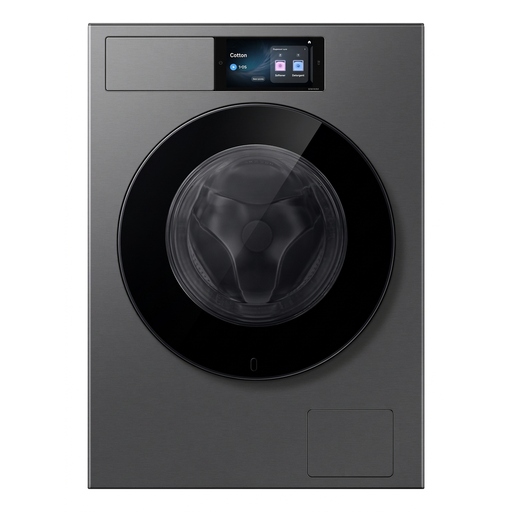
Samsung Series 9 AI Home Washing Machine WF90H09C4ST1, 9 kg, 1400 RPM, Dark Steel
For households looking to follow a recurring laundry task through appliance notifications and reports.
The description lists SmartThings notifications and a post-wash report; SmartThings use requires an internet connection and Samsung account.
Joybuy
 No image available
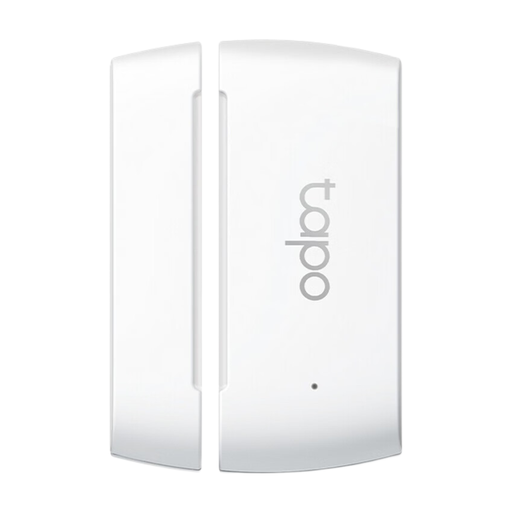
TP-Link Tapo T110 Smart Door and Window Sensor
For a household routine that uses door or window opening notifications or linked smart actions.
A Tapo Hub is required for the described notifications and smart actions, and is sold separately. The sensor and hub must support the same region-dependent Sub-1G frequency band.
Joybuy
 No image available
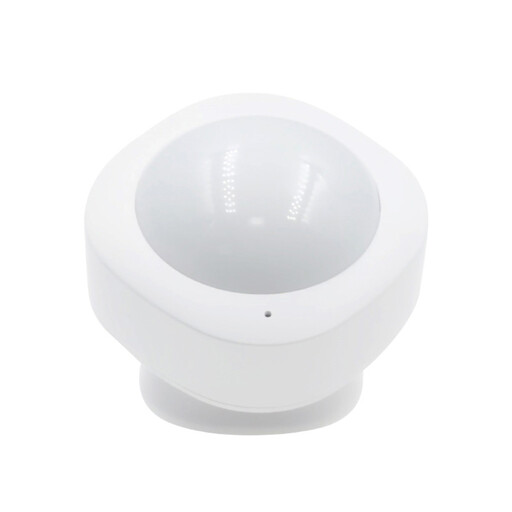
Rexsun WiFi Smart Motion Sensor RSH-MSO2
For routines that use motion detection to trigger connected-device actions or send app alerts.
The description specifies 2.4GHz Wi-Fi and two CR123A batteries.
Joybuy
 No image available
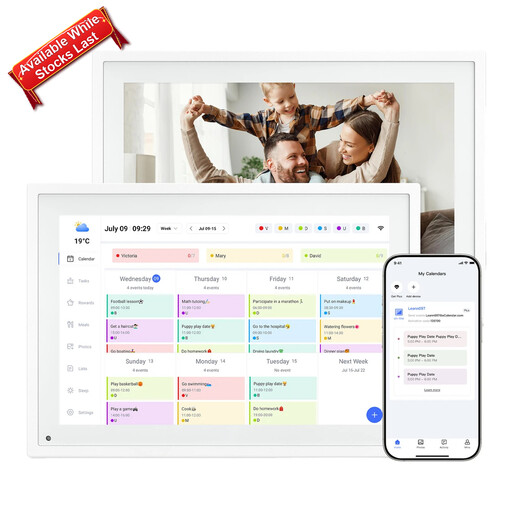
TABWEE P10 Wi-Fi Digital Calendar, 10.1-inch
For households that want shared schedules, events and reminders displayed on a calendar board.
The description specifies two-way schedule syncing through a dedicated mobile app.
Joybuy
Questions about shared smart devices
Will a smart device work if the internet goes down?
It depends on the model and function. TP-Link says the Tapo P110 retains local Tapo-app control and schedules without internet; that does not establish continued remote access or the same behaviour for other models. Check each control you plan to use.
Can everyone at home use one app account?
Do not assume that sharing one set of login details is necessary. Check the product’s member invitations, permissions and personal-information settings; Philips Hue describes account-permission management, but controls vary by product.
What ongoing maintenance should we plan for?
Check how the manufacturer provides updates, keep the managing app current and review account permissions. The National Cyber Security Centre advises checking the support period for the specific device; a stated minimum period is not a promise of indefinite support.
Does UK law require a security-update period to be stated?
For consumer connectable products within the UK regime, manufacturers must state the minimum period for which important security updates will be provided. The regime took effect on 29 April 2024, and UK Government guidance identifies exceptions, including specified products made available for supply in Northern Ireland. Check the exact product’s scope and statement rather than assuming every connected item is covered.
Does an app-connected appliance necessarily reduce household costs?
Connectivity alone does not establish a saving. Check what the exact appliance measures or controls, then consider its purchase and running costs on a like-for-like basis.


