
24/7 Customer Support

Free returns

Same-day & Next-day Delivery

Quality Guaranteed

Unlock Your Welcome Offers: FREE Delivery | Up to 80% OFF | Free 30-day JoyPlus trial
Download the APP
A smart door lock can make everyday entry more convenient, but the wrong model may create installation problems, unreliable access or unexpected maintenance costs. Homeowners, tenants and smart-home users should look beyond fingerprint access or app control and check whether the lock suits the existing door, the household’s routine and the local property requirements.
Before buying, watch for these common pitfalls:
A retrofit smart lock is fitted over or around an existing locking mechanism, which can reduce permanent alterations. The Xiaomi Self-Install Smart Lock is described as compatible with the original lock structure and designed for no drilling and no modifications. This may suit tenants or homeowners who want a damage-conscious installation, but the existing lock must still be suitable.
Before ordering, measure:
If you rent, obtain the landlord’s permission before changing access hardware. For a flat, shared entrance or fire-rated door, check building management requirements. A smart lock should not interfere with a communal locking system or the door’s required closing function.
A fingerprint door lock can be convenient for residents who regularly arrive without keys, while a keypad door lock is useful for family members, cleaners or short-term guests. App access can make it easier to manage permissions and review events, but it depends on phone availability and connectivity.
Look for a practical combination of:
The LNDU DL500 supports fingerprint, password and app entry, and its listing also describes an emergency knob. Its anti-peep password function is intended to make PIN entry less visible to onlookers. These are user-facing features, not a substitute for checking the product’s installation instructions and keeping a secure backup entry method.
A Wi-Fi smart lock can support remote status checks, alerts and app management when correctly connected. A Bluetooth smart lock generally offers lower-complexity local control, although remote functions may require additional connectivity.
Automatic locking is another useful feature, particularly for busy households. However, it should be configured carefully. Confirm that the door is fully closed before the motor engages, and keep a backup key or alternative access method available.
The Xiaomi model connects with Xiaomi Home using Wi-Fi and Bluetooth, with functions including lock-status checks, logs, alerts and family arrival reminders. It also detects the door position and can engage automatically after a set delay. The lock uses a 2,450mAh lithium-ion battery, while its keypad uses two AA batteries.
For the LNDU DL500, the product information states up to 240 days of battery life on a single charge. Treat this as a product specification rather than a fixed real-world result. Check app low-battery alerts regularly, particularly before holidays or periods of cold weather.
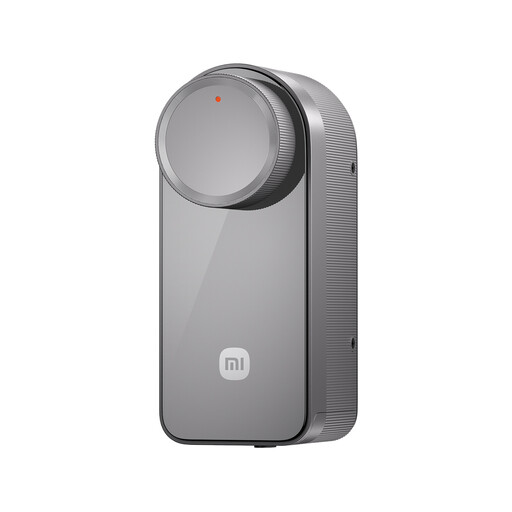
Why This Fits Their Persona: A practical option for homeowners or tenants seeking a damage-conscious retrofit without drilling, subject to existing lock compatibility and permission where required.
Its stated no-drill installation helps avoid unnecessary door alterations. Buyers should still confirm the original lock structure and door alignment before purchase.
Wi-Fi and Bluetooth connectivity; automatic locking after the door closes; multiple unlocking methods.
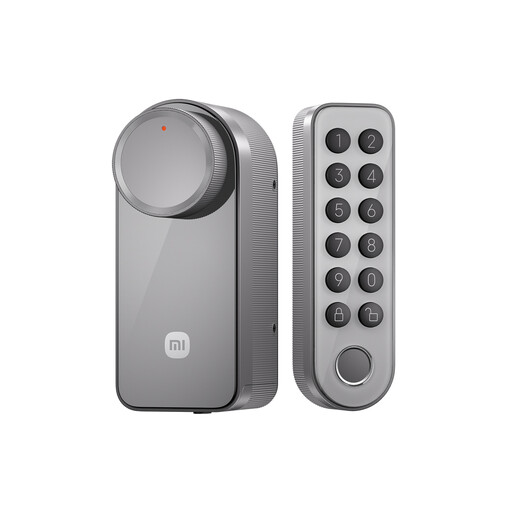
Why This Fits Their Persona: Suits connected households that want keypad access alongside app management, especially where several people need entry without sharing a physical key.
The included keypad reduces the need to buy a separate access unit. Wi-Fi and Bluetooth support also gives users more than one control route.
Keypad dimensions are 133 × 40 × 29mm; Xiaomi Home supports status checks, logs and notifications.
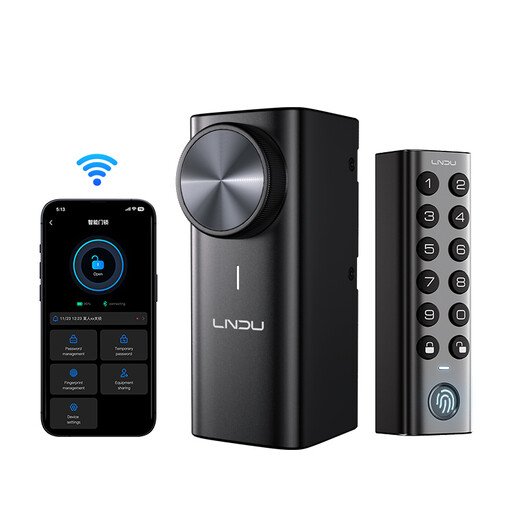
Why This Fits Their Persona: Designed for households that prioritise several access methods, app alerts and a retrofit format for compatible UK or European-style doors.
It provides fingerprint, password and app entry, plus an emergency knob. The listing also includes an alignment warning, helping buyers address motor strain before installation.
Eight adapters are listed for US/EU door compatibility; exterior panel is rated IP65, while the interior electronics should be protected from direct rain.
Test the original latch manually before fitting any electronic hardware. It should extend and retract smoothly without rubbing against the frame. After installation, test every access method with the door open, then check operation with the door closed.
Keep the app updated, enable low-battery notifications and store a mechanical key somewhere secure outside the property. Do not assume that an IP rating applies equally to every part of the lock. The DL500 information specifically advises protecting the interior assembly from direct rain and high-pressure water.
We have compiled a complete, real-time list of products that fully satisfy these strict selection criteria and UK safety regulations.
Installation depends on the existing door and lock structure. A no-drill or retrofit smart lock can be simpler than replacing the entire mechanism, but correct alignment remains essential. Always follow the supplied instructions and seek qualified help if the latch, frame or door is damaged.
There is no single lifespan for every household. Usage frequency, Wi-Fi activity, temperature and motor resistance all affect battery performance. Check the manufacturer’s stated capacity or duration, monitor warnings in the app and keep a backup entry method available.
Many models offer Bluetooth access when you are near the door. However, remote unlocking, status checks and alerts generally need Wi-Fi or another internet-connected hub. Check which functions remain available offline before choosing an app-controlled door lock.