What should you check before buying?
Smart doorbell
Choose it when: Visitors and activity immediately around one entrance are the main reason for installing a camera.
Trade-off: Battery upkeep or wiring requirements, and the available recording history, depend on the device and setup.
Fixed home camera
Choose it when: You need to watch a defined part of your property beyond the front-door approach.
Trade-off: An elevated or wider view needs careful aiming where neighbouring property or shared space is nearby.
For either type of camera, settle the intended view first, then check the controls and recording arrangement on the exact model.
| Priority |
What to check |
Your needs |
| Placement and view |
Check the view from the proposed mounting point. Aim to capture only your property where possible, as the ICO advises for UK home CCTV; assess any view of neighbouring property, public areas or communal space. |
I want to see the doorway or part of my property without recording more of the surrounding area than necessary. |
| Privacy and alerts |
Check privacy-mask, audio and motion-alert controls on the exact device. Ring says its supported privacy zones block areas in live and recorded video, but motion may still be detected behind a blocked area. |
If a shared path is near the edge of the view, I want to know what appears in footage and what triggers a notification. |
| Video history |
Compare included history, event-only versus continuous recording, local-storage hardware and any cloud-plan terms. Google says its battery Nest Doorbell cannot record continuous 24/7 video history. |
When I miss an alert, I want footage available for the period I actually need, using a recording arrangement I am willing to maintain. |
| Power and installation |
Check the mounting point, existing supply and compatible chime before choosing battery or wired operation. For wired E340 use, eufy specifies an installed battery and an 8 to 24V supply rated above 10VA. |
Battery charging may suit my entrance better than wiring, or I may prefer to use an existing compatible supply. |
Joybuy doorbell options
These video doorbells are options for monitoring a front-door entrance. Compare their installation and recording arrangements with the view you can achieve at your own doorway; they are not substitutes for a fixed camera aimed at another part of the property.
 No image available
tapo D230S1 Smart Battery Video Doorbell
A battery-powered option for a front-door setup. Check the view from your intended mounting point and confirm the recording and privacy controls you need for this exact model.
View on Joybuy
 No image available
eufy Security Video Doorbell C31, 2K FHD
This model is described with battery or hardwired power and live video calling for visitor contact. If continuous recording matters, check its hardwired operating conditions and the exact recording setup before choosing it.
View on Joybuy
 No image available
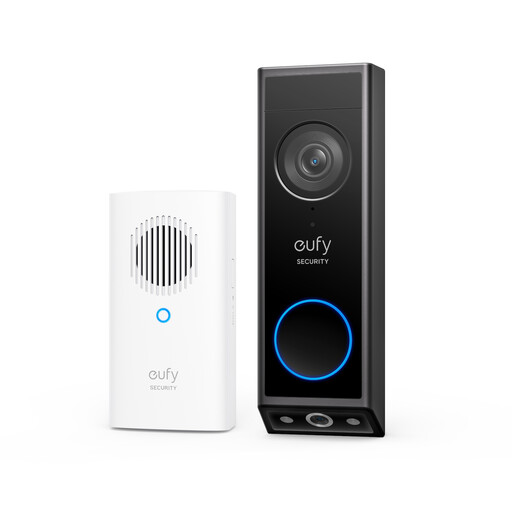
eufy E340 2K Dual-Camera Video Doorbell with Chime
Its two camera views are intended to show the visitor and the area below the doorbell; check what both views capture when mounted. The supplied product is battery-powered, while eufy specifies that wired E340 use requires the battery to remain installed and an 8 to 24V supply rated above 10VA. Confirm the chime and recording arrangement for this bundle.
View on Joybuy
Common questions
Can I use a smart doorbell or fixed camera at my UK home?
Yes. The ICO's public home-CCTV guidance covers both and advises positioning cameras to capture only your own property where possible. It says UK data protection law applies if footage captures another person's property, a public area or a communal space; the ICO says this guidance is under review.
Does local storage change the privacy rules for the camera's view?
No. The ICO's UK home-CCTV guidance ties the stated data-protection boundary to what the camera captures, not to whether footage is stored locally or in the cloud. Assess placement and coverage before choosing a storage arrangement.
Will a privacy zone fix a view that is too wide?
Not on its own. Ring says supported zones block selected areas in live and recorded video, but motion may still be detected behind them and a moved camera may no longer mask the intended area. Check model support and test the installed view.
What video history should I check before buying?
Check the included history, whether recording is event-based or continuous, and which features require a plan. Google says its battery Nest Doorbell cannot record continuous 24/7 history; its longer event-history options require a subscription.
What if someone asks for footage showing them?
Where data protection obligations apply, be prepared to locate footage containing that person's personal information. The ICO advises choosing a system that can extract relevant footage and redact third-party information where necessary, so check those controls when selecting a camera.


