
24/7 Customer Support

Free returns

Same-day & Next-day Delivery

Quality Guaranteed

Unlock Your Welcome Offers: FREE Delivery | Up to 80% OFF | Free 30-day JoyPlus trial
Download the APP
Choosing smart electronic accessories can look straightforward until compatibility problems, unsuitable connectors or inflated feature claims turn a convenient purchase into an expensive spare part. UK shoppers may be comparing car connectivity, gaming equipment, nursery devices, audio accessories and charging solutions at the same time, but each category has different requirements.
As the Joybuy Product Recommendation Officer, I focus on practical details that help separate useful specifications from marketing noise. Before buying, pay particular attention to these common pitfalls.
A wireless CarPlay adapter may only work with vehicles that already have factory-wired Apple CarPlay or wired Android Auto. It may not support aftermarket head units, Tesla systems or certain manufacturer interfaces. Similarly, a USB-C headphones model may fit the port physically but still require a compatible audio output or device setting.
Always check:
A fast charger rated at 160 W does not necessarily deliver 160 W to one device. Output may be shared between ports and the connected phone, laptop or tablet must support the relevant charging protocol. The cable also matters: a low-rated cable can limit charging performance even when the charger has a high output rating.
For a dash cam power cable, the key question is not simply whether it supplies power. Check whether it supports parking mode, low-voltage protection and automatic vehicle detection without creating a battery-drain risk.
RGB lighting, voice modification, multi-colour lighting and app controls can be useful, but they should not distract from core factors such as connection stability, physical durability, safe installation and ease of everyday use.
For example, a mechanical gaming keyboard with a detachable wrist rest may be more practical for long desk sessions than one with additional lighting modes but a fixed, uncomfortable layout. A baby sleep soother should also be assessed for placement, controls, power supply and supervision rather than relying on claims about sleep outcomes.
For cars, distinguish between a wireless CarPlay adapter, an Android Auto adapter and a device that supports both. Confirm whether the product converts an existing wired connection into wireless use or replaces the vehicle’s original system. A motorcycle CarPlay screen has different requirements again, including mounting, weather resistance, power connection and control access while riding.
For audio, wired USB-C headphones can offer a direct connection without relying on battery power, while Bluetooth gadgets provide cable-free convenience but need charging and pairing. Some products described as wired headphones may also include Bluetooth functionality, so read the connection specifications carefully.
Look for the charger’s total wattage, individual port output and supported protocols. A fast charger is more useful when its ports match the devices you carry regularly. Check that the supplied cable is rated for the expected current and power, particularly for laptops and high-capacity phones.
With a dash cam power cable, look for:
For more connector types, adaptors and power accessories, browse the wiring connectors range.
An aluminium alloy keyboard body may provide a firm desk feel, but key switch type, hot-swappable support and layout affect everyday use more directly. For nursery products, direct plug-in operation can reduce loose cables, but the device must remain out of children’s reach and should be used exactly as directed.
On motorcycle screens and in-car devices, consider screen visibility, mounting stability and whether controls can be used without unsafe distraction. Features should support responsible use rather than encourage interaction while moving.
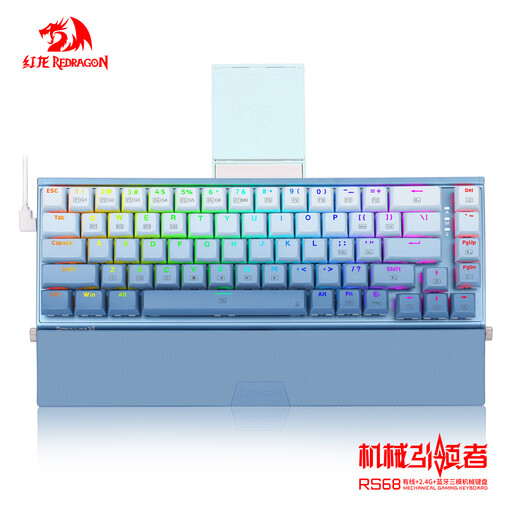
Why This Fits Their Persona: A flexible keyboard option for shoppers moving between office work, study and casual gaming without buying separate equipment.
The listed wired, wireless and Bluetooth connection options reduce reliance on one connection method. Check the exact switch and layout details before ordering.
Aluminium alloy construction; detachable hand bracket; hot-plug shaft seat listed in the product title.

Why This Fits Their Persona: Suits drivers who want a compact in-car setup and already have factory-wired CarPlay or Android Auto.
The listing clearly states the factory-wired requirement and exclusions including BMW, Tesla and aftermarket head units, helping prevent unsuitable purchases.
USB-A and USB-C input support; Bluetooth 5.2 and dual-band Wi-Fi listed; supports voice control through Siri and Google Assistant.
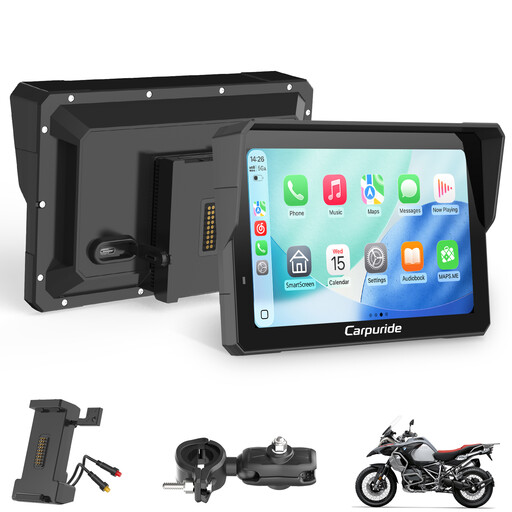
Why This Fits Their Persona: Designed for motorcyclists who need navigation and smartphone connectivity on a two-wheel setup, subject to correct mounting and power installation.
The listed 7-inch screen, waterproof design, BM05 mount, wired controller and intercom functions make the intended motorcycle use clearer than a generic car accessory.
Wireless CarPlay and Android Auto listed; dual Bluetooth and a wired controller included in the feature description.
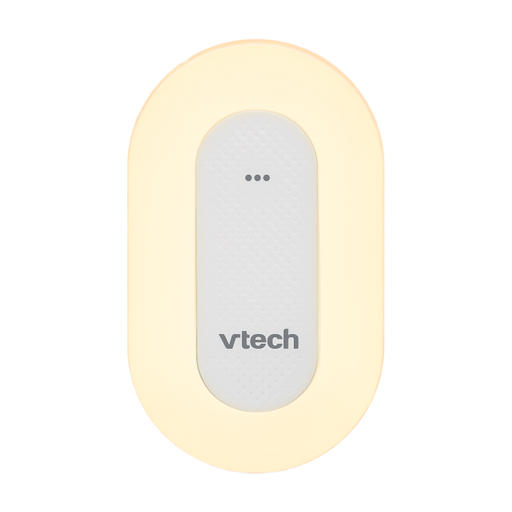
Why This Fits Their Persona: A nursery accessory for parents seeking built-in audio, adjustable lighting and app-based routine controls in one plug-in unit.
The direct plug-in design avoids battery replacement, while the supplied safety instructions emphasise keeping the unit and plug out of children’s reach.
40 preloaded audio items; over 250 listed night-light colours; Bluetooth streaming and custom voice recording through the app.
Content creators may prefer the VoxorAI KM08 or KM09 live streaming headphones, which are listed with a built-in sound card for real-time monitoring, Type-C compatibility and a 1.2-metre cable. Compare the connector and device support before ordering, especially when using a tablet or phone without a 3.5 mm socket.
For charging several devices, the Baseus GaN5 Pro Digital Display Fast Charger 160 W lists multiple Type-C and USB ports and includes a Type-C to Type-C cable. Check the supplied plug type, output allocation and whether your devices accept the advertised charging standard.
For continuous dash cam recording, the KAWA Dash Cam OBD Power Cable lists 24/7 parking mode, three-level low-voltage protection and acc detection. Installation should follow the manufacturer’s instructions, with the vehicle and dash cam specifications checked first.
Running costs depend on power consumption, charging frequency and standby use. Plug-in products may draw small amounts of electricity while connected, while Bluetooth gadgets require periodic charging. A charger’s wattage describes its capacity, not necessarily the amount of electricity used by every connected device.
No. Many adapters require factory-wired CarPlay or wired Android Auto. Check the vehicle model, infotainment system and exclusions before buying. An adapter designed to convert a wired connection is not automatically compatible with an aftermarket head unit.
Use the correct cable and power rating, keep connectors free from dust and moisture, avoid excessive bending at cable ends and install vehicle accessories securely. For nursery and motorcycle products, follow the stated placement, mounting and safety instructions rather than modifying the hardware.