Start with the information you need: a supplier-provided in-home display suits household electricity use and cost, while an energy-monitoring smart plug suits one compatible plug-in appliance. Choose smart lighting for lighting routines, and move to a hub or Matter-capable setup only when wider ecosystem control matters; check electrical ratings, plug format, network requirements and app limitations before buying.
Who each route suits
Households seeking a whole-home view
For people who want to see household electricity use and cost before deciding which routines to change, rather than starting with controls for individual appliances. Ofgem and UK government smart-meter guidance describe in-home displays as a source of household energy information.
Households focusing on one appliance
For people who want to monitor and schedule a compatible plug-in appliance, such as a lamp or charger, and can check the appliance load and any motor or compressor restrictions.
Smart-home users building routines
For people whose main aim is scheduled lighting or connected controls across existing apps, voice assistants or Matter-compatible ecosystems.
Buying priorities
Decide whether you need household information, appliance-level monitoring or routine control before comparing devices. Then check the electrical and ecosystem conditions that apply to the exact model.
| Priority |
What to check |
Your needs |
| Monitoring scope |
Check whether the device connects to a smart meter for household information, or whether it measures only the load connected through its own plug. |
I want to understand total household electricity use and cost before changing routines. For one appliance, I need monitoring at that individual plug. |
| Schedules and control |
Confirm that the appliance or light can be switched safely, and check app setup, timers, range and whether a hub is needed for the intended automations. |
A simple recurring on/off routine may be enough for a lamp or light. I would add a hub only where more devices, wider coverage or integrations matter. |
| Electrical compatibility |
Compare the plug rating with the appliance label and any extension lead. Check indoor-use conditions, motor or compressor restrictions and the physical plug standard. |
I need the exact product variant to suit my socket and connected appliance, rather than assuming every smart plug is suitable for every load. |
| Accessibility and support |
Ask the energy supplier about accessible in-home display options where larger text, buttons, braille or speech features would help. Check what ongoing supplier support applies. |
I need household energy information that can be read and operated comfortably by the person who will use it. |
Common buying pitfalls
-
Using a plug monitor for a whole-home question
A smart plug measures the connected load, while an in-home display is intended to show household energy information and cost. Plugging every outlet into monitors can still leave hard-wired loads outside the picture.
Start with an in-home display or smart-meter-connected route when the question is about total household consumption. Add plug monitoring to appliances whose routines you can realistically change.
-
Ignoring electrical ratings and appliance restrictions
Overloading sockets or extension leads creates a fire risk. Product instructions can also exclude EV charging or restrict use with particular motor and compressor loads.
Check the device maximum load, appliance label and extension-lead rating before connection. Do not use a consumer smart plug for EV charging where the manufacturer excludes it.
-
Assuming Matter makes every feature available everywhere
A Matter-certified device can still keep a feature such as energy monitoring within its own app, so a hub or platform may not expose the data you expect.
Confirm the exact feature you need, such as energy history, live power, schedules or automations, in the chosen app and hub before purchase.
-
Assuming a marketplace listing has the UK plug variant
Products with the same model name can have different plug standards and electrical ratings. A plug-format mismatch is a compatibility issue, not a cosmetic difference.
Verify the plug standard, voltage, rating and exact model variant against the manufacturer information before ordering.
A mismatched plug variant may require return or replacement rather than being safely usable in a UK Type G socket.
Relevant brand references
Tapo (TP-Link)
A smart-plug route for appliance-level monitoring, remote control and schedules. The P110M adds Matter certification for households planning wider ecosystem use.
- TP-Link states that the P110 and P110M offer energy monitoring, schedules and app control.
- The cited UK pages specify indoor use, a 13A maximum output, no EV charging and restrictions for higher motor or compressor loads.
- TP-Link states that P110M energy monitoring is currently viewed in the Tapo app rather than through Matter.
Philips Hue
A smart-lighting ecosystem for changing lighting routines, with direct Bluetooth control or a Bridge-based Zigbee mesh setup.
- Philips Hue states that its app can control and automate lighting routines.
- Its own comparison describes Bluetooth for in-room use and a Bridge for a full-home Zigbee mesh with wider integrations.
- Smart lighting changes lighting control; it does not measure appliance-by-appliance electricity use.
Samsung SmartThings
An app-led smart-meter and compatible-appliance monitoring route for households already using SmartThings-compatible devices.
- Samsung states that SmartThings Energy can connect to a smart meter and control compatible Samsung appliances.
- Samsung says smart-meter data can take up to 48 hours to appear after setup.
- According to Samsung, minute-by-minute household usage in the app requires an ivie Bud in-home display.
Joybuy product options
Joybuy product options for appliance control, plug-level monitoring and scheduled lighting routines.
 No image available
Eve Energy Matter Smart Plug with Power Meter, UK Type G
For monitoring one compatible plug-in appliance and adding schedules or remote control in an established Matter ecosystem.
Stated 13A/2900W maximum, Matter over Thread, power tracking, schedules, timers and automation functions.
A compatible Matter controller and Thread Border Router are required for full Thread and Matter functionality. Indoor use only; keep the connected appliance within the stated limit.
Joybuy
 No image available
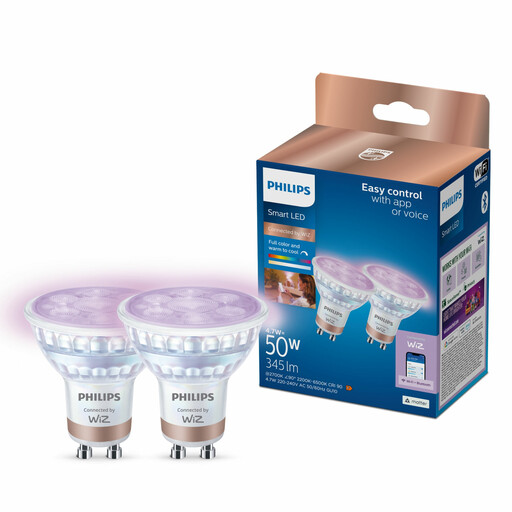
Philips Smart Light Bulb GU10, 2-Pack
For timed lighting routines and remote control where the existing fitting accepts GU10 bulbs.
Stated Wi-Fi app control, no-hub setup, daily or weekly schedules, and full-colour warm/cool spectrum lighting.
This controls lighting routines rather than providing whole-home or plug-level electricity measurement. Check the fitting and use-location conditions.
Joybuy
 No image available
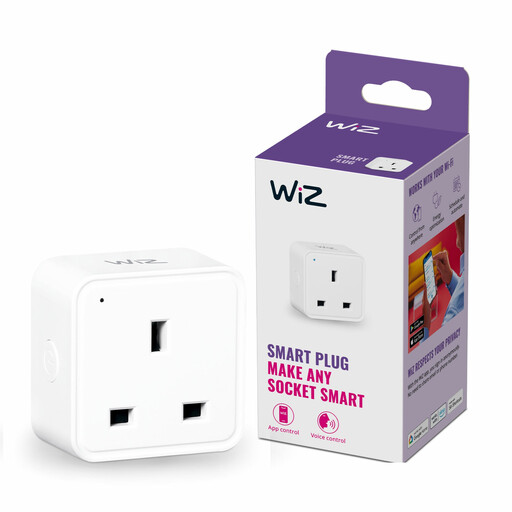
WiZ Smart Plug White
For straightforward on/off control and recurring schedules for compatible simple plug-in devices.
Stated Wi-Fi setup, smartphone control, daily or weekly scheduling and no separate hub requirement.
Check whether appliance-level energy monitoring is needed, then confirm the plug type, rated current and maximum load for the intended socket and appliance.
Joybuy
 No image available
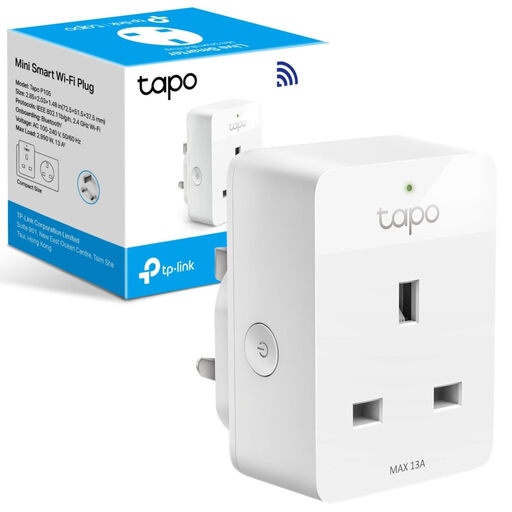
Tapo P105 Mini Smart Wi-Fi Plug, 1-Pack
For app-led schedules and timers for compatible everyday devices without adding a hub.
Stated direct 2.4GHz Wi-Fi setup, app control, voice-assistant support, schedules, timers and Away Mode.
Check whether energy monitoring is required, and verify the plug format, maximum load and appliance suitability before use.
Joybuy
 No image available
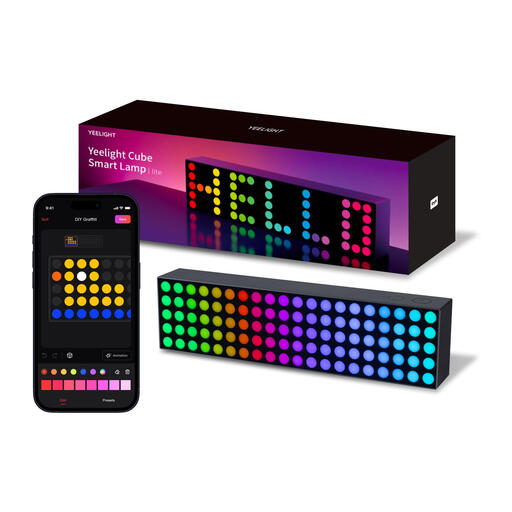
Yeelight Cube Lite
For adding timed ambient lighting to a desk or room where decorative smart-light control is the priority.
Stated app control, Bluetooth connection, voice-assistant support and timer scheduling.
This is a decorative lighting option rather than a stated whole-home or appliance-level monitor. Check power, network and any hub requirements before buying.
Joybuy
Frequently asked questions
When is a supplier-provided in-home display more suitable than a smart plug?
Choose an in-home display when you need household-level electricity use and cost information. Ofgem says that an in-home display shows energy usage in pounds and pence, while UK government guidance says electricity information is near real time; a smart plug is more targeted for one connected appliance.
Can a smart plug be used with an EV charger, heater or every motorised appliance?
Do not assume that it can. TP-Link’s UK pages for the Tapo P110 and P110M state a 13A maximum output, indoor use only, no EV charging and restrictions for motor or compressor loads above 1/6HP; check the exact product instructions and appliance rating first.
Does Matter guarantee that energy data will appear in every smart-home app?
No. TP-Link states that the P110M energy-monitoring feature is not currently supported through Matter and should be used in the Tapo app. Check feature-level compatibility rather than relying on the Matter logo alone.
Can a smart plug be used with an extension lead or multiway adaptor?
Only if the combined load stays within the rating of the extension lead and socket. Electrical Safety First advises checking ratings, avoiding overloads and never connecting one extension lead to another; it states that a single socket is typically limited to 13A or about 3kW.


