
24/7 Customer Support

Free returns

Same-day & Next-day Delivery

Quality Guaranteed

Unlock Your Welcome Offers: FREE Delivery | Up to 80% OFF | Free 30-day JoyPlus trial
Download the APP
The line between our professional and personal lives is more blurred than ever. We need technology that can keep pace, transitioning seamlessly from a focused work session to an immersive gaming marathon. For many tech enthusiasts and professionals, the search is on for a single piece of wearable tech that does it all. Smart glasses have emerged as a powerful contender, but the market is crowded with options, each promising a different vision of the future.
This guide is designed to cut through the clutter. As a Joybuy Product Recommendation Officer, my role is to provide clear, practical advice to help you understand what to look for. We will explore the key features that matter, analyse different types of smart glasses and highlight some of our top recommendations to help you find a device that fits your digital lifestyle.
Before diving into specific models, it’s important to clarify what you want your wearable to achieve. Focusing on these key areas will help you make a more informed decision.
The term 'smart glasses' covers a broad category. Your first step is to decide between a visual-first or audio-first device.
A pair of smart glasses is only as good as the devices it can connect to. Before purchasing, always check for compatibility with your phone, games console or computer. For video-centric AR glasses, look for devices that support USB-C with DisplayPort (DP) Alternate Mode, a feature common on modern Android phones (like the Samsung S-series), the iPhone 15 and later, and most laptops. For audio glasses, ensure they support a recent Bluetooth standard (e.g., Bluetooth 5.3) for a stable, low-latency connection.
For any piece of wearable tech in the UK, daily usability is crucial. Consider the following:
Based on functionality, user needs and innovative features, here are our recommendations for those exploring the world of smart glasses.
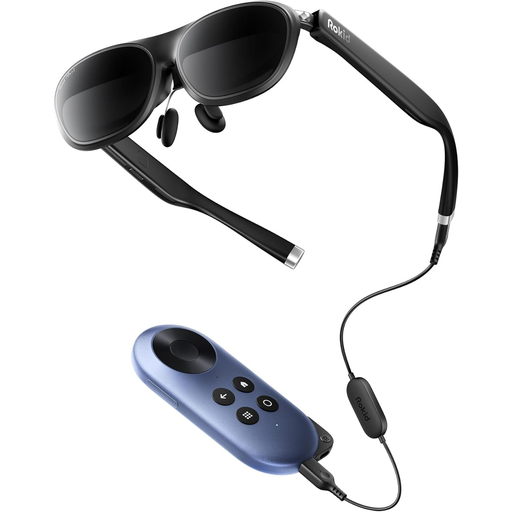
Why It Stands Out
The Rokid Joy 2, Max 2 is engineered for an unparalleled immersive experience. It projects a massive 215-inch virtual screen that transforms any space into your personal cinema or gaming arena. The dual Micro-OLED displays deliver sharp, high-contrast images, while the 120Hz refresh rate ensures fluid motion, which is a critical feature for competitive gaming.
Pros
Who is it for?
This is an ideal choice for film lovers, avid gamers and professionals who need a private, high-definition portable monitor for work or travel.
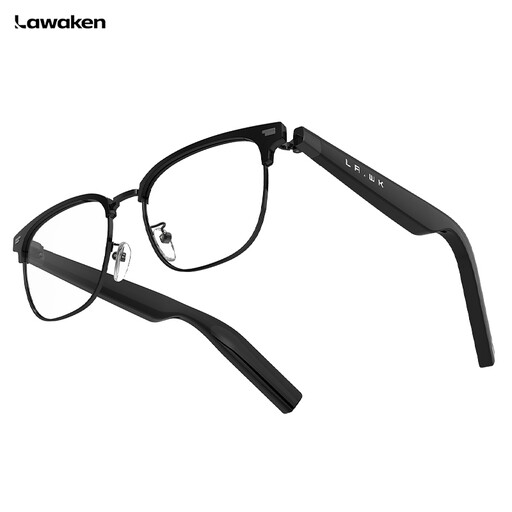
Why It Stands Out
The LAWAKEN AI Chat City glasses focus on intelligent, hands-free productivity. They integrate powerful AI capabilities, including real-time translation across 128 languages and an AI Note feature that can record and summarise meetings. With support for AI agents like ChatGPT and Gemini, it acts as a true digital assistant on your face.
Pros
Who is it for?
This is perfectly suited for international business travellers, busy professionals who attend many meetings and anyone looking for a discreet, hands-free way to manage calls and access AI assistance on the move.
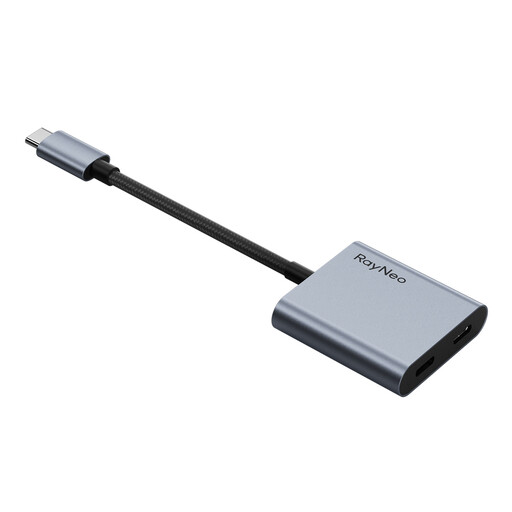
Why It Stands Out
While not a pair of glasses itself, the RayNeo adapter is an essential accessory that solves one of the biggest challenges for AR glasses users: battery drain. This compact device allows you to charge your source device (like a Switch or phone) while simultaneously outputting video to your glasses, enabling uninterrupted play and watch sessions.
Pros
Who is it for?
A must-have for any serious gamer or streamer who uses AR glasses as their primary display and cannot afford to have their session cut short by a dead battery.
The world of smart wearables is constantly expanding. If your work requires specific features or you're exploring different styles tailored for a professional environment, there are many other models to consider.
To discover more, browse our curated collection of work glasses to find the perfect fit for your needs.
1. Can smart glasses replace my monitor?
For many tasks, yes. AR glasses like the Rokid Max 2 can serve as an excellent portable or secondary monitor, offering privacy and a large virtual screen in a tiny package. They are great for watching media, gaming and general productivity. However, for all-day, text-intensive work, some users may still prefer the ergonomics of a traditional desktop monitor.
2. Do I need a specific phone for smart glasses?
It depends on the glasses. For AR glasses that function as a display, your phone needs a USB-C port that supports DisplayPort (DP) Alternate Mode for video output. This is standard on many flagship Android phones and the iPhone 15 or newer. For audio-focused glasses like the LAWAKEN AI Chat City, a standard Bluetooth connection is all that's required, making them compatible with almost any modern smartphone.
3. Are smart glasses safe for my eyes?
Reputable manufacturers design their products with user comfort and safety in mind. Features like adjustable brightness and myopia dials help create a clear, comfortable image. However, as with any screen, it is advisable to follow the manufacturer's guidance, which typically includes taking a 15-minute break for every hour of use. If you experience any eye strain or dizziness, you should stop using them and rest.