Choose a smart-home device by what it needs to see or hear: check camera placement and masking for doorbells and cameras, and look for an understandable microphone or camera-off control in shared rooms. Before buying, confirm what the exact model disables, how its app handles personal information and how long it will receive security updates; switching a sensor off can also interrupt monitoring or voice control.
Who these choices matter to
Households with boundary-facing cameras
If a doorbell or exterior camera could show a pavement, shared accessway or neighbouring property, its mounting position and view need attention before privacy zones are configured. The Information Commissioner's Office advises capturing only your own property where possible.
Households using shared rooms
A speaker, display, baby monitor or indoor camera in a room used by others needs an off control that household members can understand and use when listening or recording is unwanted.
People keeping connected devices long term
Before choosing a device to keep for several years, compare its stated security-update period with your intended use and review what information its app requests or shares.
What to check before buying
Start with the device's location and whether people need an immediate off switch. Then check the exact model's security support and app permissions, whichever device type you choose.
| Concern |
Buying checks |
Who this matters to |
| Camera placement and masking |
Check the view from the intended mounting point and whether that model offers privacy or motion zones. Masking does not replace careful positioning. |
If my doorbell faces a shared entrance, I want to see visitors without unnecessarily filming beyond my property; around 36% of consumers put camera placement first. |
| Direct camera and microphone controls |
Check whether the exact model has a physical or app-based control, what it switches off and whether its off state is clear to everyone who uses the room. |
In a shared room, I want a straightforward way to stop listening or recording when it is unwelcome. Around 29% of consumers place an immediate, understandable off control first. |
| Security updates |
Find the exact model's stated security-update period and end date, and compare them with how long you expect to use it. |
If I plan to keep a connected device for years, I need to know how long it will receive security updates; around 21% of consumers make support duration their primary concern. |
| App data and storage |
Review requested permissions and privacy information. For cameras, check whether the recording arrangement needs a cloud service or compatible local-storage hardware. |
When setting up an app, I want to limit information sharing that is not needed for the functions I use. Limiting data collection comes first for around 14% of consumers. |
Privacy-control pitfalls
-
Treating a privacy zone as a substitute for camera placement
A masked area can remove useful video context. Ring says movement behind one of its Privacy Zones may still be detected; masking also does not settle questions raised by a view of neighbouring or public space.
Check the live view from the planned mounting point first. Configure available privacy and motion controls afterwards, and check the view again if the camera moves.
-
Assuming every model has the same off control
A control advertised for one camera may be absent from another in the same range. Tapo identifies physical privacy buttons on selected models, while Ring lists devices without Privacy Zone support.
Check the precise model's controls, what they disable and any conditions for using them before relying on a product-line description.
-
Overlooking the security-update period
The National Cyber Security Centre warns that devices may become easier to compromise or stop working as intended when important updates end. A stated security-update period is not a promise of future feature updates.
Find the exact model's support end date and consider whether it covers the time you expect to keep the device.
-
Accepting every app permission during setup
The Information Commissioner's Office advises reviewing what a smart product collects and shares. An app permission may affect more information than the function you intend to use requires.
Review each request during setup, decline optional access you do not need and revisit the settings after changing apps or features.
Relevant brands to consider
Ring
Doorbells and security cameras for households considering app-based privacy zones, motion settings and audio controls.
- Ring says supported devices can mask selected areas in live and recorded video.
- Privacy Zones are unavailable on some models, and movement behind a masked area may still be detected. Check the model and any conditions for disabling audio.
Google Nest
Cameras and doorbells for households considering audio controls within Google's home-app ecosystem.
- Google Nest Help describes settings for turning camera or doorbell microphones on and off.
- Check the device generation and whether its settings are managed in the Google Home or Nest app.
Tapo
Indoor and outdoor cameras for households comparing privacy modes with controls on the device itself.
- Tapo says the C125 and C225 are among selected models with a physical privacy button.
- Do not assume every Tapo camera has that button or that every privacy mode operates in the same way.
Amazon Echo
Smart speakers and displays for shared rooms where a direct microphone-off control matters.
- Amazon says the microphone-off button disconnects the microphones on Echo, Echo Dot and Echo Show devices.
- Alexa cannot respond to voice commands while the microphones are off. Amazon says active voice requests are sent to its cloud for processing.
eufy
Camera systems for households considering compatible local-storage hardware.
- eufy markets HomeBase 3-compatible systems with local storage.
- A local-storage claim does not establish how every app or account feature handles data. Check camera compatibility, permissions and security support for the system you intend to use.
Indoor camera choices on Joybuy
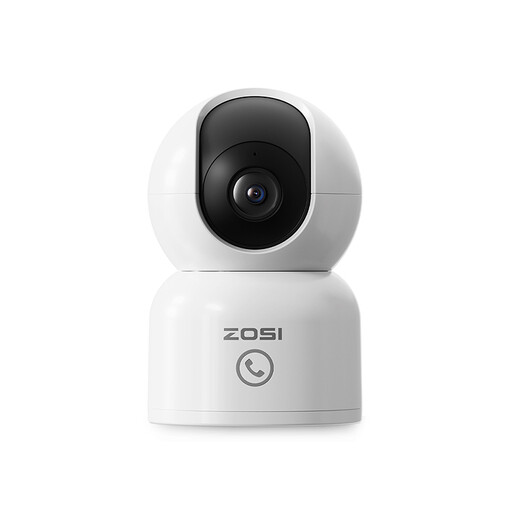
This indoor camera is relevant to monitoring a room, including use as a baby monitor. Check how its privacy controls work before choosing it for a shared space.
 No image available
ZOSI C518 2MP Indoor Security Camera, 1 PCS
For indoor monitoring, including use as a baby monitor, check whether this model's privacy mode stops video, audio or both before relying on it.
The listed configuration includes 360° pan and tilt, dual-band 2.4G/5G WiFi, two-way audio, and cloud and local storage options. Check how recording is stored and whether the app settings suit your household.
Confirm the model's security-update end date and review app permissions before setup.
Joybuy
Questions about smart-home privacy
Does UK data-protection law apply to a home camera or smart doorbell?
The Information Commissioner's Office says it applies when a home CCTV or smart-doorbell system captures someone else's property, a public area or a communal space. Position the camera to capture only your own property where possible. The ICO notes that its public guidance is under review following changes made by the Data (Use and Access) Act, so consult its current guidance for your placement.
What should I test before installing a camera or doorbell?
Check the live view from the intended mounting position, then test any privacy zones, motion zones and audio controls available on the exact model. Ring says its Privacy Zones mask selected areas in live and recorded video, but movement behind a zone may still be detected.
How do I compare security-update support?
Compare the manufacturer's stated security-update end date for each exact model with how long you intend to use it. For in-scope consumer connectable products supplied to UK consumers, UK product-security regulations define the support period as a minimum period expressed with an end date.
Can I switch off a smart speaker's microphones?
Amazon says the microphone-off button disconnects the microphones on Echo, Echo Dot and Echo Show devices and displays a red light. Alexa will not respond to voice commands until the microphones are switched back on.


