Who should plan beyond one device?
If your first purchase may lead to more devices, decide how they will be controlled and shared before settling on a product.
Households planning several connected devices
A speaker, light, socket or sensor may be the starting point, but the next device needs to fit the same plans. Check exact platform and device-category support, whether a hub or Thread border router is needed, and how household members will control the setup. Google Home Help and Apple Support describe requirements that depend on the platform and accessory.
Households sharing control
Several people may need to operate lights without all of them managing cameras, services or settings. Compare account requirements and permission levels before inviting others. Google Home Help distinguishes administrators from members with more limited access.
Households starting with security
For a camera or doorbell, decide whether live alerts are enough or whether you need to review recordings later. Ring distinguishes those functions in its subscription information, while Tapo describes both local storage and plan-dependent cloud features. Camera placement also matters if the view extends beyond your property, as the Information Commissioner's Office explains.
What matters when choosing a first setup?
Settle on the control method and the first task you want it to perform, then check the exact device against that plan. A lighting or socket setup lets you assess everyday controls; a camera-led start calls for closer attention to recording, access and placement.
| Concern |
What to check |
Who this matters to |
| Platform compatibility |
Check the exact model and device category against your chosen app, including required hubs, Wi-Fi or Thread connections and the functions available outside the maker's app. |
If I plan to add devices later, I want each purchase to work with the controls I have chosen rather than relying on a logo alone. Around 33% of consumers put compatibility and expansion first. |
| Recording and privacy |
For a camera, compare live viewing with recorded-event review, local and cloud storage, plan coverage and the intended field of view. |
I need to know who can see footage and whether keeping recordings involves an ongoing commitment. For around 27% of consumers, recording and privacy are the primary concern. |
| Shared control |
Check who owns the home account, what members can change, and whether remote or shared control requires a home hub. |
When several people use the home, I want them to operate the devices they need without giving everyone broad access. Shared control comes first for around 20% of consumers. |
| First useful device |
Choose one task you will use regularly, then decide whether direct setup meets it or a bridge or hub serves your next planned devices. |
I would rather try a light, socket or routine before building a larger system around it. Around 20% of consumers prioritise that practical starting point. |
Relevant brands and platforms
These platforms illustrate different control, lighting and camera decisions; a brand name alone does not establish compatibility with an individual device.
Google Home / Nest
An app and voice-control route for households using a Google Account.
- Google Home Help describes setup and management of supported Matter devices, alongside administrator and member permissions.
- Google lists a Google Account, home Wi-Fi, a Matter-enabled hub and a supported device among its Matter setup requirements. Device-category support and Thread requirements also need checking.
Amazon Alexa
A voice-led route for compatible connected devices.
- Amazon provides device compatibility information, including its Works with Alexa badge.
- Amazon says connecting a Thread-based Matter device to Alexa requires a Thread-enabled Alexa hub or device; general Alexa compatibility does not establish that setup requirement.
Apple Home
Home app control for households using Apple devices and supported accessories.
- Apple Support describes pairing supported Matter accessories and using a home hub for remote control, sharing and automations.
- Check the accessory category and setup path. Thread accessories require Thread-capable infrastructure, and initial pairing does not by itself establish every remote or shared-control function.
Philips Hue
A dedicated smart-lighting system with bridge-based and eligible direct Matter setup routes.
- Philips Hue says its Bridge supports older Hue products and provides features including dynamic scenes and entertainment sync.
- Direct Matter setup applies to eligible Matter-enabled bulbs and does not provide every bridge-based feature.
Ring
A camera and doorbell route where the distinction between live use and recorded history matters.
- Ring says users can view live video and respond to alerts without a subscription.
- Ring requires a subscription to review recorded video; assess the plan against the number of devices needing coverage.
Tapo
A range spanning cameras and other connected devices, with camera storage choices to assess model by model.
- Tapo describes local camera storage without Tapo Care and cloud clip history as a Care feature.
- Tapo says available features can vary by model, firmware and plan; confirm the combination relevant to your camera.
Joybuy products for two starting routes
These products represent a camera-led start and a smart-plug start. Choose between those tasks first, then check each model's platform support, setup equipment and ongoing-service terms against your household's plans.
 No image available
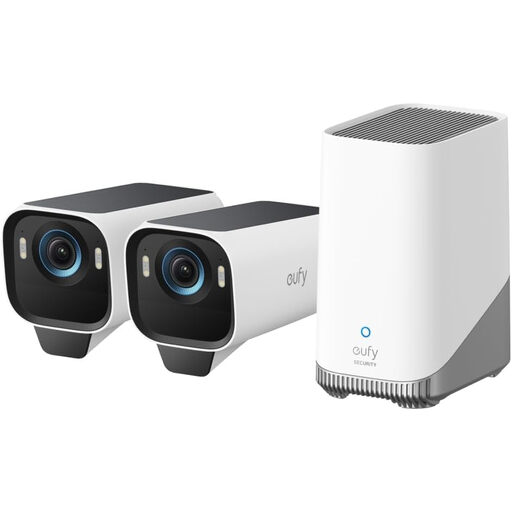
eufy Security eufyCam S3 Pro 2-Cam Kit, Solar, 4K
Consider this outdoor camera kit if local recording is central to your first setup. The listing describes solar power, 4K capture and expandable local storage; confirm the recording terms and supported functions on your chosen control platform.
The title identifies a 2-Cam Kit, while the accompanying kit description differs. Confirm the cameras and base station included before choosing a mounting location.
View on Joybuy
 No image available
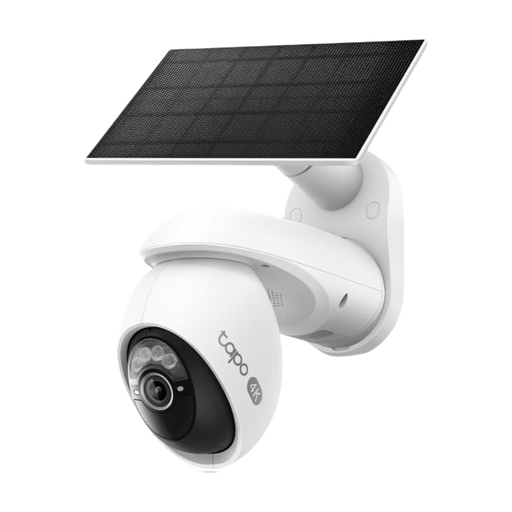
Tapo C660 KIT Solar-Powered Pan/Tilt Security Camera Kit
This is another camera-led starting point if a solar-powered outdoor installation suits the intended position. The listing describes pan-and-tilt control and microSD recording; check the mounting location, whether a microSD card is included and which recording features require Tapo Care.
Tapo says service features vary by model, firmware and plan. Confirm the functions available through your chosen voice platform as well as the Tapo app.
View on Joybuy
 No image available
Eve Energy Matter Smart Plug with Power Meter, UK Type G
A plug can provide a first indoor control task without starting with a camera. This UK Type G model is described with a power meter; confirm that its monitoring and control functions work in the app you intend to use.
The product information describes both Wi-Fi and Matter over Thread. Resolve the connection method and any controller or Thread border router requirement for this exact model before buying. The listing specifies indoor use and a limit of 13A or 2900W.
View on Joybuy
Questions before you set up
Does Matter mean every feature will work in every smart-home app?
No. Matter provides an interoperability route for supported devices and categories, not identical functions in every app. Google Home Help says platforms add support for Matter device categories at different times, so check the exact device, chosen platform and feature you need.
Do I need a hub for my first Matter device?
The requirement depends on the device's connection method and your chosen platform. Google lists a Matter-enabled hub for its setup and a Thread border router for Thread devices. Apple Support describes some initial pairing through an iPhone or iPad, while a home hub supports remote control, sharing and automations; Thread accessories still need suitable Thread infrastructure.
Can other people control the home without becoming administrators?
Yes, where the platform offers a suitable limited role. Google Home Help distinguishes members from administrators, who can manage broader home settings and services. Decide what each person needs to operate before granting access, particularly when cameras are involved.
Will a security camera work without a subscription?
Some functions can, but recording arrangements depend on the product. Ring says live viewing and alert response work without a subscription, while reviewing recorded video requires one. Tapo describes local storage without Tapo Care and cloud clips as a plan feature; check the exact camera's storage options and terms.
What if my doorbell camera captures beyond my property?
The Information Commissioner's Office says data-protection law applies if domestic CCTV captures someone else's property, a public area or communal space. Plan the viewing angle and consider privacy masking where needed. Its home CCTV guidance is under review following the Data (Use and Access) Act, so check the current guidance before installation.


