Start with one routine you would use regularly, then choose a controller and first device that work with your household’s phones, preferred app and any existing equipment. A speaker makes sense when hands-free commands matter most; a compatible plug, light or sensor can be a smaller first step for app control. Before expanding, check the exact device’s Matter features, network requirements, security-update period and any functions tied to a paid plan.
Who is starting a smart home?
Compatibility-first beginners
If you are starting with a light, plug or sensor, you may want to add other brands later without replacing your first purchases. Matter is intended to help compatible devices work across ecosystems, but the Connectivity Standards Alliance’s interoperability aim does not mean every feature appears in every app.
Voice-and-routine households
Hands-free control is useful when you want one spoken command to trigger several supported actions. Amazon documents compatible-device setup and Alexa routines; check that the particular devices and actions you have in mind work together.
Privacy-and-support cautious buyers
A microphone, camera or connected sensor in a shared room calls for a closer look at recording controls, household access and software support. The Information Commissioner’s Office explains that connected products can process information including voice, video and sensor data.
What should you check first?
Choose the everyday action first, then check whether its device, controller and app can perform it together. The concerns below help separate a simple first purchase from commitments that matter when you add more devices.
| Concern |
What to check |
Who this matters to |
| Future compatibility |
Check the exact device’s Matter support, intended app and network type. A Thread device also needs a suitable border-router path. |
I want to start with one device without closing off other brands later; around 33% of consumers put future compatibility first. |
| Privacy and support |
Find the stated security-update period and review account, sharing and recording-deletion controls where relevant. |
Before adding a microphone or connected sensor to a shared room, I want to know how access and personal information are managed; roughly 27% of consumers make privacy and support their first concern. |
| Everyday control |
Confirm that your chosen app or voice assistant supports the intended trigger and action; check whether remote control or sharing requires a hub. |
I need an easy way to run a repeated lighting or plug routine, rather than a collection of devices I rarely use; around 20% of consumers prioritise straightforward control. |
| Paid features |
For cameras and doorbells, distinguish included functions from video history, alerts or recognition that require a plan. |
I want the functions I rely on to remain available if I do not keep a subscription; roughly 20% of consumers put that question first. |
Common buying mistakes
-
Assuming Matter carries every feature into every app
Matter can connect supported devices across ecosystems without making manufacturer-specific functions identical. TP-Link says energy monitoring on its Tapo P110M is not currently available through Matter and is used in the Tapo app.
Check the Matter feature list and the manufacturer’s app features for the exact model, especially if a particular sensor reading or automation is the reason you are buying it.
-
Buying a Thread device without checking the network path
A Matter label alone does not establish that your controller can connect a Thread-based device. TP-Link says its Tapo H500 cannot directly add Matter devices that require Thread.
Identify the device’s network type and confirm a compatible controller and Thread border router where required.
That requirement may mean adding controller or border-router hardware to the setup.
-
Choosing a camera for features tied to a plan
Google says Home Premium features vary by plan, device and region. If the subscription lapses, access to video history and the face library is lost.
Decide which history, alerts or recognition features you need, then check what remains available without the plan for the exact device.
-
Leaving security and privacy settings until after setup
Connected devices may handle account, voice, video or sensor information. The National Cyber Security Centre says relevant UK devices must state the minimum period for important security updates.
Locate that statement before buying. Once setting up a device, review recording and sharing controls, use a unique password and enable two-step verification where offered.
Relevant brands and platforms
Amazon Alexa
An app-and-voice ecosystem to consider when spoken commands will be the main way your household controls connected devices.
- Amazon documents adding compatible devices and combining supported actions in Alexa routines.
- Review Alexa’s voice-history and deletion controls before using microphones in shared spaces.
Google Home / Google Nest
A Google account-based ecosystem for connected-home control, with Nest cameras and doorbells among the products a household might add later.
- Google sets out plan, device and regional differences for its Home Premium features, allowing you to check the particular functions you want.
- Google says a lapsed Home Premium subscription removes access to video history and the face library.
Apple Home
An option for households already using iPhone, iPad, HomePod or Apple TV and wanting to organise compatible accessories in the Home app.
- Apple supports pairing Matter accessories with an iPhone or iPad and organising accessories by room.
- Apple uses a home hub for away-from-home control, shared access and automations. Check each intended accessory’s compatibility rather than relying on its brand name.
TP-Link Tapo
A product family spanning connected plugs, lights, sensors and hubs for households considering a primarily app-managed setup.
- TP-Link identifies selected Matter-capable products, so compatibility can be checked model by model.
- Support differs by model and feature: TP-Link says the Tapo H500 does not directly add Thread-based Matter devices, while P110M energy monitoring is not currently supported through Matter.
Home Assistant
A more hands-on controller platform for households willing to manage their own smart-home setup.
- Home Assistant says its Matter integration controls compatible devices on local Wi-Fi or Thread networks.
- A Thread setup may require appropriate radio hardware and configuration; check those requirements before choosing devices.
Joybuy products for a first routine
These sensor and plug options can form part of an app-controlled routine. Before choosing either, confirm that its exact connection method, controller requirements and supported app fit the setup you intend to use.
 No image available
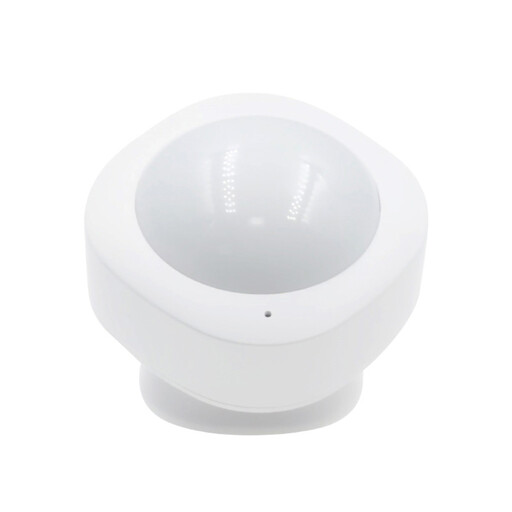
Rexsun RSH-MSO2 white PIR smart motion sensor
Consider this sensor if motion is the trigger you want for a room routine, provided the devices you intend to control work with its app setup.
The product name identifies PIR detection, Wi-Fi connectivity and a stated 26.2 ft detection range. Confirm compatibility with your chosen ecosystem, along with the security-update period and privacy controls, before connecting it to a household account.
View on Joybuy
 No image available
Eve Energy Matter smart plug with power meter, UK Type G
Consider this plug if switching a connected appliance or scheduling its operation would give you a useful first routine.
The product name identifies a UK Type G plug and power meter. Its Wi-Fi wording conflicts with a description specifying Matter over Thread, so confirm the exact connection method, compatible controller and any Thread border-router requirement before buying. Also check the stated security-update period and account privacy controls.
View on Joybuy
Smart-home questions
Will every Matter feature work in my chosen app?
No: check feature support for the exact product and platform. TP-Link says the Tapo P110M’s energy monitoring currently works in the Tapo app rather than through Matter, even though Matter supports interoperability for compatible functions.
Do I need a hub before adding a smart-home device?
Not for every device or initial setup, but the functions you want may require one. Apple supports pairing Matter accessories with an iPhone or iPad and uses a home hub for away-from-home control, sharing and automations; a Thread-based device also needs a suitable border-router path.
What should I check before placing a voice-controlled device in a shared room?
Review its recording history, deletion options and household access controls before use. The Information Commissioner’s Office notes that connected products can process voice and other personal information, while Amazon provides controls to review and delete Alexa voice history.
Will a camera keep its video history if I cancel a subscription?
That depends on the service; do not assume stored history remains accessible. Google says access to video history and the face library is lost when a Google Home Premium subscription lapses, and available features vary by plan, device and region.
What UK security-support information should I look for?
Look for the manufacturer’s stated minimum security-update period for a relevant connected product. GOV.UK says the UK consumer connectable product security regime took effect on 29 April 2024, and the National Cyber Security Centre explains the update-period requirement; check the product’s applicable UK information rather than assuming every connected device has the same scope or support duration.


