
24/7 Customer Support

Free returns

Same-day & Next-day Delivery

Quality Guaranteed

Unlock Your Welcome Offers: FREE Delivery | Up to 80% OFF | Free 30-day JoyPlus trial
Download the APP
The dream of a 100-inch screen for movie nights, live sports or immersive gaming is more accessible than ever, thanks to the rise of the smart projector. These compact devices promise a full-blown home cinema projector experience without the clutter and complexity of traditional setups. Yet, the market is flooded with options, and it's easy to fall into common traps that lead to disappointment and wasted money.
As the Joybuy Product Recommendation Officer, my role is to help you see past the marketing clutter. Many buyers are lured in by impressive-sounding numbers, only to end up with a device that is dim, difficult to use or can't even stream their favourite shows. Before you buy, let's look at the most common pitfalls UK shoppers face.
To make an informed choice, you need to focus on the specifications that genuinely impact your viewing experience. Here are the three non-negotiable factors to check.
Image clarity is determined by a projector's native resolution. This is the actual number of pixels the device can display.
Be wary of projectors advertised as "4K supported." This simply means the device can accept a 4K signal, but it will downscale the image to its lower native resolution (e.g., 1080p or even 720p). Always look for the native resolution for a true measure of sharpness.
As mentioned, the only brightness figure that matters is ANSI lumens. This is a standardised industry measurement of the light output. General guidelines for a good viewing experience are:
A true smart projector should be a self-contained entertainment hub. Key features to look for include:
Based on these critical criteria, here are a few recommendations tailored to different needs and spaces.
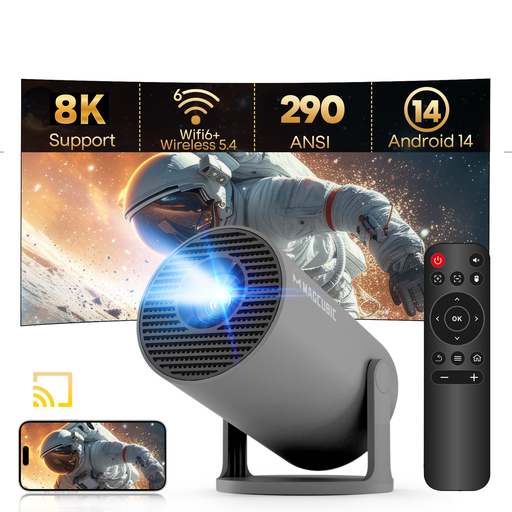
Why This Fits Their Persona: This ultra-portable projector is perfect for casual viewing in smaller spaces. Its 180-degree rotating stand is a standout feature, allowing you to easily project a movie onto the bedroom ceiling for a relaxed viewing experience.
It runs on a modern Android 14 system for access to apps and features auto keystone correction, which eliminates the frustration of manual image squaring in tight spaces.
The combination of its compact size, rotating stand and modern connectivity (WiFi 6, Bluetooth 5.4) offers exceptional flexibility for its price point.
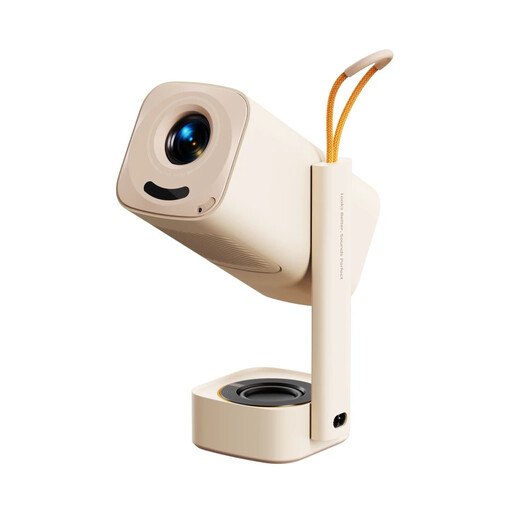
Why This Fits Their Persona: This is a true all-in-one for family movie nights in the living room or garden. Its native 1080p resolution provides a sharp picture, and the powerful 8W speaker with Dolby Audio means you don't need a separate sound system for immersive sound.
It features a built-in Smart TV OS with officially licensed Netflix and Prime Video, so it works straight out of the box. The full suite of auto-adjustments (focus, keystone and screen fit) makes setup completely hands-free.
The combination of licensed apps, strong built-in audio and effortless setup makes this an excellent plug-and-play home entertainment hub.
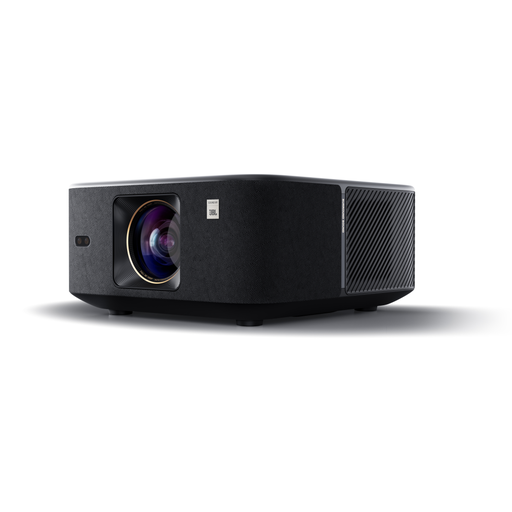
Why This Fits Their Persona: For those seeking a higher-tier experience, the K3 delivers. Its high brightness (1000 ISO Lumen) allows for clear viewing even in rooms with ambient light, and the dual 15W JBL speakers with Dolby Audio provide a powerful, room-filling sound that rivals dedicated sound systems.
It integrates Google TV, offering a polished and comprehensive smart interface with over 7,000 apps. The advanced auto-setup, including obstacle avoidance and screen fitting, ensures a perfect picture with zero effort.
Superior audio-visual performance. The combination of high brightness, native 1080p clarity and premium JBL sound makes this a top choice for a dedicated home cinema setup.
We have compiled a complete, real-time list of products that fully satisfy these strict selection criteria and UK safety regulations.
Modern smart projectors use LED light sources, not traditional bulbs. An LED lamp typically has a lifespan of 20,000 to 50,000 hours. Even if you used it for four hours every single day, that translates to well over a decade of use, making them a very durable and low-maintenance choice.
While not strictly necessary, a dedicated projector screen is recommended for the optimal experience. A smooth, white wall can work well for casual viewing. However, a proper screen is engineered to reflect light more uniformly and reject ambient light, which will significantly improve the contrast, colour accuracy and overall vibrancy of the image.
Yes, a projector for gaming can be a fantastic way to get a huge, immersive display. For the best experience, connect your console (like a PS5 or Xbox) directly to the projector's HDMI port. Some projectors also feature a "Game Mode" which reduces input lag, ensuring your controller inputs feel responsive. Check the product specifications for these features if gaming is a priority.