If following separate brass sections and percussion matters most, consider a supported stereo setup—but only if you have room to place it properly. A single tabletop speaker takes less space; whichever route you choose, match its playback options to your devices and check power, accessories and microphone controls before buying. Manufacturer specifications do not establish which model will sound most natural with brass band recordings.
Who is this for?
Detail-focused brass listener
If you want to follow cornets, horns, trombones, basses and percussion separately, consider the speaker’s stereo options and whether you can place a pair appropriately. A listed stereo feature alone cannot tell you how a particular recording will sound.
Space-limited desk listener
If monitors, documents and cables already occupy your workspace, check the footprint and power arrangement before committing to a pair. A single tabletop speaker may be easier to accommodate.
Ecosystem-led music streamer
If you usually start music from a phone, computer or particular app, make that playback route a deciding factor. Where work calls take place nearby, check the exact model’s voice and microphone controls too.
What matters when choosing?
Start with the space available for one speaker or a pair, then check how you will send music to it. Room-tuning and voice features are secondary if the placement or playback route does not suit your office.
| Concern | What to check | Who this matters to |
|---|
| Musical separation |
Check whether the exact model offers stereo from one unit or supports a pair, and whether you have suitable positions for both speakers. Google advises spacing supported pairs around 1.2–2.4 metres apart. |
If I want to follow the brass sections and percussion rather than use music as background sound, placement becomes a priority. Around 50% of consumers put musical separation first. |
| Desk practicality |
Measure the intended surface and check socket access and cable routing. For a Google stereo pair, Google advises solid, level surfaces for both speakers. |
With a working desk already in use, I need a speaker arrangement that leaves room for my equipment; around 30% of consumers make workspace practicality their primary concern. |
| Playback and controls |
Match the exact model to your usual source—such as Bluetooth, AirPlay, Cast or an analogue connection—and check its microphone controls if relevant. |
I want to start music from the devices and apps I already use without changing my routine. For roughly 20% of consumers, source compatibility and control matter most. |
What should you watch for?
-
Assuming one small cabinet replaces a spaced stereo pair
A speaker’s stereo description does not remove the placement requirements of a two-speaker setup. Google specifies matching supported models in the same room and advises around 1.2–2.4 metres between them.
Check whether two stable positions are realistic before choosing a pair. Otherwise, assess a single speaker without expecting the same left-right arrangement.
A pair also needs a second matching speaker, another suitable position and power for both units.
-
Choosing the voice assistant before the music source
Playback routes differ: Sonos lists wireless options and line-in for Era 100, Apple specifies HomePod setup requirements, and Google describes Cast and Bluetooth playback for compatible speakers.
List the phone, computer, apps and any analogue source you intend to use, then check the exact model’s connections and required accessories.
An analogue-source setup may require a suitable adapter or cable; check the requirements for the exact speaker and source.
-
Treating room tuning as a promise about brass recordings
Sonos, Apple and Amazon describe room-aware features for their respective speakers, but those descriptions do not establish which sound you will prefer with a particular recording or office layout.
Check where the speaker can stand and, where possible, listen with familiar music before deciding whether its presentation suits you.
-
Overlooking microphone settings in a working room
A voice-enabled speaker may be near calls and private conversations. The Information Commissioner's Office notes that connected devices can process sensitive information about people’s lives; microphone controls vary by model.
Review the exact device’s microphone and account settings before using it beside your workspace.
Brands to consider
Sonos
The Era 100 is a route to consider if you want several wireless playback options and may also need an external audio source.
- Sonos lists Wi-Fi, Bluetooth, AirPlay 2, line-in and Trueplay for Era 100.
- Check the connection requirements and accessories for your exact analogue source; these features do not establish how the speaker reproduces brass band music.
Apple
HomePod (2nd generation) is relevant to an office already using Apple devices and AirPlay.
- Apple lists room sensing, AirPlay and stereo-pair capability for this model.
- Setup requires an eligible iPhone or iPad and Wi-Fi; a stereo pair also requires a second compatible HomePod and space to place it.
Amazon Echo
Echo Studio is a route to examine if Alexa is your preferred way to control music.
- Amazon describes spatial audio and room adaptation for its current Echo Studio listing.
- Those are Amazon’s product descriptions, not a comparison of brass band playback. Check the exact release when assessing accessories and microphone controls.
Google
Google Home and Nest speakers may suit listeners who use Cast-enabled apps or Bluetooth and want to consider a supported stereo pair.
- Google describes Cast and Bluetooth playback for compatible speakers.
- Google requires two of the same supported model for a stereo pair and advises placing them on solid, level surfaces around 1.2–2.4 metres apart.
Joybuy product choices
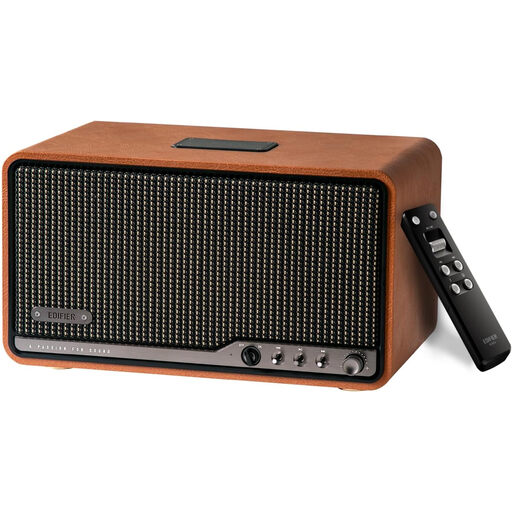
This tabletop wireless speaker is a choice to examine for home-office music playback. Check its connections, power arrangement and controls against your smart-speaker requirements.
 No image available
Edifier S300 tabletop wireless speaker, Brown
Consider this tabletop model if you have a suitable desk or shelf position for music listening. Before buying, confirm that its playback connections, power arrangement and any voice controls meet your needs.
View on Joybuy
Frequently asked questions
Should I choose one speaker or a stereo pair for brass band music?
Choose one speaker if desk space and straightforward placement take priority; consider a supported pair if left-right presentation matters more and you can position both units securely. For Google speakers, Google requires the same supported model in the same room and advises around 1.2–2.4 metres of separation.
Can I play music from a laptop or an analogue source?
Yes, if the exact speaker supports a connection your source can use. Sonos lists Bluetooth and line-in for Era 100, Apple lists AirPlay from a Mac for HomePod, and Google describes Bluetooth and Cast playback for compatible speakers. Check any adapter, cable or source requirements before buying.
What privacy controls should I check in a home office?
Check the exact model’s microphone controls and account settings before placing a voice-enabled speaker near work conversations. The Information Commissioner's Office notes that connected devices can process sensitive information, so the controls you are comfortable using should be part of the choice.
How should I dispose of an old smart speaker in the UK?
Check for a local electrical-waste collection option or an available retailer take-back route. GOV.UK explains that electrical and electronic equipment is regulated to reduce electrical waste.


