Choose a shared smart speaker around the music services and household accounts you already use; choose a display when visible calendars or touch controls would serve a real household need. A conventional wireless speaker suits listening controlled from an app or physical buttons, but cannot provide microphone-based voice requests. Check account personalisation, child settings and microphone controls separately, as service compatibility alone does not settle those choices.
Who these options suit
Shared music and radio households
If you want one accessible listening point for the household, check that it works with the services you already use. Ofcom's 2022 qualitative research documents music, radio and other content among smart-speaker uses.
Families sharing accounts and tasks
If different people need their own music or personal results, check what voice recognition and account setup each device requires. Child access and controls also need to be configured; they do not follow automatically from choosing a family-oriented product.
Listeners who prefer not to have speaker microphones
If you want connected household audio without voice requests from the speaker, look for a model explicitly described as microphone-free and check that app or physical controls suit you.
What to consider before choosing
Start with the service and household accounts you need, then decide whether voice control, a screen or microphone-free playback fits the way you will use the device.
| Concern |
What to check when buying |
Who this matters to |
| Music and radio services |
Check the exact service, how it connects, any required subscription tier and whether your preferred radio station or request is supported. |
If I want to keep using the music and radio services my household already knows, their connection method matters more than a general compatibility label. Around 29% of consumers put service fit first. |
| Shared accounts and child access |
Check how each person sets up recognition and personal music; review personal-content permissions, child membership and purchase controls. |
When several people share one device, I want music and personal results to suit the right household members, with child access set deliberately. Around 23% of consumers prioritise account separation and appropriate access. |
| Routines and device control |
List the specific task or device you want to control, then confirm the assistant, setup path and exact integration required. |
If I expect a routine to manage a particular light or other device, I need that exact integration to work rather than assuming the speaker controls it. Around 18% of consumers put routine fit first. |
| Microphones and privacy controls |
Check whether the exact model has microphones, what on-device controls it provides and which voice-history settings are available. |
For households that prefer app or physical control, the microphone hardware and its controls can determine whether a connected speaker feels suitable. Around 18% of consumers prioritise microphone control. |
| Screen and visible information |
Consider whether you will use calendars, touch controls or other visual features, and which personal information could appear in a shared room. |
If seeing a calendar or using touch controls would help with household tasks, a display may serve a purpose that audio alone does not. Around 12% of consumers put visual management first. |
Buying pitfalls to avoid
-
Assuming a supported music service separates everyone's accounts
Service access, voice recognition and personal-content permissions are separate parts of a shared setup. A service working on a device does not establish that it will automatically select each household member's account.
Before choosing, note whose music and personal results should be available, then check the exact service-and-assistant setup for those users.
-
Choosing a display just because it appears to do more
A screen adds visual information and touch interaction, but those features may not matter if the main task is listening.
Choose a display when you expect to use its calendars, controls or other visual functions; otherwise, prioritise service and household fit.
-
Confusing a microphone-free model with a similarly named speaker
Sonos distinguishes Era 100 SL by its lack of internal microphones, so the family name alone is not enough to establish which model you are considering.
Check the complete model name and microphone specification before buying.
-
Assuming a speaker can control any household device
Voice routines depend on the exact device integration; sharing an assistant brand does not by itself establish compatibility.
Confirm the specific device and integration before making it part of a planned routine.
Some routines may also require a separate compatible control device.
Relevant brands to compare
Amazon
Echo-family devices are relevant if you want Alexa voice access to supported music services; Echo Show is the display route.
- Spotify's UK instructions list Echo-family devices and specify Premium; Apple's UK instructions support Apple Music with a subscription. Amazon documents microphone-off and voice-history controls.
- Supported services do not establish automatic selection of each household member's music account. Check account setup and subscription requirements separately.
Google
Google Home Speaker provides a Gemini for Home opt-in route, while Nest Hub offers a screen-based option for households that use Google services.
- Google documents Voice Match personalisation. Its UK Nest Hub (2nd gen) page describes calendar viewing, reminders and to-dos.
- Check model, region and setup conditions for the feature you want. Google Store UK associates more capable Gemini for Home access with Home Premium; this does not mean every basic household task requires it.
Apple
HomePod and HomePod mini are relevant to households using iPhone or iPad and Siri.
- Apple documents voice recognition setup by each home member using their own iPhone or iPad.
- Enabling Personal Content expands access to information such as messages, calendars and calls, so consider permissions for a device in a shared room.
Sonos
Era 100 SL is a connected-audio option for people who do not want the speaker itself to accept voice requests.
- Sonos identifies Era 100 SL as having no internal microphones and documents app and touch controls.
- It cannot provide microphone-based voice requests. Check the SL model distinction rather than assuming similarly named models have the same hardware.
Joybuy wireless speakers for listening without voice control
These portable Bluetooth speakers suit shared listening from a compatible phone, tablet or other paired device, without relying on voice requests from the speaker.
 No image available
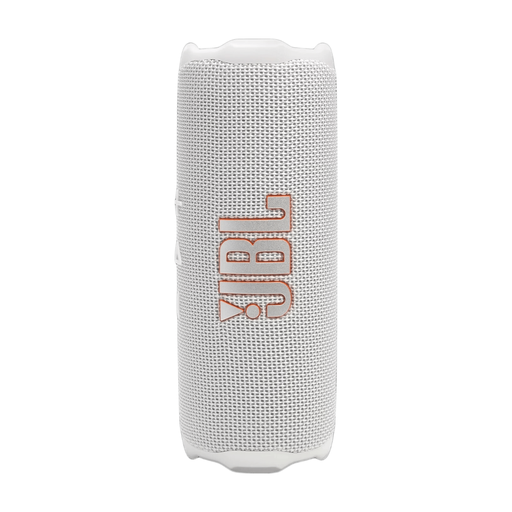
JBL Flip 7 Portable Bluetooth Speaker – White
For shared listening streamed from a compatible phone, tablet or laptop when you do not need voice requests from the speaker.
Bluetooth 5.4; Auracast multi-speaker connectivity.
View on Joybuy
 No image available
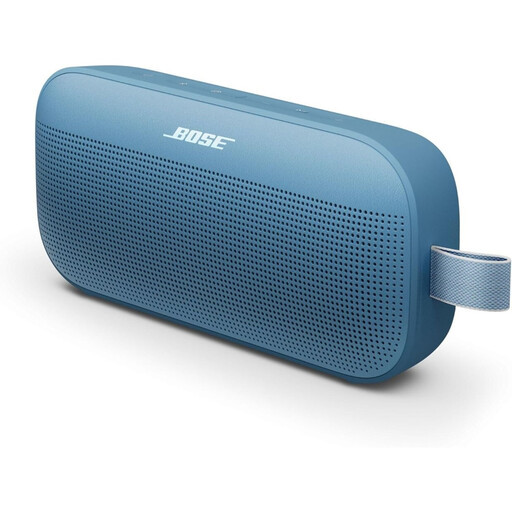
BOSE SoundLink Flex (2nd Gen) Portable Bluetooth Speaker Blue Dusk
For portable shared listening from a paired device, with app-based playback rather than voice requests from the speaker.
Bluetooth 5.3; PositionIQ detects orientation and adjusts audio output; compatible Bose speaker pairing is specified. The listing identifies iOS and Android compatibility.
View on Joybuy
Frequently asked questions
Can you keep Apple Music if you choose an Alexa device?
Yes, Apple's UK instructions support asking Alexa to play Apple Music songs and playlists. You need an Apple Music subscription and must link the service.
Does Spotify work with Echo devices?
Spotify's UK support page lists Echo, Echo Dot, Echo Spot and Echo Show among supported devices and marks its Alexa instructions as for Premium. Check that your plan meets that condition.
What setup matters when several people use HomePod?
Apple documents voice-recognition setup for each home member from their own iPhone or iPad. Decide separately whether to enable Personal Content, which adds access to features such as messages, calendars and calls.
What needs maintaining for Google's child controls?
Google says devices and apps must be up to date and each child must be a member of the home for parental controls and Digital Wellbeing to work correctly. Check the setup requirements for the specific assistant features you plan to use.
How can you reduce accidental Alexa purchases in a household with children?
Amazon UK support-forum guidance recommends disabling Voice Purchasing and describes purchase-code settings. Review the current controls in your Alexa account before relying on them.


