What matters when choosing?
Decide where you will usually listen before comparing speaker features. Then check that your music account works with the controls you prefer and that everyone sharing the flat is comfortable with the connected-device settings.
| Concern |
What to check |
Who this matters to |
| Listening area and stereo |
Consider speaker position and whether the exact model supports a compatible stereo pair. Google Nest Help specifies two speakers of the same supported model in the same room for its stereo-pair setup. |
If I listen from both the kitchen and sofa, I want folk vocals and acoustic instruments to remain clear at my normal volume. Around 42% of consumers put listening-area coverage and stereo options first. |
| Music access and controls |
Confirm your service and account plan, then check whether app or touch controls offer an alternative to voice requests. |
When I ask for a playlist while cooking, I need it to work with my existing music account and want another way to control playback. Around 33% of consumers put music access and controls first. |
| Privacy and security |
Look for a microphone-disable control you will use, review account permissions and find the manufacturer's stated minimum security-update period. |
Sharing a flat makes me want clear microphone controls and security-update information before connecting another device. Around 25% of consumers put privacy and security first. |
Relevant speaker brands
These ranges offer different routes into music playback and voice control. Check the exact model and setup requirements rather than assuming that a feature applies to every speaker from a brand.
Sonos
Sonos offers an app-based Wi-Fi speaker system for music playback and possible multi-room expansion.
- Sonos lists Wi-Fi, Bluetooth, AirPlay 2 and Trueplay room tuning for Era 100, along with touch controls.
- An analogue source needs the separate Sonos Line-In Adapter, and Sonos says its speakers must first be set up over Wi-Fi in the Sonos app.
Apple
HomePod speakers are an AirPlay and Siri route for households with compatible Apple mobile hardware.
- Apple lists AirPlay 2, multi-room audio and stereo-pair capability for HomePod mini; its larger HomePod has a different specified driver arrangement and room sensing.
- Apple specifies compatible iPhone or iPad hardware and Wi-Fi internet access. Do not assume the two HomePod sizes have equivalent audio hardware.
Amazon Echo
Echo speakers are an Alexa-led option for households that want spoken music requests and compatible smart-home functions.
- Amazon lists Amazon Music, Apple Music and Spotify support for Echo Dot Max, a microphone enable/disable button and pairing with a second Echo Dot Max.
- Check pairing against the exact Echo generation and your existing devices; Amazon's descriptions of room-adaptive sound are not a measurement of performance in your flat.
Google Home
Google Home speakers are relevant if you want playback grouped with compatible speakers and Google Cast-enabled devices.
- Google describes grouping with compatible Nest speakers, displays and Cast-enabled devices.
- For stereo rather than general grouping, Google Nest Help specifies two speakers of the same supported model in the same room.
Joybuy music-speaker options
These tabletop speakers are options to consider for music playback in the open-plan space. Check the exact connectivity and controls you need before treating either as a voice-assistant speaker or planning a stereo setup.
 No image available
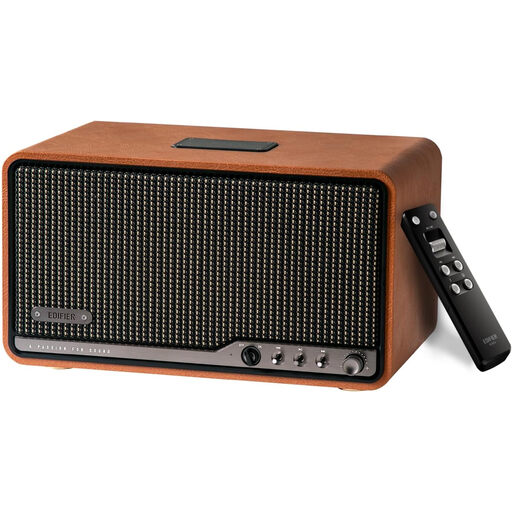
Edifier S300 wireless multi-room tabletop speaker, brown
Consider this tabletop model if multi-room music playback interests you. Before planning a stereo pair, confirm the exact unit's Wi-Fi, AirPlay 2 and same-model pairing capabilities; also check voice-assistant and microphone controls if you need them.
View on Joybuy
 No image available
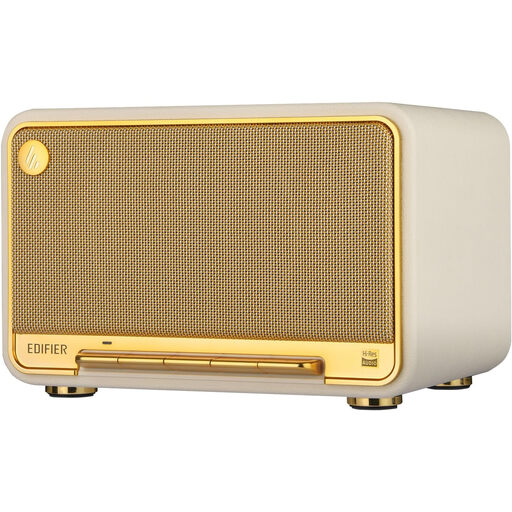
Edifier D32 tabletop wireless speaker
Consider the D32 if you want app-controlled music playback and wired-source options. Its listed features include Bluetooth 5.3, AirPlay 2, USB-C and AUX inputs, and 60W (RMS); multi-room playback alone does not establish stereo-pair support. Check your music service, voice-assistant needs and microphone-control requirements separately.
View on Joybuy
Questions before you buy
Will one smart speaker be enough for an open-plan flat?
One speaker can be a starting point if you can position it near your main listening area, but no model-independent room-size threshold settles the choice for every flat. If left-right separation matters, check whether you can place two compatible speakers where you listen; Google Nest Help specifies matching supported models in the same room for its stereo-pair setup.
Can I play my existing folk playlists and albums?
Check your exact streaming service and account plan against the speaker before buying. Sonos documents support for Spotify Free and Premium, while Amazon lists Amazon Music, Apple Music and Spotify for Echo Dot Max; the controls and features available to you may depend on your account and device.
What do I need to set up Sonos Era 100 or HomePod mini?
Sonos says its speakers must first be set up over Wi-Fi using the Sonos app. For HomePod mini, check that you have the compatible Apple mobile hardware and Wi-Fi internet access specified by Apple before choosing that route.
What security-update information should I check?
For a consumer smart device sold in the UK, identify the manufacturer's stated minimum period for important security updates. The National Cyber Security Centre describes this as part of the UK's smart-device security requirements; it is distinct from a promise that any particular model will receive updates indefinitely.
How can I assess privacy in a shared flat?
Review what the speaker and companion app collect, check sharing permissions during setup and decide whether a physical microphone-off control matters to your household. The Information Commissioner's Office identifies a physical switch that stops voice-data collection as a privacy feature consumers may wish to consider.


