Choose a smart speaker when the household wants hands-free audio, alarms and simple routines without a screen. A smart display makes more sense when visible information or video calls justify managing a camera as well; if people prefer to control playback themselves, a phone-controlled speaker or an existing phone or tablet may be simpler. Before choosing a voice device, check each person’s music accounts, personal-request settings and microphone controls.
Who each setup suits
Hands-free shared-space listeners
For households that want anyone in a common room to start radio or music, set a timer or ask for a podcast without taking control of someone else’s phone. Ofcom’s 2025 UK listening research identifies smart speakers as the most widely used voice-assistant device for radio requests.
Multi-account households
For people who want separate playlists, music libraries or personal requests on a shared device. Google and Apple describe voice-recognition options for supported devices, but each person’s account and settings need attention.
Privacy-conscious common-room buyers
For households that want to decide when a microphone is active, whether personal information can be requested aloud and, if considering a display, how its camera is covered or switched off. The Information Commissioner’s Office advises considering physical controls on connected products.
What matters when choosing
Start with how people want to control shared listening: by voice on a smart speaker, by voice and screen on a smart display, or manually through a phone-controlled speaker or an existing device. Treat household accounts as a separate setup decision, not another type of speaker.
| Concern |
What to check |
Who this matters to |
| Hands-free radio and audio |
Check voice access to the household’s named stations and music or podcast services on the exact device. Keep a manual way to select a stream. |
If I want anyone in the room to start our usual station without borrowing a phone, getting the right audio by voice comes first. Around 31% of consumers would make hands-free shared audio their primary concern. |
| Individual accounts |
Check whether each person can link their service and set up voice recognition on the chosen device; decide which personal requests to enable. |
When our playlists and reminders belong to different people, I do not want one account to answer for everyone. Separate results would come first for roughly 25% of consumers. |
| Microphone and camera control |
Check the exact model’s physical mute control and, for a display, its camera cover and camera-off control. |
In a room shared with visitors, I want a clear way to turn off voice access and manage any camera. Privacy controls would be the deciding need for around 25% of consumers. |
| Screen or simpler setup |
Decide whether visible timers, information or video calls will be useful in that room; otherwise compare screenless and phone-controlled options. |
If we only need sound, I would rather keep control simple; if we regularly need to see timers or make video calls, a display has a purpose. Roughly 19% of consumers would put that choice first. |
Common buying pitfalls
-
Assuming every spoken station name starts the right stream
Voice control does not remove the need to check favourite stations. In its 2025 UK listening research, Ofcom reported that three in five smart-speaker users said their device had played the wrong thing when asked for a particular radio station.
Try the station names and intended radio service on the platform you are considering, and keep app or touch control available.
-
Choosing hardware before checking everyone’s services
A music app working on a phone does not establish that each person can use the same service and personal library by voice on a shared speaker. Amazon, Google and Apple describe different service-linking and account conditions.
List the services and accounts household members use, then check voice support and linking requirements for the exact device.
-
Enabling personal requests without household agreement
Personalisation can make calendars, reminders or other private content relevant to requests made in a common room. Apple’s HomePod setup, for example, distinguishes personalised music from optional personal requests.
Agree which functions each member wants before enabling them, and revisit access when the household changes.
-
Buying a camera-equipped display for audio alone
A screen can show information and support video calls, but its camera adds a control decision that a screenless speaker does not have.
If the room needs a display, check the exact model’s camera cover and mic/camera-off controls. Otherwise, compare a screenless speaker or phone-controlled setup.
Relevant brands to consider
Amazon Echo / Alexa
A voice-first speaker and display range for shared audio and compatible routines.
- Amazon lists Amazon Music, Apple Music, Spotify and Deezer among services that can be linked to Echo, with access and features depending on the service.
- Amazon says the microphone-off button on supported Echo devices stops Alexa responding to voice requests until the microphones are switched back on. Check camera controls separately when considering an Echo Show.
Google Nest / Google Home
A Google-account-based speaker and display route for households considering separate music defaults on shared devices.
- Google says Voice Match can provide individual default music services and personalised libraries on supported shared devices.
- Each person needs a Google Account and device setup; Google says a user can link only one account for each streaming service.
Apple HomePod
A Siri and Apple Home route for households using iPhone or iPad and considering voice-recognised music.
- Apple says HomePod can recognise multiple voices for personalised music after the required household setup.
- Not every music service supports Siri playback. Personal requests need individual setup and a household decision about access to private content.
Sonos
An app-led, multi-room audio route with optional voice features on supported products.
- Sonos says its Voice Control can request music and group or ungroup rooms on supported products.
- Sonos lists its Voice Control languages as US English and French, so do not assume UK-English voice control. Check the assistant available on the exact speaker.
Joybuy products for phone-controlled audio
This option suits a household that is happy to choose shared audio on a phone rather than relying on a speaker for voice-operated routines.
 No image available
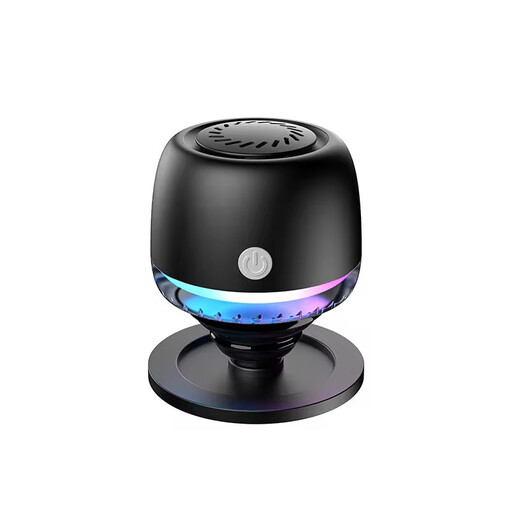
Verbex M99 Black Bluetooth Speaker with Phone Stand
For shared listening controlled from a phone, this Bluetooth speaker provides a place to hold the phone. Check access to your intended radio and podcast services on that phone, and choose a separate route if voice-operated alarms or reminders are essential.
Joybuy
Frequently asked questions
Will a smart speaker play every radio station I ask for?
Do not count on every spoken request selecting the intended station. In its 2025 UK listening research, Ofcom reported that three in five smart-speaker users said their device had played the wrong thing when asked for a particular station. Check your named stations on the relevant platform and keep a manual selection option.
Can different people use their own music accounts on one device?
Supported shared devices can offer individual music settings, but each person must complete the applicable setup. Google describes separate music defaults through Voice Match, while Apple describes personalised HomePod music through voice recognition; check your services and decide separately whether to enable personal requests.
How can we turn off voice access in a shared room?
Check the exact device’s microphone control before buying. Amazon says the microphone-off button on supported Echo devices disconnects their microphones, which also prevents hands-free Alexa requests until they are turned back on. Apple provides settings to turn off Siri listening on HomePod.
When is a smart display worth choosing over a speaker?
Choose a smart display when the household will use visible information or video calls in that room, not simply because it can play audio. If the model has a camera, check how to cover and switch it off; Amazon describes a physical camera cover and mic/camera-off control on Echo Show 5.


