Who this choice affects

Listeners loyal to a particular live service

If your concerts come from one broadcaster, music service or event app, establish how that source reaches the speaker before comparing audio features. Direct voice playback, AirPlay, Cast and Bluetooth are different routes.

Open-plan listeners mindful of neighbours

You want vocals and instruments to be enjoyable across a combined living space without relying on persistently loud playback. Your normal listening volume and the speaker's position matter more than a claim about filling a room.

Listeners switching between sources

You may move between Wi-Fi services, audio from a phone and a wired device. Check which connections the particular speaker offers and whether using one requires an adapter or initial app setup.

What matters when choosing

Start with the exact live source, then consider listening at a volume that works in your flat; connection fallbacks and future expansion matter according to how you plan to use the speaker.

ConcernWhat to checkWho this matters to
Live-source compatibility Check your exact concert app or station against the speaker's supported playback routes. Confirm any account linking or subscription requirement. If my usual concert service cannot reach the speaker, its sound features will not solve the problem. Around 36% of consumers put service compatibility first.
Sound at a considerate volume Assess vocal clarity and bass at your normal listening level, with a practical position away from shared walls where possible. I want to enjoy a concert across my living space without turning it up simply to make it feel bigger. For around 29% of consumers, controlled listening is the primary concern.
Connection flexibility Identify whether the stream starts on a phone, computer or wired source; check for AirPlay, Cast, Bluetooth or a suitable input and any required adapter. My live events come from different apps or devices, so I need another way to play them when direct integration is unavailable. That flexibility comes first for around 21% of consumers.
Stereo or multi-room expansion Check the exact model's pairing rules, where a second speaker would go and whether your intended service works with the planned setup. I may add a speaker later for a wider stereo presentation or playback elsewhere at home. Around 14% of consumers make that expansion their main priority.

Buying pitfalls

  • Choosing sound features before checking the stream

    A service available through one voice assistant may need AirPlay, Cast or playback from another device on a different speaker. Amazon notes that Alexa service availability varies by country and that some services need account linking.

    Write down the concert app and the device you use to start it, then confirm the complete playback route before choosing an ecosystem.

  • Expecting every live stream to use spatial audio

    Amazon and Sonos describe spatial-audio features for Echo Studio and Era 300, but a live stream needs compatible content to use them. Sonos also says Era 300 placement matters.

    Check whether the events you actually listen to offer compatible audio; do not use a spatial-audio label as a substitute for that check.

  • Planning wired playback or stereo without the full setup

    Sonos Era line-in uses an adapter. Stereo pairing has model-specific rules: Google specifies two eligible identical speakers in the same room for Nest Audio, while Sonos pairs speakers of the same model.

    Check the adapter, second speaker, power locations and placement your intended arrangement requires.

    A wired Sonos source requires a suitable adapter, and a stereo arrangement requires a second compatible speaker.

  • Treating an open-plan room as a reason to turn up the volume

    Sound can travel beyond a flat even when a louder setting makes music more involving inside it. Wandsworth Borough Council identifies music played too loudly, for too long or too late as a domestic-noise concern.

    Judge the setup at the level you expect to use regularly, consider its position relative to neighbours and follow your building or tenancy requirements.

Brands to consider

Sonos

The Era 100 and Era 300 are options when concerts may come from Wi-Fi services, Bluetooth devices or an occasional wired source.

  • Sonos documents Wi-Fi and Bluetooth playback, adapter-based line-in and same-model stereo pairing for the relevant Era setup.
  • Era speakers need Wi-Fi setup before Bluetooth use, and line-in requires an adapter. Sonos's spatial-audio descriptions for Era 300 depend on suitable content and placement.

Amazon Echo

An Alexa-led option if your concert service or live-radio source is available through the UK Alexa setup you intend to use.

  • Amazon identifies supported music services and live-radio options; Echo Studio offers Dolby Atmos and spatial-audio features described by Amazon.
  • Check your service in the Alexa app: country availability, account linking and subscriptions can affect playback. A spatial-audio feature does not establish how a particular live event will sound.

Apple

HomePod (2nd generation) is relevant to households starting playback through Apple Music, AirPlay or a compatible service.

  • Apple lists room sensing, stereo-pair capability and multi-room AirPlay. Available Apple Music lossless tracks can play under Apple's subscription, software and settings conditions.
  • Confirm the route for a non-Apple concert provider; Apple Music lossless support does not make every live stream lossless.

Google Nest

Nest Audio is a route to consider when your live source can be cast from a compatible app and you use Google Home.

  • Google lists Wi-Fi and Bluetooth for Nest Audio, stereo pairing for two eligible identical speakers in the same room, and speaker groups across compatible devices.
  • Check that your concert app supports the playback route you need. Those features do not establish how Nest Audio will sound in your particular flat.

Joybuy product choices

This tabletop wireless speaker is worth considering if your concert stream can reach it through AirPlay 2, Bluetooth or a wired connection. If voice-assistant control is essential, confirm that separately before choosing it.
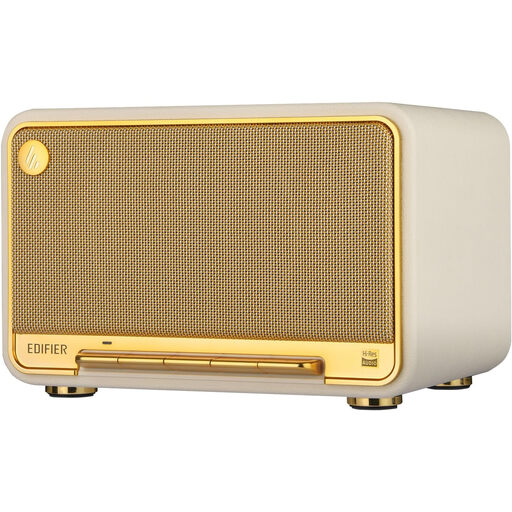
Edifier D32 tabletop wireless speaker

Edifier D32 Tabletop Wireless Speaker

Consider it for live audio played from a compatible device via AirPlay 2, Bluetooth 5.3 or AUX; check that your particular concert app can use the route you intend.

The product listing specifies a 2.1 acoustic design, 60W RMS and up to 11 hours of playtime. Those figures do not establish how it will sound at a considerate volume in your flat.

Check its voice-control capability if you need a voice assistant rather than playback from another device.

View on Joybuy

Frequently asked questions

Will any smart speaker play a live concert stream from my phone?

No: the stream needs a playback route that both your device or app and the speaker support. HomePod can receive AirPlay from compatible Apple devices, while Sonos Era speakers offer Bluetooth after Wi-Fi setup and adapter-based line-in; check the specific app's casting, account and playback restrictions before buying.

Do I need two speakers for live concerts in an open-plan flat?

No; one speaker is a simpler starting point, particularly when placement and neighbour impact matter. Consider a second for a wider stereo presentation only if you can place and power a compatible pair: Google requires eligible identical speakers in the same room for Nest Audio stereo, and Sonos specifies same-model pairing.

Can a Sonos Era speaker play a wired concert source?

Yes, if the source has a suitable audio output and you use the relevant Sonos adapter. Sonos documents its Line-In Adapter or Combo Adapter for Era 100's USB-C port and an auxiliary connection through its Line-In Adapter for Era 300.

Will Apple Music Lossless improve every live stream on HomePod?

No. Apple says HomePod can play available Apple Music lossless tracks with an Apple Music subscription, current software and the Lossless Audio setting enabled. That does not establish the format of a broadcaster's feed or a third-party concert stream.

How should I judge listening volume in a flat?

Assess the speaker at the volume you expect to use regularly, not only at a louder demonstration level. Consider placement and any building or tenancy requirements; Wandsworth Borough Council highlights music played too loudly, too long or too late as a domestic-noise concern.