For unobtrusive music in one open-plan living area, start by choosing a speaker you can place sensibly where you listen; consider a matched pair if left/right stereo separation at the seating area matters to you. Choose connections and an assistant that fit the devices your household already uses, then check Wi-Fi setup, music-service compatibility and microphone controls before buying.
Who this suits
Open-plan background-music listeners
You want music across a combined kitchen, living and dining space without making volume the main priority. Think about where the speaker can sit and whether you would value a matching second speaker at your usual listening position.
Multi-device households
Several people may start music from their own phones, while occasional Bluetooth use or playback in another room may matter later. Check how each connection works before choosing the first speaker.
Voice-assistant households
If your household already uses Apple Home, Alexa or Google Home, check the setup device, music service and microphone controls as well as the speaker’s audio features.
What matters when choosing
Decide where you want to hear the music first, then check how household devices will connect and whether the speaker fits your existing voice-assistant setup.
| Concern | What to check | Who this matters to |
|---|
| Playback across the main area |
Check the intended position and the maker’s placement guidance. Apple specifies room sensing and automatic bass correction for HomePod (2nd generation). |
I want quiet music to reach the shared living space without relying on a higher volume. Around 40% of consumers would put coverage of the main area first. |
| Connections and expansion |
Check Wi-Fi and Bluetooth setup, any wired-source adapter, and the exact model needed for a future stereo pair. |
Different household members may want to play music from their phones, or I may add another speaker later; around 30% of consumers would prioritise playback flexibility. |
| Device ecosystem |
Confirm the required setup device, supported music services and preferred assistant. Apple requires an iPhone or iPad to set up HomePod. |
If I already use one phone and smart-home platform, I want the speaker to work within that routine. Around 20% of consumers would make ecosystem fit their primary concern. |
| Microphone control |
Check the exact model’s physical microphone control and what happens to voice operation when it is off. |
In a shared room, I want everyone to be comfortable with the voice controls; around 10% of consumers would put microphone control first. |
Mistakes to avoid
-
Assuming any two speakers make a stereo pair
Apple’s HomePod and Google’s listed speaker-pair setups require two speakers of the same model in the same room. Grouped playback should not be mistaken for a left/right stereo pair.
If you may add a second speaker, note the first speaker’s exact model and generation and check the pairing requirements before buying it.
-
Buying for Bluetooth without checking initial setup
Sonos says Era 100 must be set up and connected to Wi-Fi before switching to Bluetooth mode. Bluetooth use later does not remove that initial requirement.
Check the setup device and Wi-Fi connection available where you intend to install the speaker.
-
Expecting an analogue source to plug straight in
Connecting an analogue source to Sonos Era 100 uses the Sonos Line-In Adapter rather than a direct connection to its USB-C port.
Check the adapter, cable and source requirements for your particular turntable or other wired device before ordering.
-
Leaving voice privacy out of a shared-room decision
A speaker in the main living area affects everyone using that space. Amazon says the microphone-off button on Echo devices electronically disconnects the microphones.
Discuss voice use with household members and check the physical control on the exact speaker you are considering.
Brands to consider
Sonos
The Era 100 is worth considering when several people need Wi-Fi playback, occasional Bluetooth use or a connection for an analogue source.
- Sonos lists Wi-Fi and Bluetooth playback for Era 100, with line-in available through its Line-In Adapter.
- Era 100 needs Wi-Fi setup before Bluetooth use; an analogue source needs the relevant adapter.
Apple
HomePod (2nd generation) fits households considering Apple’s room sensing, AirPlay multi-room playback and a possible stereo pair.
- Apple specifies room sensing, automatic bass correction and AirPlay multi-room audio for this model.
- Setup requires an iPhone or iPad; a stereo pair needs two HomePods of the same model in the same room.
Amazon Echo
Echo Studio (2025 release) is an Alexa route for households already using Amazon’s voice platform.
- Amazon describes spatial sound with Dolby Atmos on its Echo Studio listing; Amazon also says Echo devices have a physical microphone-off control.
- Check the music services and Alexa features your household uses rather than treating Amazon’s sound description as a comparison with other speakers.
Google Nest
Nest Audio is a model to consider if your household uses Google Home and may want a stereo pair.
- Google lists Nest Audio among speakers eligible for stereo pairing.
- Google requires both speakers in a stereo pair to be the same model and in the same room; check the exact model you intend to buy.
Joybuy speaker for flexible music playback
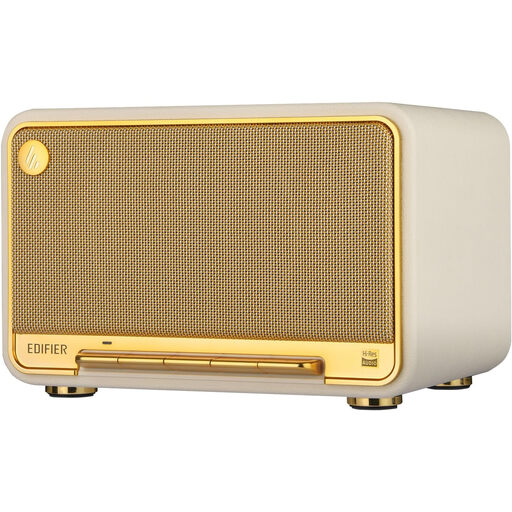
The Edifier D32 offers several ways to play music in a shared living space. If voice-assistant operation is essential to your smart-speaker choice, check that requirement separately.
 No image available
Edifier D32 tabletop wireless speaker
Consider the D32 if your household wants to switch between wireless and wired music sources in the main living area.
- Bluetooth 5.3, Wi-Fi, AirPlay 2, USB-C and AUX inputs.
- 60W (RMS) and a 2.1 acoustic architecture; these specifications do not establish how evenly it will sound in your room.
- Listed playback time of up to 11 hours per charge. Check whether its playback and charging arrangements suit your intended use.
- Check voice-assistant support and compatible music services if either is important to your household.
Joybuy
Common questions
Do I need two speakers for ambient music in an open-plan flat?
Not necessarily: start with one speaker if your priority is background music in the main area, and consider two if left/right stereo separation at your seating position matters. Apple and Google specify same-model requirements for their listed stereo-pair setups, so check the pairing rules before planning a second purchase.
Can I set up a HomePod without an iPhone or iPad?
No. Apple says HomePod setup requires an iPhone or iPad connected to the intended Wi-Fi network; a Mac cannot complete that setup.
Can Sonos Era 100 be used with Bluetooth only?
Bluetooth can be used after initial setup, but Sonos says Era 100 first needs to be set up and connected to Wi-Fi. Make sure that connection is available even if you expect to use Bluetooth most often.
Where should I place a HomePod in the open-plan room?
Apple advises placing HomePod on a solid surface with at least 15 cm of space around it. Check that your proposed shelf or cabinet allows that clearance before choosing it as the speaker’s position.
Can I turn off an Echo speaker’s microphones?
Yes. Amazon says Echo devices have a microphone-off button that electronically disconnects the microphones; hands-free Alexa requests will not work while they are off.


