For quiet orchestral listening, choose around your usual playback volume and music-service setup rather than treating a sound claim or spatial-audio label as proof of how a speaker will perform. If left-to-right placement matters to you, consider two speakers that are documented to form a stereo pair; if you want one compact unit, listen to familiar recordings at your normal volume before committing.
Who is this for?
Quiet-evening orchestral listeners
If strings, woodwinds and quieter passages matter more to you than maximum loudness, assess tonal balance and instrumental detail at the level you actually use. Stereo presentation and placement are worth considering, but feature claims cannot tell you how your recordings will sound.
Ecosystem-committed streamers
If your music and household controls already run through Apple, Alexa or Google Home, check how a speaker receives music and how you will control it. An appealing audio feature is less useful if your usual devices or services do not fit the setup.
Listeners planning a stereo setup
If you intend to add a second speaker, confirm that the exact models and release generations can form a stereo pair. Two similarly named speakers are not necessarily compatible.
What matters when buying?
Start with the orchestral passages you want to hear at your normal volume, then check playback compatibility, room placement and whether you might add a second speaker.
| Concern |
What to check |
Who this matters to |
| Clarity at low volume |
Listen to familiar orchestral passages at your usual level; assess balance and instrumental separation in a suitable position. |
I want to follow quieter instruments without turning the music up. Around 36% of consumers put low-volume clarity first. |
| Playback compatibility |
Confirm the setup device, music-service route and everyday controls for the model you choose. |
My music should play easily from the devices and services I already use; around 29% of consumers make that fit their primary concern. |
| Stereo and placement |
Check exact stereo-pair compatibility and whether the maker's placement guidance fits your room. |
I may add a second speaker to position left and right channels separately. For around 21% of consumers, that expansion path comes first. |
| Privacy and setup |
Review microphone controls, account permissions and stated security-update support. |
I want to understand the connected speaker's controls before placing it in a shared or private room; around 14% of consumers prioritise this need. |
Common buying mistakes
-
Taking an any-volume sound claim as a listening test
A manufacturer's description of separation or tuning does not establish how a particular orchestral recording will sound at your evening listening level.
Where possible, try familiar passages at that level and listen for instrumental detail, tonal balance and changes in volume, not just bass or maximum loudness.
-
Assuming similarly named speakers will form a stereo pair
Amazon's compatibility guidance lists separate stereo-pair paths for the 2019 and 2025 releases of Echo Studio.
Check the exact model and release generation against the maker's pairing guidance before ordering a second unit.
A mismatched second speaker could mean arranging a return or replacement.
-
Overlooking the connection for an existing music source
Sonos says an Era 100 needs its separate Line-In Adapter for an analogue connection; a cable alone does not provide that input.
List the sources you intend to use, then confirm the chosen speaker's inputs, required accessories and setup steps.
-
Skipping privacy settings during setup
A connected speaker can collect personal information. The Information Commissioner's Office advises checking data collection, sharing, permissions and security-update support.
Before buying, check the maker's privacy information and microphone controls; review account permissions when setting the speaker up.
Relevant brands to consider
Sonos
Consider its Wi-Fi speaker range if app-based playback and room adjustment fit your listening setup.
- According to Sonos, Trueplay analyses room acoustics to adjust EQ. Sonos also offers the Era 100 SL without built-in voice control.
- Era 100 setup uses Wi-Fi and the Sonos app, and analogue line-in requires a separate adapter. Sonos's sound claims do not establish quiet orchestral performance in your room.
Apple
HomePod (2nd generation) is an Apple-focused option for households using compatible devices and AirPlay.
- Apple specifies room sensing, automatic bass correction and stereo-pair capability for HomePod (2nd generation).
- Setup requires a compatible current iPhone or iPad and Wi-Fi; check that your preferred music playback route fits.
Amazon Echo
Echo Studio is an Alexa-centred option if voice control and a possible matched pair matter to you.
- Amazon documents Echo Studio stereo pairs within matching release generations.
- Check whether a second unit matches the exact release generation; pairing support does not establish how orchestral music sounds at low volume.
Google Nest
Nest Audio is relevant when Google Home control and network playback are your starting points.
- Google lists Wi-Fi, Bluetooth, a 2-inch driver and dual passive radiators for Nest Audio.
- Those hardware specifications alone cannot tell you whether its presentation of quiet orchestral passages suits your preferences.
Joybuy speakers for quiet listening
This tabletop wireless speaker is a multi-room option to consider for the listening scenario. Check how it works with your music sources and assess familiar orchestral recordings at your usual volume.
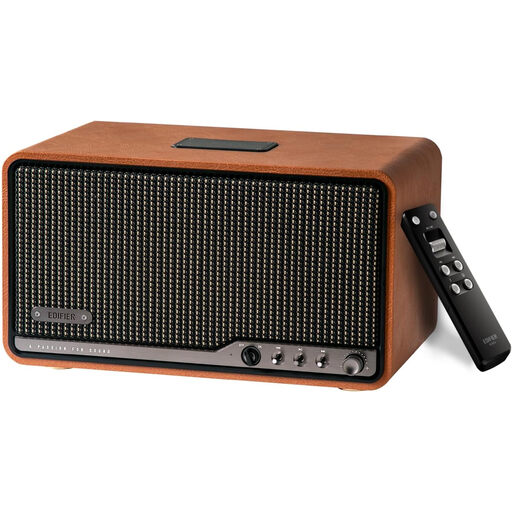 Image unavailable
Edifier S300 wireless multi-room tabletop speaker, brown
Consider this model if a wireless tabletop speaker suits where you listen and you want multi-room playback.
Check your preferred source and setup requirements before buying. If you plan to add a second speaker, confirm the exact pairing procedure; listen at your usual volume to judge orchestral balance.
View on Joybuy
Frequently asked questions
Should I use two speakers for orchestral music?
A supported stereo pair gives you separate positions for left and right channels, which may matter if you want a wider orchestral presentation. Check the precise models before buying two: Apple lists HomePod (2nd generation) as stereo-pair capable, while Amazon lists Echo Studio pairings within matching release generations.
Can I control a smart speaker without speaking to it?
Yes, some models offer touch or app controls, but setup requirements still vary. Sonos Era 100 offers touch and app controls and requires Wi-Fi and the Sonos app for setup; HomePod has touch controls but requires compatible Apple hardware and Wi-Fi.
What privacy features should I check before buying?
Check what information the speaker collects and shares, its permissions, microphone controls and the maker's stated security-update support. The Information Commissioner's Office identifies a physical switch that stops voice-data gathering as a feature some consumers may want; check whether the particular model provides it.
What should I do with an old speaker when replacing it?
Check the retailer's electrical-waste take-back arrangements before disposing of the old speaker. GOV.UK says retailers must offer take-back of electrical waste of the same type as an item a customer buys; confirm the applicable handover or collection arrangements with your retailer.


