Choose a matched stereo pair if hearing the left-right placement of the instruments is your priority and you have room for two compatible speakers. One speaker is simpler to place, but check your music service, setup devices and any connection needed for a CD player or other external source before choosing either arrangement.
Who each setup suits
Listeners focused on stereo placement
If the positions of the two violins, viola and cello matter to you, plan for two compatible speakers with space between them. Google and Apple both document same-model requirements for their respective stereo pairs.
Listeners with limited room for speakers
One speaker keeps the physical setup straightforward when you mainly want convenient access to recordings in one room. Check its setup requirements and music-service support rather than assuming every smart speaker works with your existing devices.
Listeners using several music sources
If you alternate streaming with a CD player or a turntable preamp, check for a suitable input and any required adaptor. Sonos documents an external-source route for Era 300, subject to its line-in conditions.
What matters when choosing
Decide whether separated left and right speakers matter more to your listening than a compact setup. Then check how your recordings will reach the speakers.
Matched stereo pair
Choose it when: Left-right placement in stereo quartet recordings is a priority and you can position two compatible speakers in the same room.
Allow for: Two units, two power connections and deliberate placement; pairing alone does not determine how a recording will sound in your room.
Single smart speaker
Choose it when: Space and a straightforward one-speaker setup matter more than physically separated left and right playback positions.
Allow for: One cabinet cannot put separate speakers on opposite sides of the room. Spatial-audio features also depend on the service and recording format.
| Concern |
What to check |
Who this matters to |
| Stereo placement |
Check same-model pairing rules and measure the intended speaker positions. Google advises placing its paired speakers approximately 1.2–2.4 metres apart on solid, level surfaces. |
If I want to follow the instruments across a stereo recording, I need room for distinct left and right speakers. Roughly 33% of consumers put stereo placement first. |
| Services and devices |
Confirm that your music service and setup device work with the exact speaker. Apple specifies a compatible Apple device and Wi-Fi for HomePod setup. |
My recordings need to play conveniently from the devices and subscription I already use. For around 27% of consumers, that compatibility is the primary concern. |
| External sources |
If you use a CD player or turntable preamp, confirm a suitable line-level connection and any adaptor. Sonos says Era 300 line-in requires its Line-In Adapter. |
I want to keep playing physical recordings alongside streaming without choosing a connection that will not suit my source. About 20% of consumers make source flexibility their first priority. |
| Simple placement |
Check where a single speaker and its power connection will sit, and whether its setup method suits your household. |
I have space for one speaker and would rather keep the arrangement straightforward than plan a pair. Roughly 20% of consumers prioritise that simplicity. |
Mistakes to avoid
-
Assuming one cabinet replaces a placed stereo pair
A single speaker and two speakers positioned apart are different arrangements when you want to hear the left-right layout of a quartet recording.
If stereo placement is central to your choice, check pairing rules for the exact models and measure where both speakers would go.
-
Expecting spatial audio from every recording
A speaker’s Dolby Atmos or spatial-audio capability does not mean your preferred quartet recording is available in that format.
Check the particular recording and service. Assess stereo-pair support separately if you mainly listen to stereo releases.
-
Overlooking the connection for a physical source
Sonos Era 300 needs the Sonos Line-In Adapter for an external line-level source. Sonos also says line-in is unavailable when the speaker is used as a home-theatre surround speaker.
Check your source’s output, the adaptor and the role the speaker will have in your system before ordering.
-
Choosing a voice assistant without checking setup and controls
A voice-controlled speaker still needs to fit your devices, network and preferences for microphone and account controls.
Check the exact model’s setup requirements, supported music services and available privacy controls before choosing an ecosystem.
Brands to consider
Sonos
Sonos Era 300 is relevant if you want Wi-Fi playback with an option to connect an external line-level source.
- Sonos documents Bluetooth, line-in and stereo-pair support for Era 300.
- Initial setup uses the Sonos app and Wi-Fi; line-in needs an adaptor and is unavailable when Era 300 serves as a home-theatre surround speaker.
Apple
HomePod (2nd generation) is worth considering if your listening already centres on compatible Apple devices and AirPlay.
- Apple lists AirPlay, Spatial Audio with Dolby Atmos and stereo-pair capability for this model.
- Setup requires a compatible Apple device and Wi-Fi, while a stereo pair requires two HomePods of the same model.
Google
Google’s supported smart speakers are relevant if you use the Google Home app and want to plan a matched pair.
- Google documents stereo pairing for named models, including Nest Audio.
- The two speakers must be the same model and in the same room; check pairing support for the precise model you intend to buy.
Amazon Echo
Echo Studio is relevant to households already using Alexa and the music services listed for the model they are considering.
- Amazon lists Amazon Music, Apple Music, Spotify and Deezer among Echo Studio’s supported services.
- The available format depends on the service and recording. Check the exact Echo Studio generation rather than treating different listings as identical.
Joybuy product choices
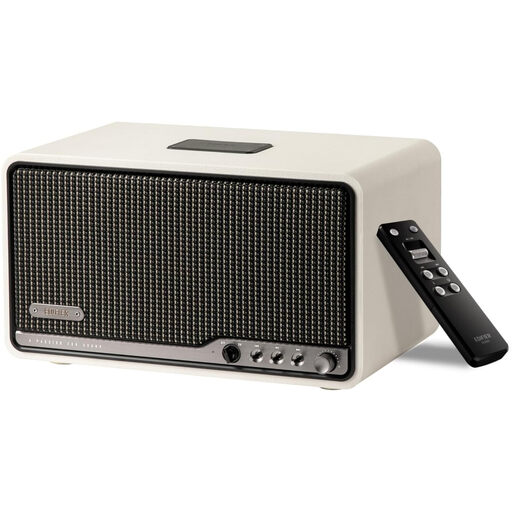
This EDIFIER tabletop speaker is a choice to examine if you are planning a fixed-room setup and may want a matched pair. The listing is for one speaker; confirm pairing compatibility before planning a two-speaker arrangement.
 No image available
EDIFIER S300 Wireless Multi-Room Tabletop Speaker, Ivory
A tabletop option for listening in a fixed room. The S300 is listed as a wireless multi-room speaker in Ivory; if separate left and right speakers matter to you, confirm pairing support for the exact model before obtaining a second compatible unit.
Check the intended source connection and power arrangement for your setup, particularly if you need voice control or expect to move the speaker between rooms.
View on Joybuy
Questions about listening and setup
Do I need two speakers for string quartet recordings?
No: one speaker can suit a compact, straightforward setup. Choose a matched pair when separate left and right playback positions are more important to you; Google requires the same model in the same room for its supported pairs, and Apple requires two HomePods of the same model.
Can I connect a CD player or turntable to Sonos Era 300?
Yes, if the source provides a suitable line-level output and you use the Sonos Line-In Adapter. A turntable may need a preamp, and Sonos says Era 300 line-in is unavailable when the speaker is configured as a home-theatre surround speaker.
Can I use Bluetooth on Sonos Era 300 before setting up Wi-Fi?
No. Sonos says Era 300 must first be set up through the Sonos app on Wi-Fi before it can connect to a Bluetooth device.
What privacy controls should I check on a voice-controlled speaker?
Check the exact model’s microphone control, account settings and options for managing voice history before buying. The Information Commissioner’s Office includes smart speakers in its guidance on connected products, but the controls available to you differ between devices and ecosystems.


