Buying priorities
Screen-free smart speaker
Choose it when: Your main tasks are voice-led timers, alarms, reminders, music, radio and compatible-device control.
Consider: It is less useful for at-a-glance calendars, recipes or touch controls, and ecosystem fit still matters.
Smart display
Choose it when: Calendars, recipes, media, touch controls or supported video calls are part of your regular routine.
Consider: It takes more space and may add a camera or more personal information on-screen in shared areas.
Compatible connected controls
Choose it when: You have selected an ecosystem and want voice commands to control lights, plugs or heating.
Consider: Check the accessory’s platform support, any required hub or bridge, UK electrical suitability and the commands it supports.
Start with the routine you want to make easier, then check the devices, accounts and privacy controls that need to work together.
| Priority |
What to check |
Your needs |
| Hands-free routine help |
Check timer, alarm, reminder, music and radio functions, plus the voice controls available for your intended compatible devices. Consider multi-room audio only if you plan to add compatible speakers. |
I want useful help while cooking, cleaning, waking up or moving around the home, rather than another device that duplicates my phone. |
| Privacy and updates |
Look for microphone controls, listening indicators, voice-history settings, skill or service permissions and the manufacturer’s stated security-update period for the exact model. |
I want to understand when microphones are active, what requests may be retained and who can access connected-home services. |
| Compatibility and shared access |
Confirm support for your phone platform, music service, smart-home app, accessories and household profiles. Review personal-request, contact and account permissions separately for shared rooms. |
My speaker, household accounts and connected controls need to work together without unintentionally exposing calendars, messages, contacts or personal music preferences. |
Joybuy product options
Joybuy product options for adding compatible voice-controlled lighting to a home routine.
 No image available
Yeelight Ultra Slim Smart Ceiling Light YLXDD-0033, 0.98 Inch IP54 RGB Backlight
A ceiling-light option for scheduled, voice-operated household lighting routines.
Stated features include WiFi app control, Alexa and Google Assistant voice control, scheduling, smart automations, IP54 protection and a quick-mount base.
Check that the intended Alexa or Google Assistant account and commands work with your setup. Hardwiring may require a qualified electrician, and it should not be installed in direct water spray areas such as inside a shower stall.
View on Joybuy
 No image available
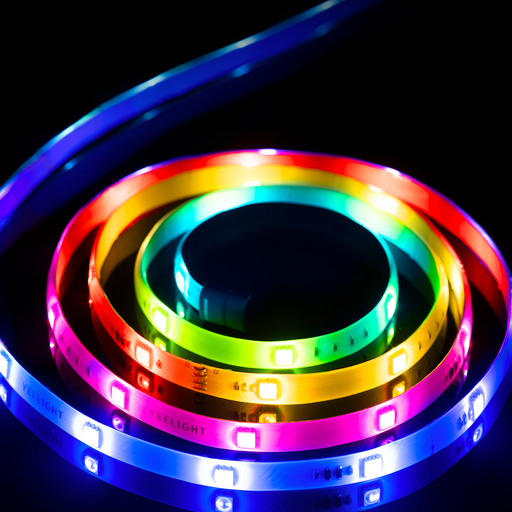
Yeelight LED Lightstrip Pro Extension 1m RGBIC
An extension option for adding voice-controlled ambient lighting to an existing compatible Yeelight Lightstrip Pro installation.
The stated specification is a 1 m RGBIC extension with app and voice control through Alexa, Google Assistant and Samsung SmartThings.
This is an extension segment and requires a compatible Lightstrip Pro base setup. Confirm the exact base model, supported extension configuration, account compatibility and intended routine commands before buying.
View on Joybuy
Frequently asked questions
Should I choose a smart speaker or a smart display for home routines?
Choose a speaker when your routine is mainly voice-first: timers, alarms, reminders, music, radio and basic questions. Choose a display when calendars, recipes, media, smart-home dashboards, touch interaction or supported video calling will be useful. A display is not automatically the better option, so check whether its screen, camera and supported services solve a regular task.
Can different people in the home receive separate personal results?
It depends on the ecosystem and household setup. Apple states that HomePod voice recognition can support up to six users invited to a shared Home app home, while Personal Requests can use information from Messages, Contacts, Calendar, Reminders and Notes. Review invitations, enabled devices and authentication requirements before enabling personal features in a shared space.
Will a compatible smart plug or light work with any smart speaker?
No. Check the exact accessory’s stated compatibility with your chosen ecosystem, as well as any Matter, Thread, hub, bridge, app-account or firmware requirements. Google lists Matter-hub and Thread-border-router capabilities for specified current speakers, rather than for every speaker or accessory.
How should I manage privacy after installation?
Use the device and app controls rather than relying only on default settings. Amazon says applicable Echo devices offer microphone-off buttons, listening indicators, voice-history review and deletion, plus settings for smart-home history and skill permissions. The Information Commissioner’s Office also advises considering privacy features and the security-update period before buying smart products.
Can a HomePod replace a telephone for hands-free calls?
Do not assume that it can. Apple states that HomePod uses an iPhone or iPad for telephone and FaceTime audio calls, and an iPhone is required for telephone calls. Check the exact product’s calling method and the availability of the required phone or account before treating a smart speaker as a communications device.


