For a defined left/right presentation of stereo string quartet recordings from a main listening seat, start with two compatible, matching speakers configured as a stereo pair. One speaker is simpler when placing two units is impractical and listening across the room matters more than a fixed stereo image. Check your devices, Wi-Fi and music-source connections before choosing either setup.
Who is this for?
Listeners focused on stereo placement
You listen from a main seat, want a defined left/right presentation for the quartet and have space for two matching speakers. Apple documents separate left and right channels for a compatible HomePod pair; Sonos also supports same-model stereo pairing.
Listeners choosing one speaker for a large room
You prefer one unit and may listen from different places in the living room. Sonos lists Trueplay tuning for Era 300, while Apple lists room sensing for HomePod (2nd generation); neither feature removes the need to judge whether one-speaker listening suits your seating.
Households choosing around existing devices
Your phone, voice-assistant setup or music source may determine which speaker is practical. Check the requirements of the exact model, particularly if you need an analogue connection or plan to add a matching speaker later.
What matters when choosing?
For quartet recordings in a large living room, decide whether your main listening seat, one-speaker convenience or compatibility with your existing devices takes priority.
| Concern |
What to check |
Who this matters to |
| Stereo placement |
Confirm same-model pairing and measure the available positions for two speakers. Sonos recommends 8–10 ft between speakers in its stereo-pair guidance. |
If I usually listen from one seat, I want a defined left/right presentation of the quartet. Roughly 50% of consumers would make stereo placement their primary concern. |
| Listening with one speaker |
Check the exact model’s room-adaptation features and whether listening from one unit suits your seating arrangement. |
When I move around the living room, placing two speakers may matter less to me than keeping the setup simple. Around 30% of consumers would put one-speaker listening first. |
| Devices and sources |
Check phone, account and Wi-Fi requirements, plus the connections needed for your music source and any required adapter. |
If my music comes from particular devices or a wired source, I need a speaker that works with them. About 20% of consumers would treat compatibility as their main concern. |
Buying pitfalls
-
Treating spatial audio as a substitute for a stereo pair
A single speaker’s spatial-audio features do not make it the same arrangement as the separate left and right channels Apple documents for a HomePod stereo pair.
If a defined image at your listening seat matters most, compare compatible two-speaker setups before choosing on spatial-audio features alone.
-
Assuming any two speakers in a family will pair
Pairing depends on the exact models: Apple and Sonos specify matching models for these stereo setups, and Amazon lists Echo Studio (2025 release) as pairable with another of the same release.
Check both complete model names before ordering the second unit.
-
Overlooking setup and source requirements
Apple specifies a compatible iPhone or iPad and Wi-Fi for HomePod setup; Amazon specifies an account, the Alexa app and Wi-Fi for Echo Studio (2025 release). Sonos’s Era 300 line-in option requires its Line-In Adapter.
List the devices and music sources you intend to use, then check them against the exact speaker’s setup and connection requirements.
-
Skipping voice-privacy controls
Amazon says the Echo Studio microphone can be disabled and voice-recording history can be reviewed or deleted.
Before placing a voice-enabled speaker in the living room, review the microphone and voice-history settings for the platform you choose.
Brands to consider
Sonos
Era 300 is relevant if you want a Sonos speaker with wireless playback, room tuning or an optional physical-source connection.
- Sonos lists Trueplay room tuning, Bluetooth and same-model stereo pairing for Era 300.
- A stereo pair needs space for two matching units; analogue line-in requires the Sonos Line-In Adapter.
Apple
HomePod (2nd generation) is relevant to households with compatible Apple devices that want Siri, AirPlay and the option of a stereo pair.
- Apple lists room sensing and says a compatible HomePod pair creates left and right channels.
- Setup requires a compatible iPhone or iPad and Wi-Fi; the two speakers in a pair must be the same generation.
Amazon
Echo Studio (2025 release) is relevant to households that already use Alexa and are considering a matching pair.
- Amazon lists pairing between two Echo Studio units of the 2025 release.
- Setup requires an Amazon account, the Alexa app and Wi-Fi credentials.
Joybuy product choices
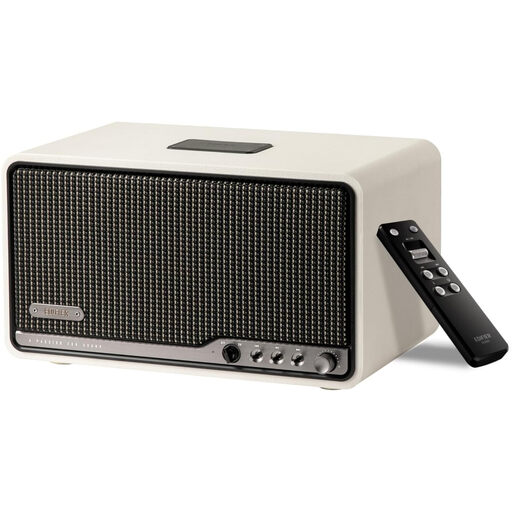
This wireless tabletop speaker is a product choice for comparing music-source connections and a possible left/right setup. Check its suitability for your living room and any voice-control requirements separately.
 No image available
EDIFIER S300 Wireless Tabletop Speaker, Ivory
For listeners considering a left/right setup, the product listing describes pairing multiple S300 speakers; check the pairing process and where two units would sit. This is a wireless tabletop model in Ivory. Confirm that its source connections, voice-control options and suitability for your listening area meet your needs.
View on Joybuy
Frequently asked questions
Do I need two speakers for string quartet recordings?
No: one speaker may suit you if a simpler setup and listening around the room matter most. If defined left/right placement from a main seat is the priority, consider two compatible matching speakers; Apple documents separate channels for a HomePod pair, and Sonos supports same-model stereo pairing.
How far apart should I place a Sonos stereo pair?
Sonos recommends 8–10 ft between paired speakers and a listening position 8–12 ft away. Use those figures as Sonos placement guidance, then check whether your room can accommodate the pair.
What do I need to set up HomePod or Echo Studio?
HomePod (2nd generation) requires a compatible iPhone or iPad and Wi-Fi, according to Apple. For Echo Studio (2025 release), Amazon specifies an Amazon account, the Alexa app and Wi-Fi credentials.
Can I connect a wired music source to Sonos Era 300?
Sonos lists a line-in option for Era 300 using its Line-In Adapter and a 3.5 mm audio cable. Check the output on your source device and the accessories needed before choosing this connection.


