Hands-free playlist hosts
If people need to start or change music from across the lounge, choose a voice ecosystem that works with the household’s existing music service and account.


Choose around how people will start and control the music: an Echo Studio suits an Alexa household seeking voice requests, a Sonos Era 100 offers several playback methods and an expansion route, and a Google Home Speaker fits an existing Google Home setup. If built-in voice control is unwanted, consider the Sonos Era 100 SL instead. Check the household’s music accounts, shared Wi-Fi access and preferred guest controls, and do not assume that one speaker will provide the sound level wanted in every lounge.
If people need to start or change music from across the lounge, choose a voice ecosystem that works with the household’s existing music service and account.
If playback methods matter now but another speaker may be added later, look for a documented stereo-pairing or multi-room route rather than choosing on single-speaker features alone.
If an onboard voice microphone is unwelcome in a shared room, consider how people will use app, touch or Bluetooth controls instead.
Start with the service that holds the dance playlists and who will control it. Then decide whether the lounge calls for another playback method, a future speaker pair or a device without built-in voice control.
Choose when: The household uses Alexa and wants hands-free music requests, with the option to pair another Echo Studio or use compatible Echo devices for multi-room playback.
Check: Music services must be linked; Spotify says its Alexa integration is for Premium users, and Amazon UK directs users to the Alexa app for available services.
Choose when: Wi-Fi, Bluetooth and control through supported music apps matter alongside a possible stereo or multi-room setup.
Check: Setup uses the Sonos app and Wi-Fi; connecting a source by line-in requires a separate adapter.
Choose when: The household already uses Google Home and wants to group compatible Nest speakers, Nest displays or Google Cast-enabled devices.
Check: For Spotify setup, confirm the correct Google and Spotify accounts and a shared Wi-Fi network.
Choose when: The lounge needs music playback but not built-in voice control on the speaker.
Accept: It cannot take built-in voice-assistant requests; Sonos says setup requires Wi-Fi and its app.
| Concern | What to check | Who this matters to |
|---|---|---|
| Playlist-service compatibility | Confirm the exact music service and account plan, then check whether the chosen model supports the voice or phone controls you intend to use. | If my dance playlists are tied to one service, I need that account to work with the controls everyone expects to use. Around 36% of consumers would put service compatibility first. |
| Lounge sound and expansion | Decide whether the aim is background or higher-energy listening; check documented stereo-pairing or multi-room options without assuming one speaker will suit the room. | I may start with one speaker, but I want a way to add another if the lounge needs it. For around 29% of consumers, sound in the shared room and expansion would be the primary concern. |
| Shared control and privacy | Choose a workable guest-control method, such as Bluetooth, a supported app or voice, and review microphone and app-permission settings. | Several people may want to change tracks, while not everyone wants a voice microphone in the room. Around 21% of consumers would put shared control and privacy first. |
| UK connection and disposal | Check the mains connection and product information on the listing; when replacing a speaker, check suitable electrical-waste collection options. | I want to know the speaker can be connected appropriately at home and what to do with the old one. For around 14% of consumers, those practical checks would come first. |
A familiar music-service name does not settle which account or voice functions will work. Spotify specifies Premium for its Alexa integration, while Amazon UK says available Alexa services depend on the country and linked account.
Check the household’s current plan and the selected speaker’s integration before ordering.
The voice-playback route you want may require a music subscription.
Amazon and Sonos document speaker-pairing and grouping options, but those features do not establish how loud one speaker will sound in your particular lounge.
Decide what listening level matters to your household, check the available expansion route and read the retailer’s return terms before relying on a single speaker.
Meeting the intended setup later may require a second speaker.
Guests may not use the same account, and a shared room can call for choices about microphone and app permissions. Spotify says devices must be on the same Wi-Fi network for their first Spotify Connect connection.
Agree on an alternative control method, such as a supported app, Bluetooth or touch controls, and try the household setup before a gathering.
A listing intended for another market calls for a careful connection check. GOV.UK advises that electrical products bearing the crossed-out wheelie-bin symbol should not go in household rubbish.
Confirm the supplied connection and product information before buying, and find an appropriate electrical-waste collection option when replacing a speaker.
An Alexa-centred route for a lounge where people want to request playlists by voice.
A music-system route for households weighing playback methods and future speaker additions.
A route for households already arranging compatible devices through Google Home.
These Edifier speakers offer ways to play music in or around a lounge. Choose between the listed wireless and wired connection options according to how people will control playlists; check any required music-service or voice-assistant integration separately.
 No image available
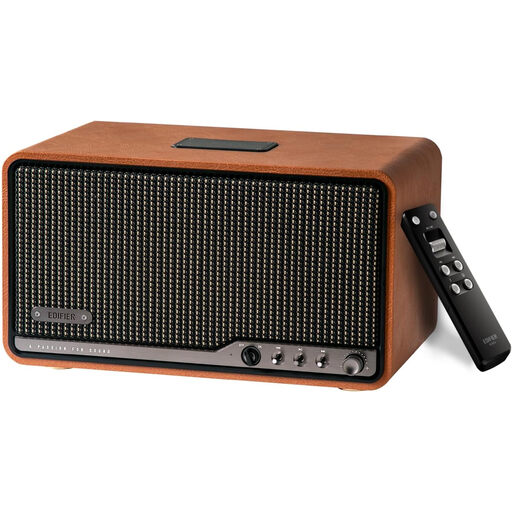
Consider the S300 if a tabletop speaker with a stated multi-room option suits the lounge plan.
Check how it will connect to the household’s playlist service and whether its controls meet everyone’s needs. Confirm its suitability for the intended room and the supplied mains connection before buying.
 No image available
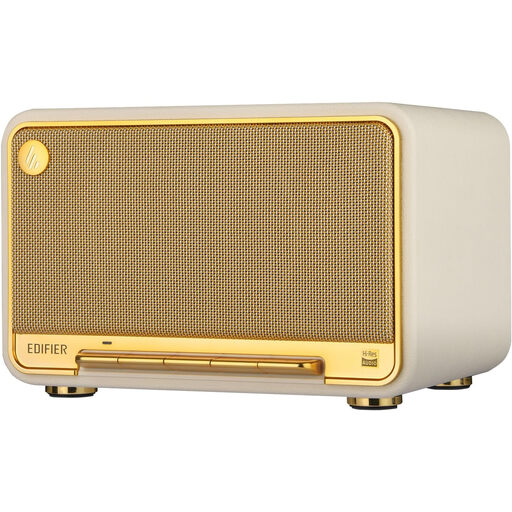
Consider the D32 if the lounge needs a tabletop speaker with both wireless playback and wired input options.
The product name lists Bluetooth 5.3, AirPlay 2, USB-C and AUX inputs, app control and 11h playtime. Check the conditions behind the playtime figure, the household’s music-service controls and the supplied mains connection.
 No image available
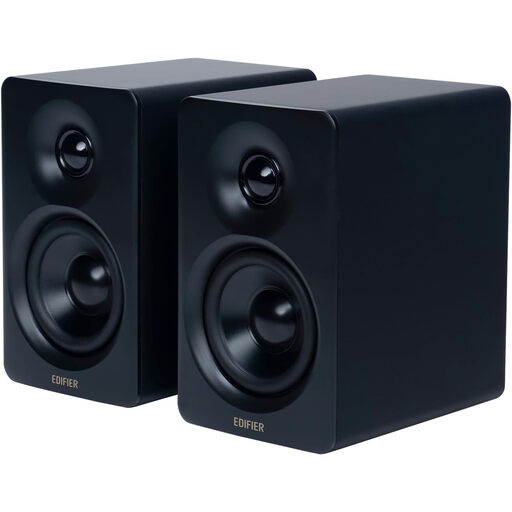
Consider the M60 if a compact desktop-style speaker with Bluetooth and wired inputs matches the intended listening position.
The product name lists Bluetooth 5.3, USB-C and AUX inputs. Check whether its desktop format suits the lounge, how playlists will be controlled and the supplied mains connection.
Yes, on a compatible, correctly configured route with the required account. Spotify says its Alexa integration is for Premium users; for Google devices, link the Spotify account through Google Home using the account connected to the device. Check the exact speaker and plan before buying.
Yes, if the speaker supports the phone-control method the household wants. Spotify says devices need the same Wi-Fi network for their first Spotify Connect connection; Sonos also documents supported-app, Bluetooth and touch controls for Era 100.
Choose a suitable control route without built-in voice requests, such as the Sonos Era 100 SL, if app-based playback meets the household’s needs. The Information Commissioner’s Office advises reviewing smart-product permissions, which can include microphone access, during setup.
Check that the supplied mains connection suits the intended UK use and that the seller provides clear product and safety information. This matters particularly if the listing does not clearly identify its intended market.
An electrical product bearing the crossed-out wheelie-bin symbol should go to an appropriate collection option instead. GOV.UK advises against putting such products in household rubbish when they are unwanted or no longer work.