Voice-playlist households
You want to request festive playlists, radio or podcasts without picking up your phone. Start with the assistant and music services your household already uses, then check whether the speaker supports them.


For voice-requested festive music in a small living room, choose an assistant that works with your household's devices and music service before comparing speaker size. Echo Dot suits an Alexa setup, HomePod mini requires a compatible Apple device for setup, and Google's speakers fit a Google Home setup. Sonos Era 100 offers other playback options, but wired sources need a separate adapter.
You want to request festive playlists, radio or podcasts without picking up your phone. Start with the assistant and music services your household already uses, then check whether the speaker supports them.
You use compatible Apple devices and want Siri and AirPlay 2 in a compact speaker. Apple says HomePod mini also supports multi-room audio and can form a stereo pair with a second unit.
You have room for a speaker such as Sonos Era 100 and want to consider Bluetooth, AirPlay 2 or a wired source alongside Wi-Fi playback. Sonos specifies a separate adapter for line-in.
Settle on the assistant and playback method you will actually use, then check where the speaker can sit. If a wired source matters, make that a requirement rather than assuming every smart speaker accepts one.
| Concern | What to check | Who this matters to |
|---|---|---|
| Assistant and service fit | Confirm that your music service works with the chosen assistant and account, and check any required phone compatibility. | If I want to request a playlist by voice, I need the speaker to work with the services my household uses. Around 45% of consumers put that fit first. |
| Space and simple playback | Measure the intended surface and check access to mains power and Wi-Fi; decide whether the available playback methods suit you. | When shelf space is tight, I want a speaker I can place conveniently for everyday music. Compact placement is the main concern for roughly 33% of consumers. |
| Sound and connections | Check whether the exact model offers the stereo arrangement and inputs you want; Sonos Era 100 needs a separate adapter for line-in. | If I may play music from more than one type of source, I want to know how each connects before choosing. Around 22% of consumers prioritise sound and connection flexibility. |
A speaker can fit the shelf yet be awkward to use with your phone, assistant or music account. Apple specifies a compatible Apple device and Wi-Fi internet access for HomePod mini setup.
Check setup requirements and service compatibility first; compare dimensions among the models that meet them.
Those are different ways to play audio, and the available combination depends on the model. Sonos specifies an adapter for a wired source on Era 100.
List the devices you want to play from and check the exact speaker's connection options before ordering.
Using a wired source with Sonos Era 100 requires a separate Sonos Line-In Adapter.
Google presents some enhanced Gemini capabilities through Google Home Premium, so access may depend on subscription terms.
Check which features work without a subscription and review trial eligibility and renewal terms if those enhancements matter to you.
A connected speaker may retain account or personal information. Recycle Your Electricals advises a factory reset before passing one on or recycling it.
Reset the speaker before donating, selling or recycling it, then check available electrical-recycling or take-back routes.
Echo Dot is Amazon's compact Alexa route for voice-controlled music in a small room.
HomePod mini is Apple's compact Siri and AirPlay 2 option for households with compatible Apple devices.
Google's Home and Nest speakers are routes to consider if your household uses Google Home.
Era 100 offers several playback routes for listeners considering a speaker beyond the smallest voice-controlled options.
These Bose models are soundbars with voice-music features, not conventional compact smart speakers. Consider them if a soundbar suits your living-room layout, and measure the intended position before choosing between their different widths.
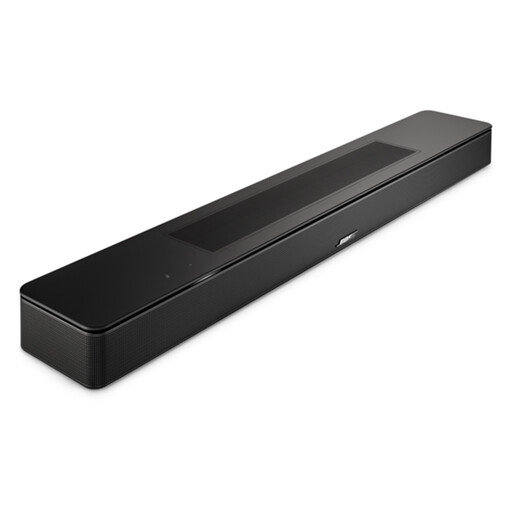 No image available
Consider this soundbar for voice-requested music if its stated 69.4 cm width fits your intended position.
Before buying, check that your music service works as expected with your account and that the available playback methods suit your devices.
 No image available
Consider this soundbar for voice-requested music only if its stated 104.5 cm width works in the room.
Check your music-service and device compatibility before ordering, and allow for mains power and Wi-Fi setup.
Plan on Wi-Fi for connected setup and smart functions, even if the model also offers Bluetooth playback from a phone. Apple specifies Wi-Fi internet access for HomePod mini setup, while Amazon lists both Wi-Fi and Bluetooth music playback for Echo Dot.
That depends on the model and on what you mean by stereo. Sonos describes stereo sound from a single Era 100; Apple specifies that two HomePod mini units can form a stereo pair. Check whether you want one speaker now or intend to add a second later.
Choose a model with an expressly supported wired connection. Sonos says Era 100 accepts an auxiliary source through its separate Sonos Line-In Adapter; do not assume another smart speaker has an analogue input.
Factory-reset it before passing it on or recycling it to clear personal data, as Recycle Your Electricals advises. Then check local electrical-recycling or retailer take-back options rather than putting it in ordinary household waste.