Apple TV 4K hobby-room viewers
If you watch films through Apple TV 4K, Apple documents a route to audio from one HomePod or a matching stereo pair. Check the required devices and Home app setup before choosing speakers.


Choose around what plays the soundtrack: an album or playlist needs a compatible music service and speaker, while film sound from a television needs a documented route from the video source to the audio system. Apple documents HomePod audio with Apple TV 4K, and Amazon describes Echo Studio pairing with compatible Fire TV devices. Sonos Era 300 suits supported Wi-Fi spatial music, but television sound requires a compatible Sonos home-theatre setup rather than its line-in.
If you watch films through Apple TV 4K, Apple documents a route to audio from one HomePod or a matching stereo pair. Check the required devices and Home app setup before choosing speakers.
If you mostly play film-score albums rather than live television audio, check the speaker, Wi-Fi music service and individual tracks together. Sonos and Apple describe spatial-music playback under service and content conditions.
If you might add television sound, another speaker or an external music source later, decide which role the first speaker must play. Amazon, Apple and Sonos document different paths for pairing, TV audio and home-theatre expansion.
Start with the source: playing a soundtrack album and hearing the soundtrack of a film on screen call for different connections.
Consider it: You watch through Apple TV 4K and want to use one HomePod (2nd generation) or a matching stereo pair for film audio, as documented by Apple.
Bear in mind: The home-cinema route depends on Apple TV 4K and the required Home app setup; a stereo pair needs two matching HomePod speakers.
Consider it: Your video playback uses compatible Fire TV hardware and you want the pairing route described by Amazon for Echo Studio.
Bear in mind: Confirm your exact Fire TV device and planned speaker configuration; Amazon's product claim is not an assessment of sound in your room.
Consider it: You mainly stream compatible soundtrack albums over Wi-Fi and may later build a Sonos home-theatre system.
Bear in mind: Sonos documents Era 300 as a surround speaker in a compatible TV-audio system, not as a standalone television line-in speaker.
| Concern | What to check | Who this matters to |
|---|---|---|
| Soundtrack albums | Check whether your music service works with the speaker and whether the albums you play offer a compatible spatial format. Sonos specifies Wi-Fi and supported content for spatial music; Apple ties HomePod Dolby Atmos music to available Apple Music tracks. | If I mostly play film scores as albums, I want the music I actually choose to be available in the format I am buying for. Around 37% of consumers put compatible soundtrack-music playback first. |
| Film and video sound | Identify the video player and check the manufacturer's documented path to the speakers; confirm the television connections where that path uses them. | When I watch a film, I need its on-screen sound to reach the system, not just a separate recording of the score. Around 27% of consumers place video-audio integration first. |
| Existing devices | Check your Apple TV 4K or Fire TV model against the proposed speaker configuration, including whether you intend to add a matching second speaker. | If I already use a media platform in the room, I want the new speaker to fit that setup before I commit to another one. Around 18% of consumers make ecosystem fit their primary concern. |
| Later expansion | Check the input, any required adapter and which functions remain available if the speaker becomes part of a surround system. Sonos says Era 300 line-in is disabled in its surround role. | I may add a physical music source or expand to surround sound, so I need to know what the speaker can still do after the change. Around 18% of consumers prioritise that flexibility. |
Speaker capability alone does not establish the format of an album or playlist. Sonos requires a supported Wi-Fi service and compatible content for spatial music; Apple's HomePod Dolby Atmos music playback depends on available Apple Music tracks.
Check the albums you play in your chosen service before selecting a speaker for that format.
The music service you need may require a subscription.
A film's audio must travel from its video source to a compatible speaker system. Apple documents an Apple TV 4K and HomePod route, Amazon describes pairing Echo Studio with compatible Fire TV devices, and Sonos places Era 300 in a compatible home-theatre system for TV audio.
List your video player, television and intended speakers, then check the manufacturer's configuration for those components.
The documented route may require a compatible media player, soundbar or additional speakers.
Sonos says this connection is not intended for TV and that line-in is disabled when Era 300 is used as a home-theatre surround.
For a suitable external music source, confirm its output and the required connection; for TV sound, choose a documented Sonos home-theatre configuration.
Line-in requires the separate Sonos Line-In Adapter and an appropriate cable.
A Wi-Fi speaker will need ongoing software attention. The National Cyber Security Centre advises consumers to consider the manufacturer's stated period for important security updates.
Check the manufacturer's support information, use a unique password where setup calls for one and install available updates.
Echo Studio is relevant if the hobby room uses Alexa and compatible Fire TV hardware.
Era 300 is a music-first option for supported Wi-Fi spatial audio, with a separate expansion path into a Sonos home-theatre system.
HomePod (2nd generation) is relevant if Apple TV 4K is the room's video source or Apple Music is its soundtrack service.
These soundbars are options for a hobby-room setup centred on sound from a television. They are not standalone smart-speaker substitutes for the HomePod, Echo Studio or Era 300 routes above; check how each would connect to your television before choosing.
 No image available
Consider this soundbar if film audio from a television, rather than a standalone music speaker, is your priority. Confirm the connections needed for your television and intended setup.
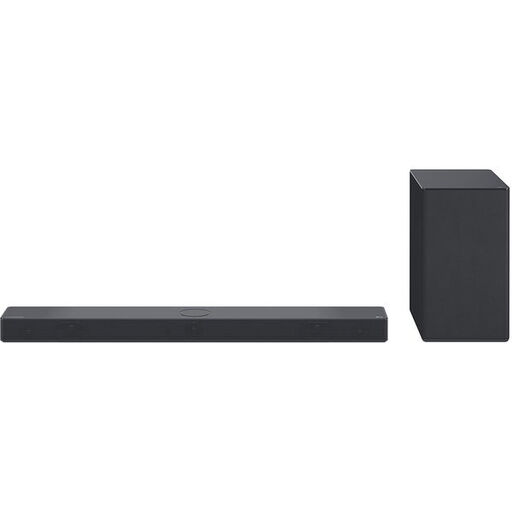 No image available
Consider this soundbar-and-subwoofer setup if your hobby-room soundtrack listening centres on a television. Check its connections against your TV and allow for placement of both components.
No: the playback source and content must support the format too. Sonos specifies Wi-Fi, a supported service and compatible content for spatial music; Apple requires available Apple Music tracks for HomePod Dolby Atmos music. Film audio from a video player needs its own documented route to the speaker system.
Yes, Apple documents home-cinema audio with one HomePod or a matching stereo pair as Apple TV 4K audio output for supported content. Check that the devices have current software and are assigned to the same room in the Home app.
Do not choose Era 300 line-in as a TV connection: Sonos says it is not intended for that use. Sonos instead documents Era 300 as a surround speaker within a compatible home-theatre setup; line-in also becomes unavailable in that surround role.
Check the manufacturer's stated period for important security updates and how to obtain them. The National Cyber Security Centre highlights update-support information for connected devices; after setup, use a unique password where requested and install available updates.