Live-album detail seekers
If vocals, instruments and crowd ambience are central to your listening, consider stereo options, room features and where the speaker can sit on your desk.


Choose a speaker that works with your music service and devices, then check how it will fit and play at your desk. For live albums, consider stereo-pair options and room features alongside ordinary playback; if you use a CD player, turntable or computer audio output, confirm the exact connection route and any accessories before buying.
If vocals, instruments and crowd ambience are central to your listening, consider stereo options, room features and where the speaker can sit on your desk.
If you already use Apple devices, Alexa or Google services, check that setup, music control and any multi-room features fit the devices and accounts you use.
If you switch between streaming and a computer, CD player or turntable, check the input route. Microphone controls and privacy settings may also matter in a room used for work calls.
Start with the way you play your albums and the devices you use to control them. Then assess the speaker’s placement, stereo options and connection requirements.
| Concern | What to check | Who this matters to |
|---|---|---|
| Music presentation | Check the exact model’s stereo-pair option, room features and space needed around the speaker. | I want vocals, instruments and crowd ambience to be easier to follow at my desk. Around 40% of consumers put music presentation first. |
| Service and device fit | Confirm your music service, playback method and the phone or tablet needed for setup. | If I already control music through particular devices and apps, I want that routine to work with the speaker. Roughly 30% of consumers make ecosystem fit their primary concern. |
| Sources and office use | Check wired-input accessories and desk space; review microphone controls and privacy settings. | I may switch to a local audio source or take calls in the same room, so connections and controls matter to me. Around 30% of consumers put those practical needs first. |
A CD player, computer audio output or turntable needs a connection route that matches the speaker. Sonos says Era 100 requires its separate Line-In Adapter; the source may also need a suitable cable, and some turntables need a preamp.
Identify your source’s output, then check the speaker input and every accessory needed to connect them.
Apple says HomePod setup requires an iPhone or iPad and Wi-Fi; a Mac alone cannot set it up.
Make sure a compatible iPhone or iPad is available before choosing HomePod for a Mac-based office.
An office may also be used for calls or discussions. The Information Commissioner’s Office advises checking a smart product’s permissions, data sharing, privacy features and security-update support.
Compare microphone controls and review the relevant app settings and stated update period before setup.
A speaker’s format capability does not establish which version of an album your music service offers.
Check the particular albums and subscription you use, while considering how you will play their ordinary versions.
Era 100 is a Wi-Fi-led option with Bluetooth and AirPlay 2 for listeners who mainly stream at a desk.
HomePod (2nd generation) is an Apple-centred route for an office using AirPlay and Siri.
Echo Studio is an Alexa-led route for listeners who want voice control and supported music-service playback.
Authentics 300 suits listeners considering both Alexa and Google Assistant, portable use and several connection routes.
These Edifier tabletop speakers offer wireless playback routes for desk listening. If voice-assistant control is essential to your choice of smart speaker, confirm it for the exact model before buying.
 No image available
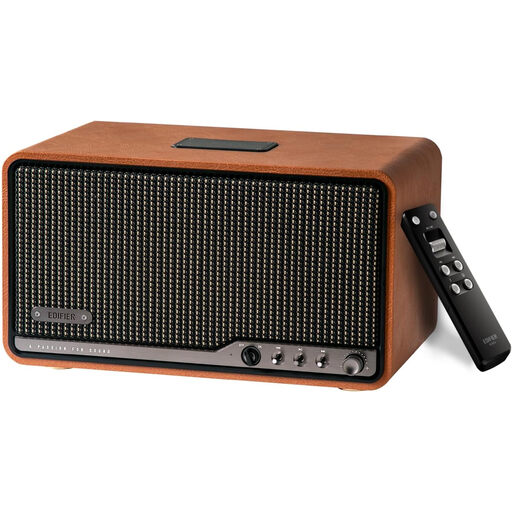
Consider this tabletop model if wireless listening at your desk is the priority.
The product name identifies it as a brown Hi-Fi wireless multi-room speaker. If you need a stereo pair, voice control or a particular wired input, confirm the arrangement and connections for this model before ordering.
 No image available
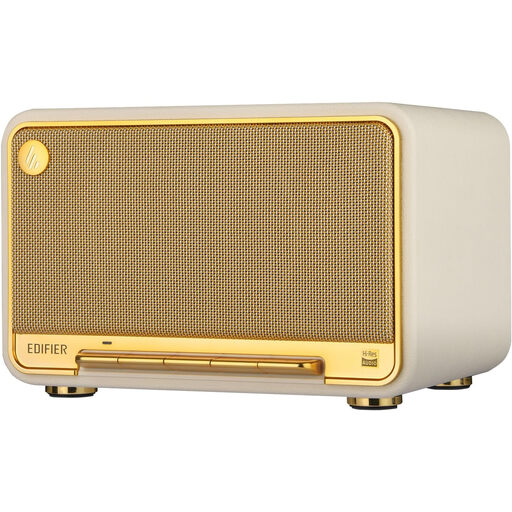
Consider this model if you want a tabletop speaker with several named playback connections and the option to move it away from a fixed power outlet.
Its product name lists AirPlay 2, Bluetooth 5.3, USB-C and AUX inputs, alongside LDAC, ALAC, a 2.1 acoustic architecture and 60 W (RMS). It also lists up to 11 hours of playback; check the conditions for that figure and confirm voice-assistant support if you need it.
Yes, if the exact speaker has a suitable external-audio route and you have the required accessories. Sonos says Era 100 needs its separate Line-In Adapter and an appropriate cable; a turntable without a built-in preamp also needs a preamp. JBL documents an external-audio connection route for Authentics 300.
No. Apple says HomePod setup requires an iPhone or iPad and Wi-Fi, and cannot be completed with a Mac. Apple also advises leaving at least 15 cm of space around HomePod when placing it.
Check its microphone-control option, app permissions, data-sharing settings and stated security-update period. The Information Commissioner’s Office recommends reviewing those privacy and update details for smart products, especially where the room is also used for conversations or calls.
Look for a suitable reuse or electrical-equipment recycling route rather than putting it in ordinary household waste. GOV.UK describes the UK’s waste electrical and electronic equipment framework as encouraging recovery, reuse and recycling.