For live concert albums in a large living room, consider two compatible speakers if separated left and right playback matters and you have room for a matched pair. A single speaker with room adjustment is simpler to place, but it cannot provide the physical separation of two speakers. Check your music service, setup device and connection needs before choosing an ecosystem; Sonos and Google specify same-model stereo pairing, while individual speakers have their own setup requirements.
Who should consider these setups?
Listeners who want sound across the room
If you listen to live albums from different seats in a large living room, consider how the speaker disperses sound and whether it offers room adjustment. Sonos, Apple and Amazon describe these features for specific models, but their specifications do not establish how clearly each will play in your room.
Listeners with space for a stereo pair
If you have places for two speakers and a usual listening position, separate left and right channels may be worth prioritising. Sonos and Google specify matching-model requirements for their stereo-pair setups.
Listeners choosing around an existing ecosystem
If you already use Apple, Alexa or Google Home for music and household controls, check the speaker’s setup requirements and support for your preferred service before focusing on audio features.
What matters when choosing?
Decide whether you can place two matching speakers before comparing single-speaker features. Then check that your usual albums and playback sources work with the setup you prefer.
Matched stereo pair
Consider it when: You have space to separate two speakers and want distinct left and right playback for concert recordings.
Trade-off: You need two compatible units and workable positions for both; Sonos and Google require matching models for their respective pairs.
Single room-adjusting speaker
Consider it when: One place for a speaker is practical and you want a model with stated room-tuning or room-adaptation features.
Trade-off: Room adjustment does not create the physical left and right separation of a pair, and spatial-audio playback depends on compatible recordings and services.
| Concern | What to check | Who this matters to |
|---|
| Sound across the room |
Look at the exact model’s driver arrangement and stated room-adjustment features; these do not establish how it will sound in your room. |
I want vocals and instruments to remain clear when I move away from my usual seat. Around 36% of consumers would put sound across the room first. |
| Stereo presentation |
Confirm same-model pairing support and measure where both speakers could stand. |
If I listen from a regular seat, I want instruments and audience ambience placed across distinct left and right channels. For roughly 29% of consumers, stereo presentation would be the primary concern. |
| Music sources |
Check your streaming service and whether you need AirPlay, Bluetooth or an analogue input; connection conditions vary by model. |
I need my albums to play from the devices and services I already use, without changing my main source. About 21% of consumers would make compatibility their first concern. |
| Setup and control |
Confirm the required app, Wi-Fi connection and setup device, particularly if you plan to add a second speaker later. |
I would rather manage one familiar system than juggle another setup routine for everyday listening. Ease of setup would come first for around 14% of consumers. |
Mistakes to avoid
-
Expecting one speaker to provide separated stereo playback
A single enclosure cannot occupy the two physical positions of a stereo pair. Pairing also depends on model compatibility and available space, as Sonos and Google explain for their systems.
If left and right placement matters to you, measure two possible speaker positions and check the pairing requirements before choosing one unit.
A stereo setup requires two matching speakers rather than one.
-
Assuming spatial audio applies to every live album
A speaker’s Dolby Atmos capability does not make an ordinary stereo recording an Atmos recording. Playback of a compatible mix also depends on the supported service and content.
Check whether the live albums you want are available in a compatible format on your preferred service.
-
Choosing connections before checking setup requirements
Sonos says Era 300 needs Wi-Fi setup before Bluetooth use and an adapter for analogue line-in. Apple lists a compatible iPhone or iPad among HomePod (2nd generation) setup requirements.
List the phone, streaming service and any physical sources you will use, then check the connection path for the exact speaker.
An analogue source connected to Era 300 requires the relevant Sonos line-in adapter.
Relevant brands to consider
These examples illustrate different pairing, room-adjustment and control requirements; check the exact model rather than treating a brand name as a specification.
Sonos
Era 300 is a route to a single speaker now and a same-model stereo pair later within the Sonos system.
- Sonos describes six drivers, Dolby Atmos Music support and Trueplay room tuning for Era 300.
- Sonos requires initial Wi-Fi setup before Bluetooth use; analogue line-in needs an adapter, and stereo pairing requires compatible same-model speakers.
Apple
HomePod (2nd generation) suits consideration by households that already use compatible Apple devices and AirPlay.
- Apple lists room sensing, automatic bass correction, Spatial Audio support and stereo-pair capability for this model.
- Apple’s setup requirements include a compatible iPhone or iPad and Wi-Fi.
Amazon
Echo Studio is an Alexa-led option to examine if Amazon’s music and compatible Fire TV controls matter to your setup.
- Amazon describes spatial audio, Dolby Atmos and room adaptation for Echo Studio.
- Those descriptions are Amazon’s own product claims, not a comparison showing how Echo Studio will perform against another speaker in your room.
Google
Google’s speaker system is relevant if Google Home is already your preferred way to control music.
- Google supports stereo pairing for matching speaker models placed in the same room.
- Check the pairing rules for the exact model and plan positions for both units before buying a pair.
Joybuy tabletop speaker options
These tabletop wireless speakers offer ways to play live albums in a living room. If you need voice control, room tuning or a matched stereo pair, confirm those features for the exact model before choosing it for that purpose.
 No image available
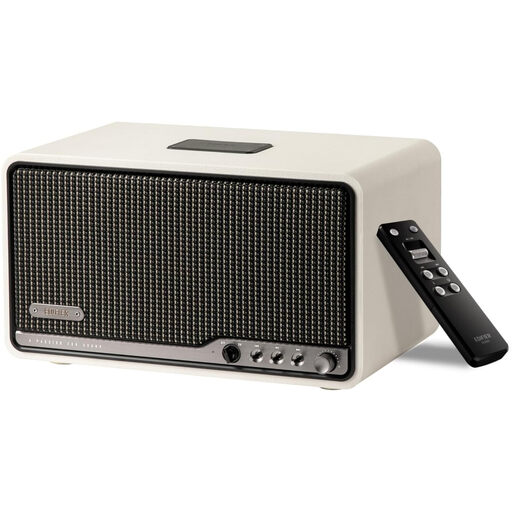
EDIFIER S300 wireless multi-room speaker, Ivory
Consider the S300 if a tabletop speaker fits your room and you want to explore adding a matching unit for stereo listening; check pairing and placement before committing to two.
The product name identifies a wireless, multi-room tabletop speaker in Ivory. If room tuning or voice control matters, confirm support for the exact model.
View on Joybuy
 No image available
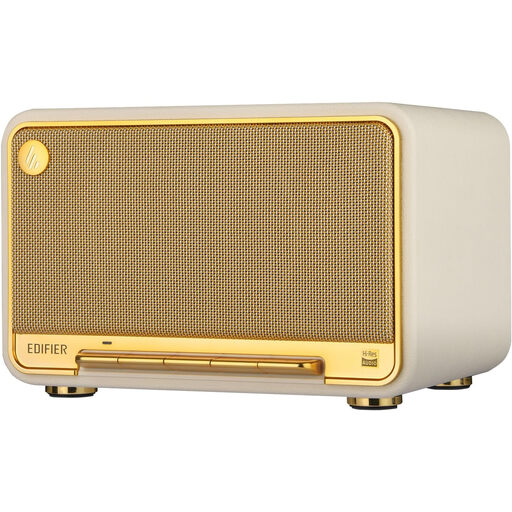
Edifier D32 tabletop wireless speaker, 60W (RMS)
Consider the D32 if you want a tabletop speaker with several named playback connections; confirm stereo-pairing, room tuning and voice-control support if those affect your choice.
Its product name lists a 2.1 acoustic architecture, 60W (RMS), Bluetooth 5.3, AirPlay 2, USB-C and AUX inputs, app control and up to 11 hours of playtime. These listed features do not establish how it will sound in a large room.
View on Joybuy
Common questions
Should I choose one speaker or a stereo pair for live albums?
Choose a compatible stereo pair if distinct left and right playback matters and you can position two matching speakers. A single speaker is simpler to place, but room adjustment and spatial-audio support do not give it the physical separation of a pair. Sonos and Google specify matching-model requirements for their stereo setups.
Where should I place two smart speakers for stereo listening?
Place compatible paired speakers in the same room, with space between them and a sensible position for listening. Check the placement guidance for your exact models, then make sure neither position obstructs the room; Google specifies same-model, same-room pairing.
Can Sonos Era 300 use Bluetooth before Wi-Fi setup?
No. Sonos says Era 300 must first be set up on a Wi-Fi network before Bluetooth use. For an analogue source, check which Sonos line-in adapter is needed.
Does playing concert albums on a smart speaker require a TV Licence?
The speaker itself is not the deciding factor; consider what you watch or stream. TV Licensing says streaming live TV requires a TV Licence, so check the rules for your viewing activity if the speaker is part of a television setup.


