What matters when choosing?
For a shared lounge, start with access to the recordings and a control method everyone can use. Then decide whether room-related audio features or additional playback sources would change your choice.
Amazon Echo Studio
Consider it when: The household uses Alexa and wants the spatial-audio and Dolby Atmos features described by Amazon.
Check first: Exact voice requests depend on the linked service and plan; Amazon specifies Spotify Premium for requests for particular Spotify songs, artists or albums.
Sonos Era 100
Consider it when: People want to switch between a shared Wi-Fi system, Bluetooth playback and compatible AirPlay devices.
Check first: Sonos requires Wi-Fi setup before Bluetooth use, and an analogue source needs the Sonos Line-In Adapter.
Apple HomePod (2nd generation)
Consider it when: The household already uses Apple devices and wants to play music through Apple Music or AirPlay.
Check first: Apple requires compatible iPhone or iPad hardware and Wi-Fi internet access for setup.
Google Home Speaker
Consider it when: The household uses Google Home and wants voice control or grouping with compatible Nest and Google Cast devices.
Check first: Link a locally supported music service; Google says paid plans are needed for most exact-music functionality with Spotify and YouTube Music.
| Concern |
What to check |
Who this matters to |
| Voices and orchestration |
Check the exact model’s room-tuning or room-sensing features and whether the content and playback route support its advertised audio formats. |
If I want to follow the singers without losing the rest of the arrangement, sound presentation will guide my choice. Around 29% of consumers put this need first. |
| Access to specific recordings |
Search the intended service for favourite shows and cast albums; check speaker support, account linking and the plan needed for exact requests. |
When I ask for a particular cast album, a related station will not serve the same purpose. Access to the requested recording comes first for around 29% of consumers. |
| Shared control |
Identify who will choose the music and whether their phones, accounts or preferred voice controls work with the speaker. |
Several people may take turns choosing music in the lounge, so I do not want playback tied to one person’s device. Around 21% of consumers prioritise shared control. |
| Playback sources |
Check the required Wi-Fi, Bluetooth, AirPlay or wired route on the exact model, including any setup or adapter requirements. |
If I alternate between a phone and an occasional wired source, those connection options will decide what I can play. Source flexibility is the primary need for around 21% of consumers. |
Brands to consider
These product lines illustrate different control and connection approaches. A brand’s features do not establish that a particular recording is available through your music account.
Amazon Echo
An Alexa-led route for households using compatible music services; Echo Studio is the sound-focused model considered here.
- Amazon lists spatial audio and Dolby Atmos for Echo Studio and names Amazon Music, Apple Music, Spotify and Deezer among services available to link with Echo.
- Service and plan conditions still govern exact requests. The advertised audio features are not an independent assessment of how cast recordings will sound in your lounge.
Sonos
A multi-source route represented here by Era 100, with app-based control and several ways to send music to the speaker.
- Sonos describes Era 100 support for Wi-Fi, Bluetooth, AirPlay 2 and optional analogue line-in.
- Bluetooth follows Wi-Fi setup; line-in requires an adapter. Sonos says Alexa music services must also be added in the Sonos app.
Apple HomePod
An Apple-centred option for households that use compatible setup devices, Apple Music and AirPlay.
- Apple lists room sensing, Spatial Audio with Dolby Atmos, AirPlay multi-room audio and stereo-pair capability for HomePod (2nd generation).
- Initial setup requires compatible iPhone or iPad hardware and Wi-Fi internet access.
Google Home
A Google-account route for voice-led playback and grouping with compatible Nest and Google Cast devices.
- Google describes speaker grouping with compatible Nest speakers, displays and Google Cast-enabled devices.
- Check the locally supported music provider and linked account. Google says subscription tiers affect requests for exact music on Spotify and YouTube Music.
Joybuy product choices
These choices cover a smart soundbar and wireless tabletop speakers for lounge playback. If asking for a cast recording by voice is essential, check the voice-control route for the particular model as well as your music service and plan.
 No image available
Bose Smart Ultra Soundbar, Arctic White
Consider this soundbar if the shared lounge also centres on a TV, while allowing for soundbar placement rather than assuming it will fit where a tabletop speaker would.
Check how voice requests work with your preferred music service and whether it carries the cast albums you want to play.
View on Joybuy
 No image available
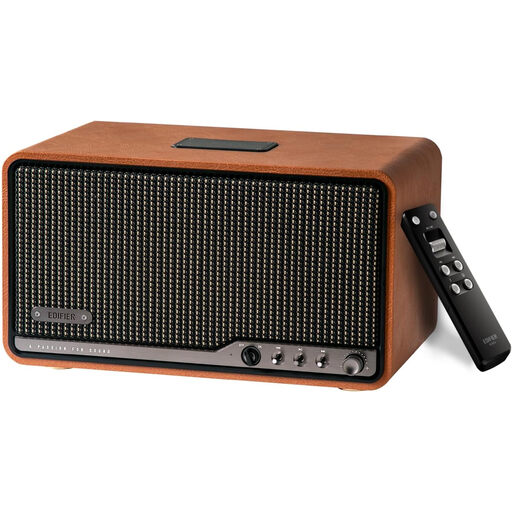
Edifier S300 wireless multi-room tabletop speaker, brown
This tabletop speaker is worth considering when a wireless playback route matters more than making hands-free requests.
Check the control method you intend to use with it, particularly if several people will choose recordings or voice control is important.
View on Joybuy
 No image available
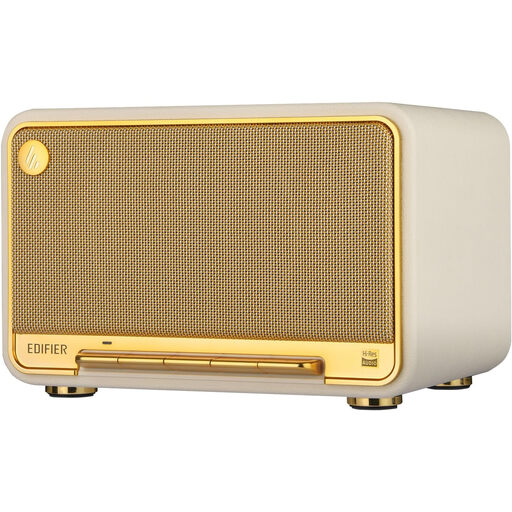
Edifier D32 tabletop wireless speaker
Consider the D32 if you want a tabletop speaker with several stated playback connections and the option to move it within the lounge.
Its product title lists 60W RMS, a 2.1 acoustic layout, Bluetooth 5.3, AirPlay 2, USB-C and AUX inputs, plus 11-hour playtime. Check the conditions behind the stated playtime and confirm voice-control options separately if hands-free requests matter.
View on Joybuy
Common questions
Will a voice request play the exact cast recording I ask for?
Not necessarily: the recording must be in a supported service, and the linked account and plan must permit the request. Amazon specifies Spotify Premium for particular Spotify songs, artists and albums; Google says a base-tier request may produce a related station instead. Search for the recording and check the service conditions before choosing a speaker.
Can I use Sonos Era 100 over Bluetooth without setting up Wi-Fi?
No: Sonos says Era 100 needs Wi-Fi and app setup before you switch it to Bluetooth mode. Allow for that initial setup even if you expect to play music from a phone later.
Can Sonos Era 100 play a CD player or turntable?
It can accept an analogue source through the Sonos Line-In Adapter and a suitable 3.5 mm cable, rather than a built-in standard auxiliary socket. Check the connection required by your source and whether you have the accessories.
Can I set up HomePod without an iPhone or iPad?
Apple specifies compatible iPhone or iPad hardware for HomePod (2nd generation) setup, along with Wi-Fi internet access. If nobody in the household has a compatible device, choose a route with setup requirements you can meet.
What conformity information should I check when buying in the UK?
Check the exact product and its intended destination rather than assuming one marking answers every UK question. GOV.UK says the Electrical Equipment (Safety) Regulations 2016 set requirements for equipment placed on the Great Britain market; its guidance dated 21 August 2026 says CE marking remains recognised there alongside UKCA where applicable. Northern Ireland has different arrangements, so check the requirements relevant to that destination.


