Choose a voice-assistant ecosystem that works with the accounts, services and connected devices your household already uses, then check how it handles individual users and shared-room permissions. A display is worth considering when visible reminders and touch controls would be useful; if you only want phone-led music, a Bluetooth speaker avoids choosing a household voice-assistant ecosystem but will not replace its spoken routines. Check child settings, microphone and voice-history controls, and the exact services you need before buying.
Who is this setup for?
Households coordinating everyday routines
A shared speaker may be useful when several people want easy access to music, radio and household requests. Ofcom’s 2022 smart-speaker research found that music and radio were central to many participants’ initial expectations. Decide whether requests should use a shared account or each person’s own profile.
Families managing child access
In a shared room, children may be able to request media or use communication and connected-home features. Amazon and Google document different routes for managing child access, so check the account setup and available controls for the ecosystem you choose.
Households weighing privacy controls
Voice convenience also brings decisions about microphone use, activity history and access to personal content. The UK Information Commissioner’s Office advises checking voice-data controls, information collection and app permissions before choosing a smart product.
What should you check before choosing?
Voice-only smart speaker
Consider it when: Spoken music requests, timers and reminders are the main reason for adding a shared device.
Bear in mind: Personalised features and connected-home commands depend on the chosen ecosystem’s accounts, permissions and compatible devices.
Smart display
Consider it when: People would use a screen to view reminders or operate compatible home controls by touch.
Bear in mind: The screen adds another way to access information in a shared room, so review what each household member can see and manage.
Bluetooth speaker
Consider it when: Playing audio from a phone matters more than independent spoken household routines.
Bear in mind: A conventional Bluetooth speaker is not a like-for-like replacement for standalone voice timers, reminders or connected-home commands.
| Priority | What to check | Your needs |
|---|
| Accounts and profiles |
Check who needs an account, how household members are invited and which requests can be personalised. Google documents Voice Match for customised media; Apple Support says HomePod voice recognition supports up to six users in a shared home. |
We share the room, but I do not want another person’s music preferences or personal requests treated as mine. |
| Child access |
Check child-account prerequisites, approved contacts, media filters and access to connected-home controls. Amazon documents Parent Dashboard controls; Google documents media filters and Downtime, with setup requirements for child accounts and Home membership. |
Children may use the speaker, so I want to configure their access before relying on it in a shared room. |
| Voice and personal data |
Check microphone controls, voice-history settings and whether personal requests can be limited by user or device. The UK Information Commissioner’s Office recommends examining voice-data controls, collection and app permissions. |
Before putting a voice device in a communal room, I want to know how to limit listening and access to personal information. |
| Services and devices |
Confirm the exact music service, radio station and connected devices on the chosen platform. If calling matters, Google Home and Nest Help says available methods depend on location, recipient and type of call. |
Our existing subscriptions and home devices matter more to me than a speaker’s brand name alone. |
| Screen or audio |
Decide whether visible reminders and touch controls would be used. Google describes both voice and touch control on the Nest Hub (2nd gen); for a Bluetooth model, check its microphone and pairing controls separately. |
I would use a screen for shared information—or I may only need music played from a phone. |
What can cause problems in a shared room?
-
Choosing a brand before checking existing accounts
Personalised media, household permissions and connected-device control depend on the platform and its setup. A familiar speaker name does not establish that your services or devices will work with it.
List the household’s phones, accounts, music services and connected devices, then check each required function on the platform you are considering.
-
Enabling personal requests without considering the room
Apple Support says HomePod Personal Requests can use information from apps including Messages, Reminders and Calendar. In a shared space, that makes the choice of users and device location important.
Enable personal features only for the people and rooms where they are appropriate, and review the available user and device permissions.
-
Assuming child controls are already active
Amazon manages documented child features through Amazon Kids and Parent Dashboard. Google’s child controls have account and household setup requirements.
Set up the child profile and check the applicable media, contact and connected-home restrictions before leaving the device for unsupervised use.
-
Treating Bluetooth audio as a smart-speaker replacement
A conventional Bluetooth speaker can play audio from another device, but it does not independently provide household voice routines. Nor does Bluetooth alone tell you whether a model has a microphone.
Choose phone-led audio only if that meets the household’s needs; check microphone controls, pairing and charging accessories on the exact model.
For Bose SoundLink Home specifically, Bose states that a power adaptor is not included, so check what you will use to charge it.
Which brands and platforms are relevant?
These platform references help compare household features; they do not indicate which products are available in the Joybuy selection below.
Amazon Echo / Alexa
Amazon positions Echo speakers for requests such as news, timers and reminders, alongside control of compatible connected-home devices.
- Amazon documents Parent Dashboard settings for child calls and messages, skills and smart-home controls.
- Review microphone, voice-history and child-profile settings rather than assuming a shared device is configured for everyone.
Google Home / Nest
Google Home combines household permissions and Voice Match; Nest Hub (2nd gen) adds a display with touch control.
- Google documents customised media through Voice Match and media filters and Downtime through its child controls.
- Check account and child-setup requirements, as well as the calling methods available for the intended location and service.
Apple HomePod
HomePod mini is an option for households using Apple devices, Siri and a shared home in Apple’s Home app.
- Apple Support documents voice recognition for up to six users in a shared home and Intercom messages to home members or specific rooms.
- Check each regular user’s Apple-device and account requirements before enabling personal content requests in a shared room.
Bose
Bose SoundLink Home represents phone-led Bluetooth audio rather than an independent household voice-assistant setup.
- Bose describes Bluetooth connectivity for SoundLink Home.
- Bose lists a built-in microphone for that model, so do not assume that choosing Bluetooth means choosing a microphone-free speaker.
Joybuy options for phone-led audio
This selection covers a portable Bluetooth option for households prioritising music from another device over a shared voice-assistant setup.
 No image available
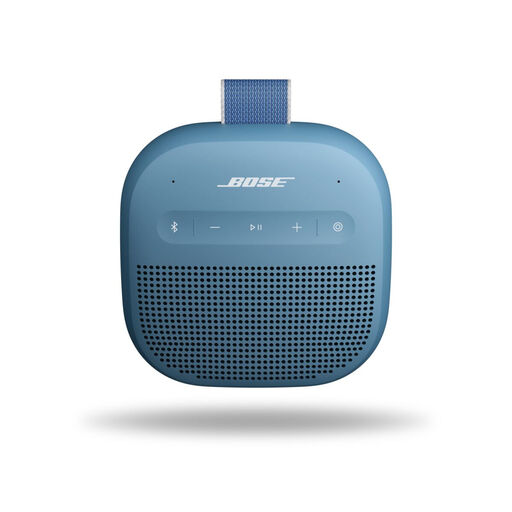
Bose SoundLink Micro (2nd Gen) Portable Bluetooth Speaker — Blue Dusk
This portable Bluetooth speaker is an option for phone-led listening rather than a device chosen for standalone household voice routines. Check its microphone controls and charging accessories if those affect where and how you will use it.
Joybuy
Common questions
Can several people use one speaker without sharing a music profile?
Yes, on some platforms, if each person completes the required account setup. Google documents personalised media through Voice Match, while Apple Support says HomePod voice recognition supports up to six users in a shared home. Check the exact device and account requirements before buying.
What should families set up before children use a shared speaker?
Set up the relevant child account or profile, then configure the controls the child needs. Amazon documents Parent Dashboard management of calls, messages, skills and smart-home controls; Google documents media filters and Downtime, subject to its child-account and household setup requirements.
How can we assess privacy before placing a speaker in a shared room?
Check microphone controls, what information the device collects, app permissions and the provider’s voice-history and personal-content settings. The UK Information Commissioner’s Office specifically recommends examining whether a smart speaker offers a physical control to stop voice-data collection.
Will a smart speaker make the calls our household needs?
Check the intended calling service and recipients rather than assuming ordinary phone calling is available. Google Home and Nest Help says calling methods depend on where you live, who you want to call and the type of call; confirm the UK options and any limitations on the exact setup before relying on it.


