Hands-free shared-room listeners
Households that want to request radio, music, podcasts, timers or reminders while using a kitchen or living room. Ofcom’s research describes music and radio among the ways people use smart speakers.


Choose a voice-enabled speaker if spoken requests for audio, alarms and reminders would make shared-room routines easier, and everyone is comfortable managing profiles, permissions and microphone controls. If listening matters more than voice features, compare non-voice Wi-Fi speakers or radio-focused devices instead. For playback across rooms, check that every planned device works in the same supported multi-room system.
Households that want to request radio, music, podcasts, timers or reminders while using a kitchen or living room. Ofcom’s research describes music and radio among the ways people use smart speakers.
Households planning playback across several rooms, where compatible speaker grouping and room-by-room volume matter more than choosing a single standalone device.
Households deciding who can use linked services or personalised results, whether children and guests can make requests, and when the microphone should be off.
Start with whether spoken requests would be useful at home. Then consider access to shared accounts, privacy controls and whether audio needs to play across rooms.
Choose when: Household members regularly want to request audio, alarms or reminders without picking up a phone.
Accept: A connected voice device calls for decisions about microphones, linked services and who can access personalised features.
Choose when: App- or touch-controlled listening matters more than spoken requests.
Accept: Music services, accounts and speaker grouping still depend on the chosen system.
Choose when: Shared access to live radio is the priority and household voice routines are unnecessary.
Accept: Do not assume it also provides personalised streaming, reminders or multi-room playback.
| Concern | What to check | Who this matters to |
|---|---|---|
| Everyday audio and routines | Check support for your preferred UK radio, music and podcast services, plus the spoken functions you would use. | If I want to start listening or set a reminder while my hands are busy, ease of access comes first. Around 33% of consumers put this everyday convenience first. |
| Accounts and personalisation | Check profiles, linked-service access and controls for children, guests and voice purchasing. | When several people use one device, I want to know whose library or permissions a request will reach. Around 27% of consumers prioritise managing that shared access. |
| Multi-room playback | Confirm that existing and planned devices can join the same group, including any account or Wi-Fi requirements. | If I plan to listen in more than one room, I need speakers that can play together. Around 20% of consumers make multi-room expansion their primary concern. |
| Privacy and microphone control | Look for a physical microphone control and review app permissions and the manufacturer’s security-update information. | I may prefer a room without an active voice assistant, even if that means giving up spoken requests. Around 20% of consumers put privacy or non-voice listening first. |
Google warns that someone else speaking to a shared device might be able to access linked music or video services. Amazon says an individual Alexa experience depends on setting up profiles on the same Alexa Account.
Decide who will use the primary account, then check profile, linked-service and purchasing settings for household members, children and guests.
A physical mute control may make a voice speaker more acceptable in a common room, but spoken commands will not work while its microphone is off.
Check the exact model’s microphone control and mute indication, and whether its touch or app controls suit the household when voice input is unavailable.
Wi-Fi or Bluetooth connectivity alone does not establish that two speakers can play in sync. Google and Sonos describe grouping within their respective compatible systems.
List the speakers and displays you intend to use together, then check supported grouping and room-level volume controls before choosing a system.
The Information Commissioner’s Office advises people using smart products to consider what personal information is collected and shared, alongside controls such as a physical microphone switch.
Review the exact model’s privacy information and stated security-update support, then check companion-app permissions during setup.
An Alexa-based route for households interested in spoken listening requests and individual profiles on a shared device.
A Google Home route for households interested in Voice Match and groups of compatible speakers, displays or listed Cast devices.
A route centred on grouping speakers across rooms, with voice features dependent on the selected model and service.
An Apple-device-centred route for households considering Siri and playback across HomePod speakers.
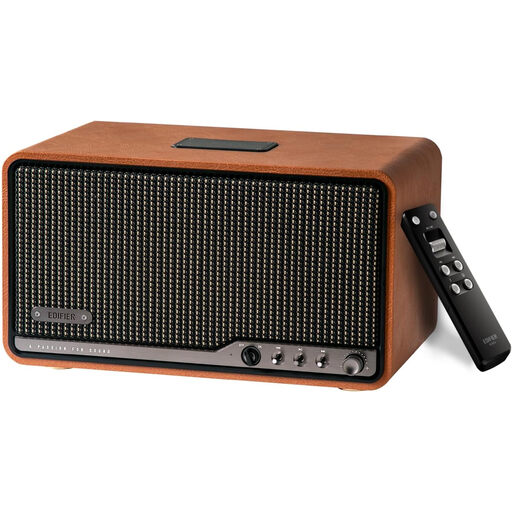
For households considering a tabletop speaker for shared listening and multi-room use, this Joybuy choice is worth checking against the devices and services already at home.
 No image available
A tabletop option for shared listening when multi-room use is part of the plan.
Wireless design; brown finish. Confirm compatibility with your planned speakers and preferred audio services, and check voice features if spoken requests matter to your household.
Yes, on the Echo devices covered by Amazon’s guidance, Alexa will not respond to voice commands until the microphone is turned back on. Google also describes physical microphone controls on listed Home and Nest devices; check the control and status indication on the exact model.
They can where the chosen device, service and account setup support individual profiles. Google describes Voice Match for separate music preferences, and Amazon describes Alexa Profiles and Voice ID; check service and device compatibility, as well as what guests can access.
Check that both devices can join the same supported multi-room group and meet its account and Wi-Fi requirements. Google lists compatible device types for its groups, while Sonos describes synchronised playback between two or more Sonos products.
No: if shared radio listening is the main need, compare radio-focused and non-voice devices as well. A voice-enabled speaker becomes more relevant if household members also want spoken requests, reminders or other supported assistant functions.