
24/7 Customer Support

Free returns

Same-day & Next-day Delivery

Quality Guaranteed

Unlock Your Welcome Offers: FREE Delivery | Up to 80% OFF | Free 30-day JoyPlus trial
Download the APP
Buying a smart TV involves more than choosing the largest screen or the highest number of pixels. A television can advertise 4K, HDR10, QLED or a high refresh rate, yet still be unsuitable for your room, streaming habits or gaming setup.
The right choice depends on screen size, viewing distance, smart platform, connectivity, audio and energy use. This guide explains the specifications worth checking and highlights suitable options for different UK households.
HDR10 TV support can improve compatible content by allowing a wider range between darker shadows and brighter highlights. However, HDR performance also depends on panel brightness, contrast, backlighting and the content itself. An affordable TV with HDR10 may accept the signal without producing the same visual impact as a brighter QLED panel.
Check the full specification rather than relying on the HDR badge alone. Some televisions support HDR10 and HLG, while others add formats such as Dolby Vision or HDR10+.
An 85-inch smart TV can create an engaging living-room display, but its width, stand depth and delivery requirements need careful planning. Conversely, a 32-inch smart TV may suit a bedroom or kitchen but look small when viewed from across a large lounge.
Measure the wall, TV unit and doorway before ordering. Also check whether the stand is included, whether the VESA mounting pattern matches your bracket and whether two people are needed to move a large panel safely.
Google TV, Roku TV, TiVo smart TV platforms and VIDAA each organise apps and content differently. Before purchasing, confirm that the services your household uses are available in the UK version of the operating system. Freely TV can provide live and on-demand content over Wi-Fi on compatible sets, but it still depends on a suitable broadband connection.
A smart platform may also change over time, so check update support and consider whether the TV has enough HDMI ports for a console, soundbar, set-top box or Blu-ray player.
For a main living room, a 55-inch smart TV is a common middle-ground size. A 43-inch or 50-inch set may work better in a smaller lounge, while a 65-inch, 75-inch or 85-inch smart TV needs sufficient viewing distance and wall space.
Resolution matters more as the screen grows. A 4K smart TV has 3840 × 2160 pixels, providing four times the pixel count of Full HD. A 32-inch TV may be perfectly practical in HD Ready or Full HD, particularly in a bedroom or student accommodation, where viewing distances are shorter.
LED, QLED and OLED panels differ in how they produce colour and contrast. A QLED smart TV uses a quantum-dot layer with LED backlighting, while standard LED models can offer a more accessible price. Compare brightness, contrast, viewing angles and local dimming rather than focusing on the panel name alone.
For HDR, look for support for HDR10, HLG and any additional formats required by your preferred streaming services. HDR content requires compatible content and does not automatically improve every programme.
For console gaming, prioritise HDMI 2.1, Auto Low Latency Mode (ALLM), Variable Refresh Rate (VRR) and a suitable refresh rate. A 120Hz or 144Hz television can display more frames than a 50Hz or 60Hz model, although the console, game and cable must also support the required signal.
A Dolby Atmos TV may offer more spacious audio with compatible content, but built-in speakers remain limited by the television’s cabinet. Check speaker output, eARC support and soundbar compatibility.
PC gamers should compare a TV with a 4K gaming monitor, while competitive players may prefer a high-refresh display. An ultrawide gaming monitor offers a broader desktop view, and AR glasses for gaming provide a portable virtual-screen alternative rather than a conventional television replacement.
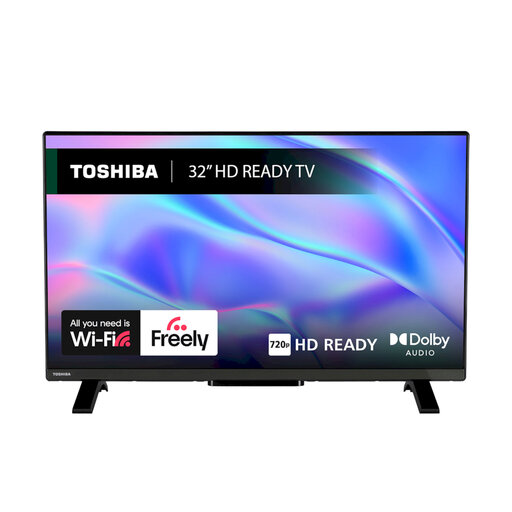
Why This Fits Their Persona: Its compact format suits bedrooms, student rooms and secondary spaces where a larger 4K panel would be unnecessary.
The 32-inch size and HD Ready resolution set realistic expectations for smaller-room viewing rather than paying for unused large-screen specifications.
VIDAA OS, Freely support, HDR10, two HDMI ports, one USB port, Wi-Fi and Ethernet connectivity.
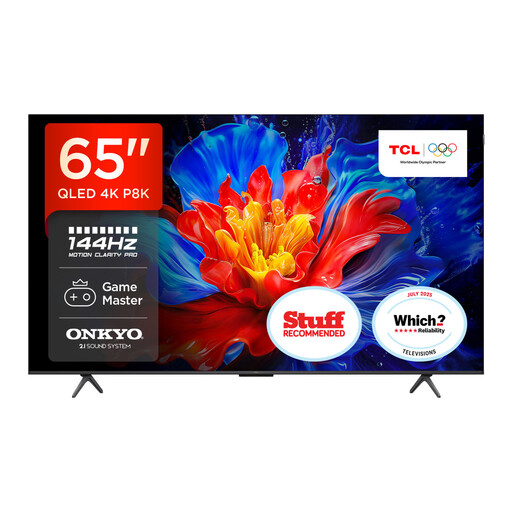
Why This Fits Their Persona: A 65-inch QLED screen suits a dedicated lounge viewing area and households wanting integrated picture, gaming and audio features.
It lists the panel type, resolution, HDR support and gaming connections together, making it easier to compare the complete specification.
QLED 4K display, Google TV, 144Hz motion support, HDMI 2.1, VRR, ALLM and an Onkyo 2.1 sound system with Dolby Atmos support.
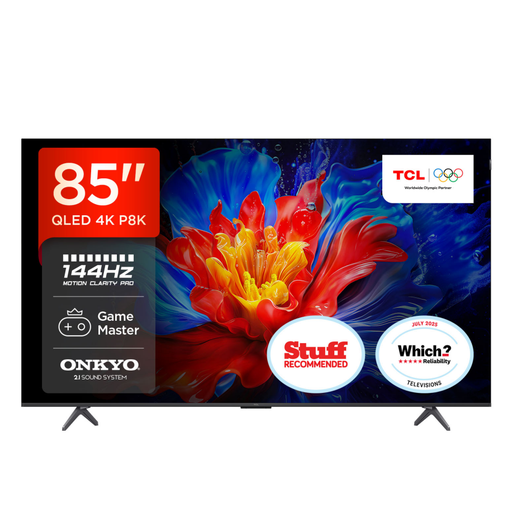
Why This Fits Their Persona: Its large format is aimed at spacious lounges, home cinema setups and users who also want high-refresh-rate console or PC gaming.
The listed dimensions, stand depth, HDMI specification and mounting details help buyers assess room fit and equipment compatibility before purchase.
85-inch 4K QLED panel, four HDMI 2.1 inputs, VRR, ALLM, FreeSync Premium, Google TV and integrated 2.1 Onkyo audio.
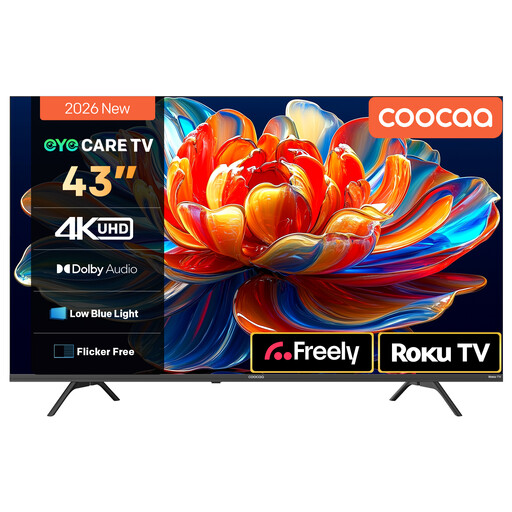
Why This Fits Their Persona: This compact 4K option is suitable for smaller lounges, bedrooms or tenants wanting straightforward streaming access.
The 43-inch size avoids paying for an oversized panel, while the specification clearly identifies 4K resolution, HDR10 and the Roku TV platform.
Roku TV interface, Freely access, HDR10 and HLG support, MEMC motion processing, voice-assistant compatibility and Dolby Audio.
We have compiled a complete, real-time list of products that fully satisfy these strict selection criteria and UK safety regulations.
Before delivery, confirm the TV’s energy label, power requirements and warranty details. Large panels may use more electricity, particularly when brightness is high or HDR content is playing. Use automatic brightness or energy-saving settings where suitable, but check that they do not interfere with your preferred picture mode.
For wall mounting, use a bracket rated for the TV’s weight and VESA pattern. Secure the unit to an appropriate wall structure and leave ventilation space around it. Keep cables tidy without sharply bending HDMI or power leads.
If your broadband signal is weak, streaming quality may suffer regardless of the TV’s resolution. Ethernet can provide a more stable connection, while a soundbar connected through HDMI eARC can improve dialogue and audio depth.
Running costs depend on screen size, energy rating, brightness and daily usage. Larger displays generally use more power than compact models. Check the UK energy label and stated consumption figures, then multiply the kWh figure by your electricity tariff for an estimate.
Service life varies with usage, ventilation, components and software support. Keeping the TV away from heat and moisture, allowing airflow and installing official updates can help maintain reliable operation. App availability may change before the panel itself stops working, so platform support is worth checking.
Not always. Services such as Freely can provide compatible live and on-demand content through Wi-Fi. However, an aerial may still be useful for terrestrial channels, and a stable internet connection is required for internet-based viewing. Check the exact tuner and platform specification before ordering.