Catch-up-first households
If several people use the main screen, easy access to BBC iPlayer, ITVX, Channel 4 and other regularly watched services may matter more than the platform name. Check the services each person needs on the exact device.


Keep a television whose screen still suits your household and add a streaming device if it has a usable HDMI input; consider replacing it when the display or its connections also need changing. Whichever route you choose, check BBC iPlayer, ITVX, Channel 4 and your other essential services against the exact UK model and its current software, rather than assuming that a platform name guarantees every app.
If several people use the main screen, easy access to BBC iPlayer, ITVX, Channel 4 and other regularly watched services may matter more than the platform name. Check the services each person needs on the exact device.
If the picture and screen size still work for you, an HDMI-connected streaming player offers another interface without replacing the display. Check the available input and the television’s picture capabilities first.
Multiple viewers may need manageable app access, account settings, connected-device permissions and privacy choices. Check which controls the selected television or streaming device actually offers.
Decide whether the screen needs replacing before comparing app interfaces. A guide-led Freeview Play setup is a further consideration if your household wants catch-up programmes alongside live television.
Choose it when: The display or its connections need replacing as well as the streaming interface.
Bear in mind: Built-in app support can differ by TV model, region and software version.
Choose it when: Your current screen is satisfactory but you want a different or more current app interface.
Bear in mind: You need an available HDMI input, a practical power arrangement and a separate device; the existing screen still limits the picture it can display.
| Concern | What to check | Who this matters to |
|---|---|---|
| Essential services | Check each must-have app against the exact UK TV or device generation and current broadcaster support information. | If our household relies on particular catch-up services, I need them available on the screen everyone uses. Roughly 33% of consumers put service compatibility first. |
| Keeping the display | Check for a free HDMI input and practical internet and power connections; assess the screen and HDMI chain if you want 4K or HDR. | My current picture is satisfactory, so I would rather change the streaming interface than the television. Around 27% of consumers prioritise keeping their existing display. |
| Guide-led viewing | Check for compatible Freeview Play equipment and internet access; live Freeview channels through its TV Guide also need an aerial. | We move between live programmes and catch-up, and I want to find both through a familiar guide. Roughly 20% of consumers make guide-led viewing their primary concern. |
| Shared controls and privacy | Review account requirements, app locks or profiles where available, and privacy and connected-device settings. | Several people use our screen, so I want account access and privacy choices that we can manage together. Around 20% of consumers put shared controls and privacy first. |
ITVX lists supported devices with platform and generation conditions, while LG says app availability can vary by country and product. A familiar operating system alone does not settle whether your household’s services will work.
Before buying, check each essential service against the exact UK model or streaming-device generation and its current software.
Roku says its streaming players can work with televisions that have HDMI, although a player cannot give an older screen 4K or HDR capabilities it does not have.
If the display still suits you, check its free HDMI input and picture capabilities before deciding to replace the whole television.
Freeview says catch-up viewing needs internet access, while live channels through the Freeview TV Guide need an aerial.
Decide whether you want on-demand programmes, live Freeview channels through the guide, or both before choosing equipment.
TV Licensing says the requirement to hold a TV Licence depends on what you watch, not whether you use a smart TV, streaming stick or aerial.
Check your household’s licence position before watching live TV on any service or using BBC iPlayer.
Samsung smart TVs are an integrated-screen option for households replacing their television.
LG televisions with webOS offer another built-in app interface when replacing the screen.
Roku offers HDMI streaming players for an existing television as well as Roku TV platform options.
Fire TV is available as a separate streaming-stick route and as a built-in television platform.
Apple TV 4K is a separate HDMI-connected box for households considering Apple’s streaming interface.
These products cover two decisions: replacing the television with a smart TV, or adding a Roku streaming stick to a screen you intend to keep. Compare your required apps against the exact model before choosing either route.
 No image available
Consider this 32-inch television if you want to replace a smaller screen and use a built-in catch-up interface.
The listing identifies webOS 22, Freeview Play, Wi-Fi, Ethernet and two HDMI inputs. Confirm the resolution before buying: its title says HD Ready, while its description specifies Full HD. Check your required apps on the exact model.
 No image available
This is a replacement-screen option if you want Freely and Fire TV built into the television rather than using a separate streaming player.
The listing specifies a 50-inch 4K QLED screen, Wi-Fi and three HDMI inputs. Streaming needs internet access; check your essential apps on this exact model and whether any services you choose require subscriptions.
 No image available
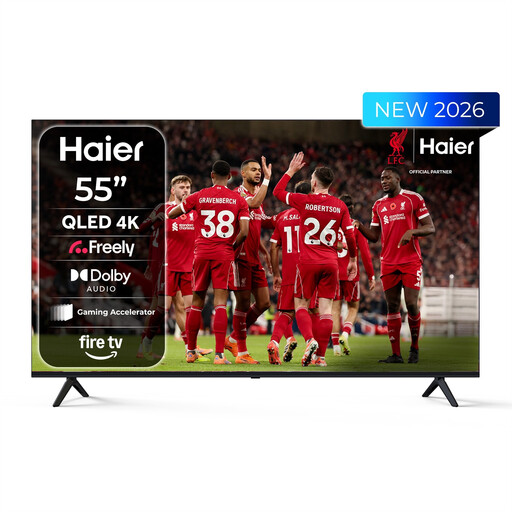
Consider this replacement television if a 55-inch screen and built-in Freely and Fire TV match your household’s setup.
The listing specifies Wi-Fi and three HDMI inputs. Internet access is needed for streaming; confirm your required apps on this exact model and check whether your chosen services require subscriptions.
 No image available
This compact replacement-TV option may suit a smaller room where built-in catch-up viewing matters.
The listing identifies Freeview Play, Wi-Fi, Ethernet and two HDMI inputs. Confirm the installed smart platform before buying: its description says Roku, while its specification calls for checking the specific operating system. Check the required apps on the exact model too.
 No image available
Choose a separate streaming stick if your current television still suits you and has a free HDMI input.
The listing specifies 4K, Dolby Vision, HDR10+ and a voice remote. Roku’s UK guidance says 4K and HDR viewing require compatible equipment, including the television and HDMI chain. Check ITVX, Channel 4 and your other essential apps for this device generation.
Yes, if you watch or download BBC iPlayer programmes, or watch live TV on any channel or streaming service. TV Licensing says the rule applies regardless of the device; watching other services solely on demand does not, by itself, create the same requirement.
Do not assume so. ITVX sets device-specific support conditions, and LG says app availability can vary by country and product. Check each essential service against the exact UK model and current software shortly before buying.
An HDMI streaming stick needs an available HDMI input, along with practical internet and power connections. If you want 4K or HDR, Roku’s guidance says the television and relevant HDMI equipment must support the intended format; a 4K stick cannot change the screen’s native resolution.
No aerial is needed solely for on-demand viewing, but an internet connection is needed. Freeview says an aerial is required for live channels through the Freeview TV Guide.
Review the selected device’s account access, app permissions, recommendations and privacy controls during setup, then revisit them after significant software changes. The Information Commissioner’s Office identifies connected TVs as smart products; the available controls depend on the device and services you use.