Who this setup suits

Households replacing the main TV

Choose the display and its streaming route together. Check app support, sound, inputs and network connection rather than assuming every smart TV provides the same services. Ofcom, ITV and Freeview all note that connected-TV routes and supported apps can vary by platform and model.

Owners of a working TV with outdated apps

You may be able to keep the screen and add a streaming device if there is a suitable HDMI input. Check the cable, internet connection, exact app support and whether the TV and audio equipment support the formats you want. Apple and Amazon set out these requirements for their streaming-device ranges.

Viewers relying on access services

Check subtitles, audio description and signed content on the exact app-device combination. ITV and Ofcom explain that controls and access-service availability can differ between services and platforms.

Buying priorities

Smart TV

Choose it when: You need a new screen and prefer one integrated home screen and remote.

Trade-off: The app platform is tied to the TV, so later app or accessibility needs may require an external device.

Streaming stick or box

Choose it when: Your current TV is satisfactory but its apps are outdated, incomplete or inconvenient.

Trade-off: It uses an HDMI input and may add another remote, cable or network accessory.

Freeview or Freely box

Choose it when: UK live channels, catch-up and guide or recording features matter most on the main screen.

Trade-off: Aerial, Wi-Fi, recording and app features differ between individual products.

Priority What to check Your needs
Essential app access List the broadcaster, catch-up and streaming services you use; check each against the exact UK model and platform; confirm how the app is presented and updated. I want the main screen to provide the services my household actually uses, rather than relying on a broadly similar platform name.
Connections and formats Check free HDMI inputs, any cable requirement, Wi-Fi or Ethernet options, and TV and audio compatibility for 4K, HDR or immersive audio. The new route needs to connect cleanly to my TV and sound system and match the picture and sound formats I expect.
Live TV and catch-up Confirm whether the product supports a combined guide, aerial reception, catch-up players, pause/rewind or recording; check the specific model rather than the product category. I still watch scheduled television and want to know how live channels, catch-up and recording will work together.
Accessibility controls Check subtitle settings, audio description, signing and programme discovery on the required app and device combination; consider remote and voice-control usability too. Access services need to work where I watch, without assuming that an app behaves identically on every platform.

Common buying pitfalls

  • Assuming every connected device has the same UK apps

    Internet access alone does not guarantee the services your household needs. ITV notes that some Android TV and Freeview Play models are unsupported, while Ofcom describes connected-TV platforms as carrying content through platform arrangements.

    Write down essential apps before shopping and check each one on the current support page for the exact UK model or platform.

  • Buying for 4K, HDR or Atmos without checking the whole chain

    A streaming device cannot make an incompatible display or audio system deliver a higher format. Compatible content, the HDMI path, TV and any soundbar or receiver all matter.

    Check display resolution and HDR support, available HDMI ports, audio equipment and cable requirements before choosing a higher-specification device.

    You may also need an HDMI cable, compatible sound equipment or a network accessory.

  • Treating subtitles or audio description as universal

    Subtitle controls and audio-description availability can change between apps and platforms. ITVX, for example, places subtitle controls in device settings on some platforms; Ofcom identifies subtitles, signing and audio description as access services viewers may rely on.

    Where access services are essential, test the exact app-device combination or obtain written confirmation before buying.

  • Replacing the TV when the problem is the connection

    A new TV platform will not add missing apps or automatically fix weak Wi-Fi at the viewing location. Wired networking can be an option for compatible devices, while newer Wi-Fi features depend on the router too.

    Test the current setup near the TV and compare a stable wired option with Wi-Fi performance before replacing the display solely to address buffering.

    A compatible Ethernet adaptor, cable or home-network upgrade may be needed for a wired setup.

Relevant brand references

Apple

Apple TV 4K is an HDMI streaming-box route for households that want an external app platform and can meet Apple’s stated TV, network and account requirements.

  • Apple states that current Apple TV 4K models support HDMI 2.1 and Wi-Fi 6; the Wi-Fi + Ethernet model includes Gigabit Ethernet.
  • An HDMI cable is sold separately, and 4K/HDR streaming requires a compatible 4K/HDR TV.

Amazon Fire TV

Amazon Fire TV Stick devices are HDMI streaming-stick options for adding a current app platform to an existing HD or 4K TV.

  • Amazon states that Fire TV Stick 4K Max works with HD and 4K UHD TVs, with wired internet available through a compatible Ethernet adaptor.
  • 4K streaming needs a 4K UHD TV and available 4K content; Wi-Fi 6E benefits need a compatible Wi-Fi 6E router.

Manhattan

Manhattan’s T4 is a Freeview-oriented set-top-box route for households prioritising live Freeview channels and UK broadcaster catch-up on the main screen.

  • Freeview describes the Manhattan T4 as offering Freeview channels, on-demand content from BBC iPlayer, ITVX and Channel 4, plus pause-live-TV and selected-programme restart features.
  • Check the exact retail model for aerial, network, app, accessibility and warranty details before purchase.

Joybuy product options

These Joybuy options are smart-TV routes for households replacing a screen and wanting integrated connected-TV viewing. Check the current UK app catalogue and access-service behaviour for the exact model before purchase.
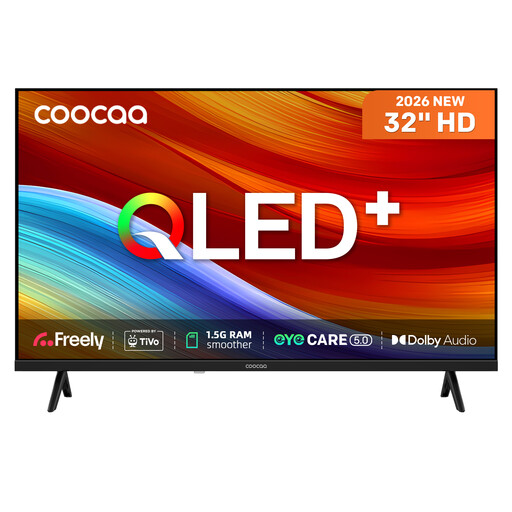
Coocaa 32CTQH38ZUK 32-inch HD QLED Freely TiVo Smart TV

Coocaa 32CTQH38ZUK 32-inch HD QLED Freely TiVo Smart TV

An integrated option for a smaller room where streamed live and on-demand TV are wanted without a separate box.

Stated features include HDR10, Dolby Audio, Freely, TiVo OS, Wi-Fi, LAN, a triple tuner, two HDMI inputs with eARC, optical output and USB recording/time-shift.

Verify essential UK apps, access-service controls and any USB recording, storage or service restrictions for your intended setup.

Joybuy

Coocaa 40CTQH38ZUK 40-inch Full HD QLED Freely TiVo Smart TV

Coocaa 40CTQH38ZUK 40-inch Full HD QLED Freely TiVo Smart TV

This all-in-one option suits a small living space where a built-in streamed TV route and audio connections are useful.

Stated features include Full HD QLED, HDR10/HLG, Dolby Audio, Freely, TiVo OS, Wi-Fi, LAN, a triple tuner, two HDMI ports with eARC, optical output and Bluetooth.

Confirm essential apps, access-service controls, aerial requirements and any recording conditions before buying.

Joybuy

Toshiba 32WV2553DB 32-inch HD Ready VIDAA Freely Smart TV

Toshiba 32WV2553DB 32-inch HD Ready VIDAA Freely Smart TV

A compact smart-TV route for a bedroom, student room or other secondary screen with room for external devices.

Stated features include HD Ready resolution, HDR10/HLG, Dolby Audio, VIDAA OS, Freely, Wi-Fi, Ethernet, USB and two HDMI ports.

HD Ready resolution will not suit a setup that requires a 4K screen; verify required apps and accessibility controls on this exact model.

Joybuy

TCL 55V6C 55-inch 4K Google TV

TCL 55V6C 55-inch 4K Google TV

A larger-screen replacement route for households that also connect consoles or compatible audio equipment.

Stated features include 4K UHD, HDR10+, HLG, Dolby Vision, Google TV, HDMI 2.1, VRR, ALLM and Dolby Atmos.

4K HDR and Dolby Atmos depend on compatible content and connected equipment; check required UK apps and access services for this exact model.

Joybuy
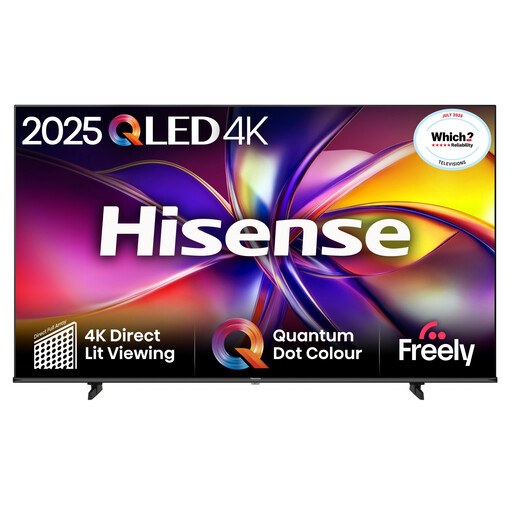
Hisense 43E78QTUK 43-inch 4K QLED VIDAA Smart TV

Hisense 43E78QTUK 43-inch 4K QLED VIDAA Smart TV

A 43-inch smart-TV replacement route for streaming and console use with HDMI-connected equipment.

Stated features include 4K QLED, VIDAA OS, Dolby Vision, HDR10+, HLG, HDMI, Wi-Fi, Bluetooth, Dolby Audio, DTS Virtual X and ALLM.

App availability may vary, so confirm each essential UK service and required access-service controls before purchase.

Joybuy

Frequently asked questions

How do I check whether a connected-TV platform has the apps my household needs?

Make a list of essential broadcaster catch-up and streaming services, then check the current official support page for the exact UK model or platform. ITV notes that some Android TV and Freeview Play models are unsupported, so a platform name alone is not enough.

Do I need an aerial for a connected-TV setup?

It depends on the route. Freely says its channels can be streamed over Wi-Fi and that an aerial can top up channels, while a Freeview Play TV or recorder combines internet-connected on-demand players with live television. Check the exact product documentation for aerial and tuning requirements.

What do I need to add a streaming device to an existing TV?

You need a free HDMI input, the correct HDMI cable where required, a stable broadband connection and any required account setup. Apple specifies HDMI, network access and an Apple Account for certain services; its Wi-Fi + Ethernet model includes Gigabit Ethernet, unlike the Wi-Fi model.

Will a 4K streaming stick give every TV 4K HDR picture and Dolby Atmos sound?

No. 4K streaming needs compatible 4K content and a 4K UHD TV, while Dolby Atmos also depends on compatible content and connected equipment. Check the app or content, streaming device, HDMI path, TV and any soundbar or AV receiver as one system.

What accessibility checks matter before choosing a TV platform?

Check subtitles, audio description, signing, remote usability and how each service exposes those features on the exact platform. ITVX states that subtitle controls on Roku sticks and NOW boxes are handled in device settings, while Ofcom identifies subtitles, audio description and signing as access services viewers may rely on.