What should you check before choosing?
Decide whether the display needs replacing before comparing app platforms. Then check the services and features your household actually uses, rather than relying on a general smart-TV or 4K label.
Add a streaming stick
Consider it: The current TV has a working HDMI input and a satisfactory screen, but its built-in apps are the problem.
Keep in mind: A stick supplies another TV platform; it cannot improve the existing panel or add display capabilities the TV lacks.
Add a streaming box
Consider it: You want a separate TV platform while keeping the current screen, and a particular box’s apps or household features suit your needs.
Keep in mind: Setup differs by device. Google says Google TV Streamer setup requires a compatible mobile device with the Google Home app.
Replace the smart TV
Consider it: The screen, inputs, picture capability or physical condition need replacing as well as the app platform.
Keep in mind: App and feature support still depends on the exact model; a new smart TV does not guarantee access to every service.
Keep an existing TV platform
Consider it: Your current provider box or TV platform already carries the services and functions the household uses.
Keep in mind: Check features individually. ITVX Help distinguishes general platform support from availability of live and regional content.
| Priority | What to check | Your needs |
|---|
| Broadcaster apps |
Check BBC iPlayer, ITVX and Channel 4 on the exact UK model and platform. Check the device’s app store as well as current service support information; LG UK says unsupported webOS apps do not appear in its Content Store. |
I want the services we already watch on the main screen, whether I keep the TV and add a device or replace it. |
| Live and regional TV |
Check ITVX live TV and regional live content separately from the basic app listing. ITVX Help lists platform-specific conditions; it currently lists regional live content as unavailable on tvOS, Android TV and LG Smart TVs from 2025 onward. |
Regional ITV programmes matter in our household, so simply being able to install ITVX is not enough. |
| Accessibility |
Check the device’s navigation options and each app’s captions or other required features. Amazon documents VoiceView and caption controls for Fire TV; Channel 4 describes platform-specific subtitle support, with differences between on-demand and live viewing. |
Someone using our TV needs controls and programme accessibility features that work in the apps they watch. |
| Display and connection |
Check the working HDMI input and the display capability you intend to use. For applicable Google streaming devices, Google specifies HDCP 2.2 for 4K, a 4K-capable display and at least 20 Mbps for 4K content. |
If we keep our TV, the added device has to work with that screen. A 4K label alone will not make an older display show 4K. |
| Setup and accounts |
Check whether setup needs a compatible phone or tablet and how each TV app handles sign-in. Google specifies mobile-device setup for Google TV Streamer; ITVX and Channel 4 provide TV account sign-in instructions. |
We need a sign-in route that the people setting up and using the main TV can manage. |
Which TV platforms are relevant?
These platform references help narrow the checks; they do not establish that every device in a brand’s range supports the same apps or features.
Amazon Fire TV
A platform found on streaming devices and Fire TV sets. ITVX Help lists Amazon Fire devices among its supported platforms, and the UK Amazon Appstore lists a BBC iPlayer Fire TV app.
- Amazon’s Fire TV help documents VoiceView and subtitle or closed-caption controls.
- Check the selected model and broadcaster app for the particular live, regional or accessibility function you need.
Google TV
An option for an existing screen through a Google TV streaming device, as well as on compatible televisions. Channel 4 lists its app for Chromecast with Google TV and Google TV Streamer.
- Google publishes display, connection and setup requirements for its streaming devices, which can be checked against the household’s equipment.
- ITVX Help says regional live content is currently unavailable on Android TV; confirm app and feature support for the exact Google TV device.
Apple TV
A set-top-box platform for keeping an existing display. Apple describes App Store access, while ITVX Help lists Apple TV support from tvOS 18 onward and the UK BBC iPlayer App Store listing includes Apple TV.
- An option to examine if the household wants the Apple TV app platform rather than a replacement screen.
- ITVX Help currently lists regional live content as unavailable on tvOS, which matters if that is part of your usual viewing.
LG webOS
A built-in smart-TV platform to consider when replacing the display. LG UK says apps unsupported on webOS do not appear in the LG Content Store.
- ITVX Help lists LG Smart TVs from 2016 onward among supported devices, subject to its model and support conditions.
- ITVX Help lists regional live content as unavailable on LG Smart TVs from 2025 onward; check the exact TV and required feature.
Joybuy options for a stick or replacement TV
These options cover adding a Roku streaming stick to a usable television or replacing the main screen with a TCL Google TV. Choose the route that addresses the hardware you actually need to change, then check your required UK apps and features on the exact model.
 No image available
Roku Streaming Stick 4K Dolby Vision
A separate streaming-stick option if you are keeping a TV with a suitable HDMI input. The product description states direct HDMI connection, 4K, Dolby Vision, HDR10+ and an included voice remote; check the existing display’s capabilities and the exact model’s UK broadcaster-app features before choosing it.
View on Joybuy
 No image available
TCL 65V6C 65-inch 4K HDR Google TV
For replacing a 65-inch main screen and its built-in TV platform. The listing states Direct LED, Google TV, HDMI 2.1, VRR and Dolby Atmos; its 120Hz Game Accelerator claim is limited to FHD, not native 4K refresh. Check required UK broadcaster apps and live or regional features on the 65V6C.
View on Joybuy
 No image available
TCL 55V6C 55-inch 4K HDR Google TV
A 55-inch screen-and-platform replacement with Direct LED, 4K HDR, Google TV, HDMI 2.1, VRR and Dolby Atmos stated in the listing. Its 120Hz Game Accelerator claim applies to FHD; check the 55V6C’s UK broadcaster apps and required ITVX functions separately.
View on Joybuy
 No image available
TCL 43V6C 43-inch 4K HDR Google TV
For a household replacing its main screen with a 43-inch Google TV. The listing states Direct LED, 4K HDR, HDMI 2.1, VRR and Dolby Atmos. Its 120Hz Game Accelerator claim is for FHD; confirm the apps and live features you use on the exact 43V6C model.
View on Joybuy
 No image available
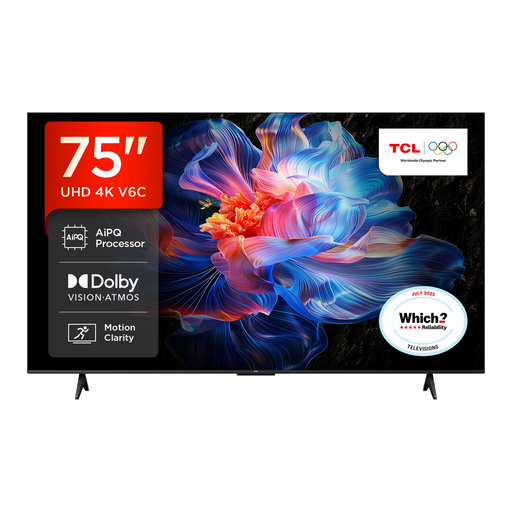
TCL 75V6C 75-inch 4K HDR Google TV
A 75-inch replacement-TV option if the intended room and installation suit that screen size. The listing states Direct LED, 4K HDR, Google TV, HDMI 2.1, VRR and Dolby Atmos; its 120Hz Game Accelerator claim applies to FHD. Check app and regional-live support for the exact 75V6C.
View on Joybuy
Common questions
Can a streaming stick replace the apps on a working smart TV?
A stick can provide a separate app platform if the TV has a suitable working HDMI input and its screen still meets your needs. It cannot repair a failing display or add 4K or HDR capability that the TV lacks; check your required apps on the chosen stick.
Will ITVX have the same features on every device?
No. ITVX Help lists platform and model conditions, and its regional live-content availability differs from general app support. It currently lists that feature as unavailable on tvOS, Android TV and LG Smart TVs from 2025 onward, so check the exact device if regional viewing matters.
Will buying a 4K streaming device give me 4K viewing?
Not on its own. For applicable Google streaming devices, Google specifies a 4K-capable display, compatible content and an internet connection of at least 20 Mbps for 4K; HDCP 2.2 is required to support 4K content. Check the requirements of the device you choose against your TV and connection.
What should I prepare for broadcaster-app sign-in?
Have access to the accounts used by your household and check the sign-in instructions for each TV app. ITVX and Channel 4 describe TV sign-in routes that can involve a QR code or web code, so a phone, tablet or computer may make setup more practical.
How do I check accessibility before buying?
Check both the exact device and the apps you intend to watch. Amazon documents VoiceView and caption controls for Fire TV, while Channel 4’s subtitle information distinguishes platforms and on-demand from live content; a device-level setting alone does not establish every app’s support.


