Households keeping a usable TV
If the picture, size and HDMI input still suit you, a compatible stick or media player offers another way to access streaming apps without replacing the display. Check the apps you need on the player itself.


Keep an existing TV and add a streaming stick or media player if its screen and HDMI input still meet your needs and outdated apps are the main problem. Replace the TV if you also need a different screen or want live TV and catch-up services integrated into a compatible set. In either case, check every service you use against the exact device model and generation before buying.
If the picture, size and HDMI input still suit you, a compatible stick or media player offers another way to access streaming apps without replacing the display. Check the apps you need on the player itself.
Make BBC iPlayer, ITVX, Channel 4 and 5 part of your device check if you use them. ITV, Channel 4 and Channel 5 publish platform-specific support information; a general “smart TV” description does not establish support for your exact model.
If you are also choosing a 4K HDR screen, sound equipment or a wired network connection, compare those requirements with the player. Apple, Google and Amazon list different video, audio and connection features for their named devices, but the rest of the setup and the chosen service must also be compatible.
Decide whether the television screen needs changing before choosing a playback platform. Then check the services your household actually watches: device-family support does not necessarily extend to every model or operating-system version.
Choose it when: The screen still suits the room and you mainly need another app platform through a working HDMI input.
Accept: The stick cannot change the TV panel’s resolution or picture capabilities.
Choose it when: You want a separate app platform and can make use of an Ethernet-capable model, such as the specified Apple TV 4K variant or Google TV Streamer (4K).
Accept: You still need a suitable HDMI TV; Apple and Google specify separately sold HDMI cables for these players.
Choose it when: You need a different screen as well as an integrated live-TV and catch-up guide.
Accept: Freeview Play requires a compatible set and internet connection; check other required apps against that exact model.
| Concern | What to check | Who this matters to |
|---|---|---|
| Required apps | Check each service’s current support for the exact device family, generation and required software version. | If ITVX, Channel 4, 5 or a subscription app is essential to my viewing, I need it to work on the device I choose. Around 36% of consumers put required-app compatibility first. |
| Keeping the existing screen | Check that the TV’s HDMI input works and that its size and picture still meet your needs. | When my current screen still fits the room, I would rather update playback than replace the display. For around 29% of consumers, keeping that screen is the primary concern. |
| Picture, sound and connection | Match 4K HDR and audio formats to the TV, equipment and service; check whether Ethernet or Wi-Fi 6E suits your network. | If I am building around compatible 4K HDR equipment or need a practical wired connection, those capabilities shape my choice. They come first for around 21% of consumers. |
| Live TV and catch-up in one guide | Confirm that the TV or recorder specifically supports Freeview Play and check its required apps. | I want to move between live programmes and broadcaster catch-up without relying on a separate app-first interface. Around 14% of consumers primarily want that integrated guide. |
Support can vary by service, platform and device generation. Channel 4 says some older devices became unsupported in 2026, so an app logo or a general “smart” description is not enough to settle the choice.
List your essential services and check each provider’s current requirements against the exact model before ordering.
A player’s listed formats do not add those capabilities to an incompatible television or audio system. Apple specifies a compatible 4K HDR TV for 4K HDR viewing; Amazon limits Atmos to select services with compatible equipment.
Check the screen, HDMI connection, audio equipment and services together. To use the Fire TV Stick 4K Max’s Wi-Fi 6E capability, Amazon also specifies a compatible Wi-Fi 6E router.
Apple and Google specify separately sold HDMI cables for their named media players, so check what you need to connect the chosen device.
TV Licensing states that watching live or on-demand programmes on BBC iPlayer requires a TV Licence, regardless of whether you use a television, stick or another device.
Check your household’s viewing against TV Licensing’s current guidance, including its rules for live programmes, rather than judging by the device alone.
Freeview says its guide integration is for compatible Freeview Play televisions or recorders connected to the internet. A smart-TV label by itself does not identify that feature.
If a combined live-TV and catch-up guide matters to you, confirm Freeview Play support on the exact set or recorder and check the other apps you use.
A streaming-stick platform to consider when retaining an HDMI television. ITV, Channel 4 and Channel 5 list Amazon Fire TV devices among their supported routes; check the required services against the particular stick.
Apple TV 4K is a separate media-player option for a suitable HDMI television, including a Wi-Fi + Ethernet variant.
Google TV Streamer (4K) is a separate player for an HDMI television when a Google TV interface and wired-network option suit the household.
An integrated guide option to look for on a compatible TV or recorder if live television and broadcaster catch-up are central to your viewing.
These choices include integrated smart TVs for households changing the screen and a Roku stick for those keeping an HDMI television. Compare the exact model’s apps and connections with your own setup before choosing either route.
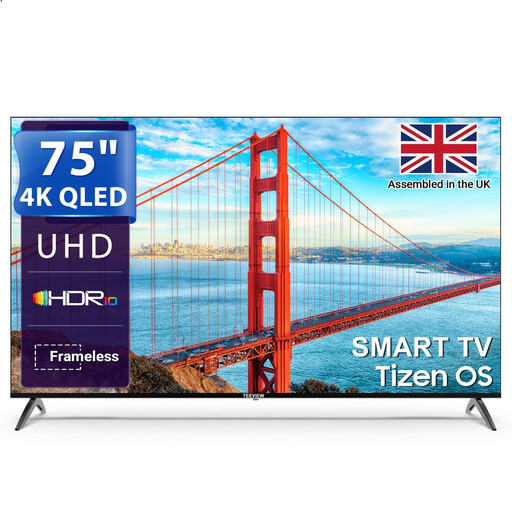 No image available
Consider this integrated TV if you need to change the screen as well as the streaming interface. Its listing describes a 75-inch QLED display with 3840 × 2160 resolution, HDR, Wi-Fi and Ethernet, and names Freeview Play.
Confirm the exact model designation, room fit and support for each app you use before ordering; the screen specifications alone do not establish picture performance.
 No image available
This is a smaller integrated-screen option if a 32-inch TV suits the room. The product description lists a 1366 × 768 HD Ready display, Roku platform, Wi-Fi and Ethernet.
Check the exact operating-system version and your required apps. Freeview HD in the title should not be taken as confirmation of a Freeview Play catch-up guide, and this is not a 4K display.
 No image available
This stick is for keeping a TV with a suitable HDMI input while adding a separate streaming interface. Its description lists 4K Ultra HD, Dolby Vision, HDR10+ and an included voice remote.
Check current support for every broadcaster and subscription app you need on this exact Roku model. Its 4K and HDR formats also depend on a compatible TV and service.
 No image available
Consider this integrated TV if you need a 70-inch replacement screen. Its description lists a QLED panel with 3840 × 2160 resolution, HDR, Wi-Fi and Ethernet.
Confirm the exact model and operating system before buying: the title names Tizen OS while part of the description refers to WebOS. That distinction matters when checking the apps you need; also confirm the set’s dimensions for installation.
No, not if its screen and HDMI input still suit you. A streaming stick or media player can provide another app platform, but check the exact device and generation against each service you need; ITV, Channel 4 and Channel 5 publish their own support requirements.
Check the services your household uses, including BBC iPlayer, ITVX, Channel 4 and 5 where relevant. Freeview says compatible internet-connected Freeview Play TVs and recorders put those services and UKTV Play alongside live television, but you should still check support on the exact equipment you intend to buy.
No: the viewing activity matters, not whether playback comes from a stick or the TV itself. TV Licensing states that live and on-demand BBC iPlayer programmes require a TV Licence; check its current guidance for any other live viewing your household plans to do.
No. Apple specifies a compatible 4K HDR television for 4K HDR streaming. Check the display and connection as well as the format offered by the programme and service; a player cannot add 4K HDR capability to an incompatible screen.
Consider Ethernet if you can run a wired connection to the TV location and Wi-Fi reliability concerns you. Apple lists Gigabit Ethernet on its Apple TV 4K Wi-Fi + Ethernet variant, and Google lists it on Google TV Streamer (4K); neither connection option guarantees uninterrupted playback on every household network.