What should you check before buying?
Start with the devices already in the home, then check who can control them, what a shared room might expose and how the exact model will remain supported.
| Priority | What to check | Your needs |
|---|
| Device compatibility |
Check the exact light, plug or thermostat against the chosen app or controller. Confirm any bridge or hub requirement and whether a Matter device supports the multi-admin setup you intend; the Connectivity Standards Alliance describes multi-admin for compatible Matter devices. |
I want the controls to work with devices already in the home, without tying everyone to an app they would not otherwise use. |
| Household access |
Compare resident and administrator roles, activity access and the steps for removing a member. Google documents separate Home access levels; Samsung SmartThings says Location members have almost the same permissions as the owner, apart from certain membership and Location-management actions. |
Everyone should be able to use shared devices, but not everyone needs to change home-wide settings or manage other residents. |
| Shared-room privacy |
Review personal results, guest behaviour, microphone controls and recording settings on the specific speaker or display. Google documents Guest Mode for supported devices; Amazon documents microphone-off and recording controls for Echo speakers. |
If a voice speaker sits in the kitchen or lounge, I do not want a visitor's request to expose a resident's personal information. |
| Control type |
Match the device to the task: a compatible smart plug switches a plug-in item, while radiator heating control calls for a suitable thermostat and valve setup. For voice control, also check that the controller supports the particular accessory. |
Switching a lamp is a different job from coordinating heating; I would choose the control for the task rather than assume one purchase manages the whole home. |
| Continuing support |
Check the manufacturer's security-update statement for the exact model and purchase conditions, plus any published end-of-support notice. The UK Information Commissioner's Office advises smart-product buyers to check the manufacturer-stated update period. |
Before relying on an app for shared control, I want to know how long the connected product is expected to receive security updates. |
Relevant smart-home platforms
These platforms illustrate different ways to share control; their account settings and support statements should be checked for the devices you plan to use.
Google / Nest
Google Home combines app and voice control for compatible household devices, including supported speakers, displays and third-party accessories.
- Google documents admin and member access, while Voice Match supports up to six people in one home.
- Guest Mode and personal-results settings need attention in shared rooms. Google's stated five-year minimum security-update policy is measured from the start of sales on the US Google Store; check the applicable statement for a specific UK purchase.
Amazon Alexa / Echo
Alexa offers voice-led control of compatible lights, plugs and thermostats through Echo devices.
- Amazon documents Echo microphone-off and voice-history controls, alongside individualised Alexa Profiles created under the same Alexa account.
- Amazon's minimum four-year security-update commitment applies to covered Echo devices bought new from Amazon as seller on Amazon.co.uk; check the model listing and seller conditions.
Apple Home / HomePod
Apple Home provides shared control of compatible HomeKit and Matter accessories; Apple says HomePod mini can act as a home hub for remote control.
- Apple documents invited residents and configurable remote-control permissions.
- Removing someone from Apple Home may leave their access through a separate accessory app. Check permissions in every linked app and the support statement for the exact HomePod model.
Samsung SmartThings
SmartThings uses a shared Location for compatible devices and routines, offering an app-centred way for residents to control them.
- Samsung SmartThings UK documents invitations that give members access to devices and routines in a Location.
- Members have almost the same Location permissions as the owner, although they cannot add or remove members or delete the Location; check whether that access level suits the household.
Joybuy options for plugs and heating
These options address two different shared-home tasks: controlling a compatible plug-in device and adjusting radiator heating. Check each against your existing equipment and chosen household-access setup.
 No image available
Eve Energy Matter Smart Plug with Power Meter, UK Type G
For switching a compatible plug-in lamp or appliance, the product description lists remote control, schedules and energy monitoring. It specifies indoor use and a maximum load of 13A/2900W. The title mentions Wi-Fi, while the detailed description specifies Matter over Thread: confirm the exact connection type and whether your setup needs a Matter controller and Thread Border Router. Check household permissions and the model's security-update statement in the platform you intend to use.
View on Joybuy
 No image available
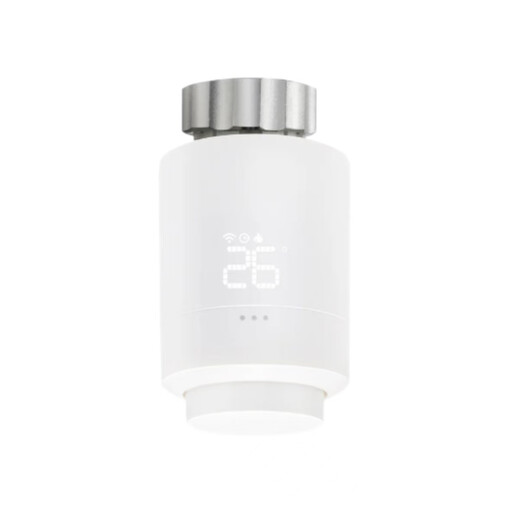
Maginon WT-1 Zigbee Smart Radiator Thermostat
For a household sharing radiator heating control, the product description lists app and voice control, schedules and manual adjustment. It names M30x1.5, Danfoss, Giacomini and Caleffi valve connections; confirm your radiator valve and heating arrangement match. Check the contents of this WT-1 offer for gateway inclusion, as the descriptions referring to a WT-2G set conflict. Also review shared-user permissions, privacy settings and the WT-1 security-update statement before relying on app control.
View on Joybuy
Questions about shared control
Will Matter make every feature work in every smart-home app?
No. The Connectivity Standards Alliance says Matter multi-admin lets compatible devices connect to multiple apps and ecosystems simultaneously, but that does not establish identical features in each app. Check the exact accessory's supported platforms, features and any bridge or hub requirement.
How can guests use a shared Google speaker without personal results?
Guest Mode is an option on supported Google speakers and displays. Google says it deletes audio recordings and voice-assistant activity from the device owner's account while active; third-party services used through the assistant may still retain related activity.
Does removing a resident from Apple Home revoke all accessory access?
Not necessarily. Apple says a removed resident may still control an accessory through a separate app if they retain permission there. Review and remove their access in each linked accessory app as well as Apple Home.
Can Google Voice Match eliminate privacy risks in a shared room?
No. Google says voice recognition can make mistakes, so a recognised-voice setting should not be the only safeguard for personal information. Consider turning off personal results on a shared or guest-facing device and using Guest Mode where supported.
How long does Amazon support Echo devices with security updates?
Amazon states that covered Echo speakers, subwoofers and switches bought new from Amazon as seller on Amazon.co.uk receive security updates for at least four years from purchase, or until a later listed date for the model. Check the exact device, listed date and seller conditions, particularly for refurbished or third-party-seller stock.


