
24/7 Customer Support

Free returns

Same-day & Next-day Delivery

Quality Guaranteed

Unlock Your Welcome Offers: FREE Delivery | Up to 80% OFF | Free 30-day JoyPlus trial
Download the APP
Modern smartphones are equipped with impressive cameras, yet achieving that smooth, cinematic look in your videos can be a challenge. Shaky footage from walking, panning or capturing action can instantly make content look amateurish. Whether you are a budding vlogger, a travel enthusiast documenting your adventures or simply want to create better family videos, a smartphone gimbal stabiliser is the tool that can elevate your videography.
This guide is designed to help you understand the key features to look for in a mobile video stabiliser. As the Joybuy Product Recommendation Officer, my role is to provide clear, practical advice to help you find a device that fits your needs, without the marketing hype. We will explore what makes a good gimbal and look at a few notable options available in the UK market.
Choosing the right gimbal involves more than just picking the first one you see. Consider these factors to ensure you get a device that works for you.
The core function of a gimbal is to stabilise your phone. This is achieved through motorised axes that counteract your movements.
If you plan to shoot on the go, size and weight are critical. A foldable phone gimbal is highly convenient, as it can be easily packed into a bag or even a large pocket. Also, look for models that include a portable gimbal with tripod functionality. A built-in or detachable tripod is invaluable for static shots, time-lapses or filming yourself without needing someone to hold the camera.
Modern gimbals are more than just stabilisers. Many come with intelligent features that can transform your creative process. An AI tracking gimbal can automatically follow a subject, which is perfect for solo creators. Other features to look for include gesture controls for hands-free operation, integrated fill lights for low-light situations and companion apps that unlock special shooting modes.
Before purchasing, always verify that the gimbal is compatible with your device. Check the manufacturer's specifications for supported phone weights and dimensions to ensure it will work as a gimbal for iPhone or a gimbal for Android models.
Here are a few recommendations that offer a strong combination of features, performance and value for different types of users.
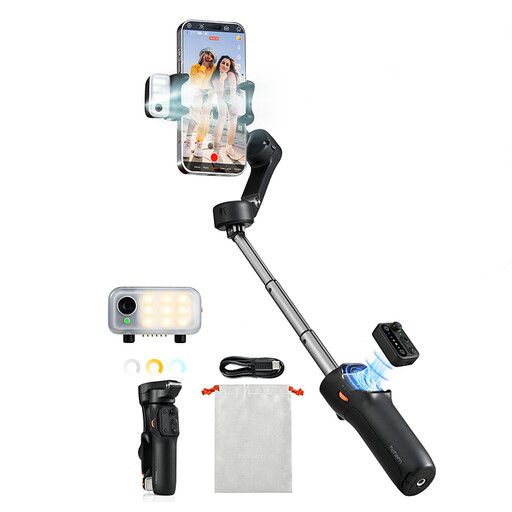
Why It Stands Out This hohem model is an all-in-one solution packed with practical features. Its standout function is the magnetic AI tracking module, which works with gesture controls without needing to be connected to an app or Bluetooth. This makes setup incredibly fast and reliable. Combined with a built-in extension rod and tripod, it provides a complete vlogging kit in one portable package.
Pros
Who is it for? This is an excellent choice for vloggers and content creators who need a versatile, feature-rich tool that is ready to go at a moment's notice, without fussing with app connections for core features like tracking.
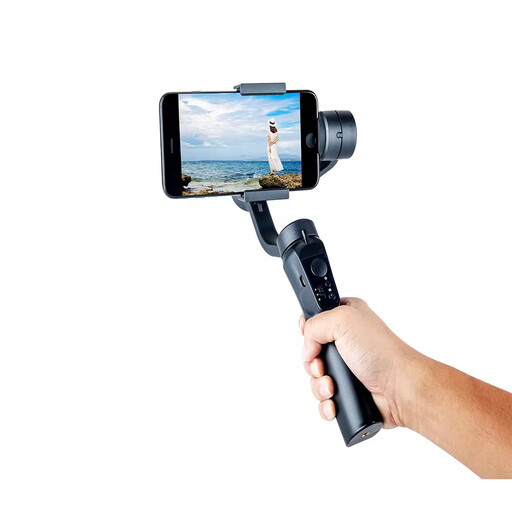
Why It Stands Out The Verbex C16 focuses on simplicity, portability and affordability. As a 2-axis gimbal, it provides basic stabilisation to remove minor shakes and vibrations, making it a significant step up from handheld shooting. Its lightweight and foldable design makes it easy to carry anywhere, and its app integration offers smart features like face tracking and gesture controls for those getting started with stabilised video.
Pros
Who is it for? Ideal for casual users, families or beginners on a tight budget. If you need a simple mobile video stabiliser for holiday clips or social media stories and don't require the advanced smoothness of 3-axis systems, this is a practical starting point.
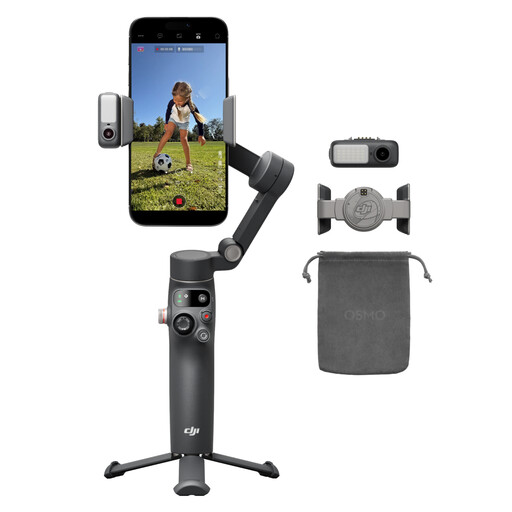
Why It Stands Out From a brand well-regarded in the gimbal and drone space, the DJI Osmo Mobile 8 offers a polished and powerful experience. It delivers robust 3-axis stabilisation and integrates advanced features like native tracking that works directly with your phone's camera. The ability to perform a seamless 360° pan rotation opens up creative possibilities, while the built-in extension rod and tripod ensure you are ready for any shot.
Pros
Who is it for? This gimbal is suited for semi-professional creators and tech enthusiasts who value a premium build, reliable performance and deep software integration. It is a strong contender for anyone seeking a top-tier gimbal for iPhone or Android.
These three models represent a fraction of the gimbals available. If your needs are different or you simply wish to explore a wider range of devices, there are many other options to consider.
For a wider selection of mobile video stabilisers, browse our complete Camera Gimbal category.
Do I really need a 3-axis phone stabiliser? For dynamic shots that involve walking, running or following a moving subject, a 3-axis model is highly recommended. It compensates for pan, tilt and roll movements, resulting in significantly smoother footage. For static shots or simple pans from a fixed position, a 2-axis stabiliser may be sufficient.
Are smartphone gimbals compatible with all phones? Most gimbals are designed to work with a wide range of both Android and iPhone models. However, compatibility is determined by the phone's weight and dimensions (width and thickness). It is essential to check the gimbal's specifications for its maximum payload and supported phone size to ensure a secure and balanced fit.
Can I use a gimbal with a phone case on? This depends on the case. A thin, lightweight case may not cause any issues. However, bulky or heavy cases can add too much weight and size, preventing the gimbal's motors from balancing correctly. For optimal performance and to avoid straining the motors, it is generally advisable to remove the phone case before mounting it on the gimbal.