
24/7 Customer Support

Free returns

Same-day & Next-day Delivery

Quality Guaranteed

Unlock Your Welcome Offers: FREE Delivery | Up to 80% OFF | Free 30-day JoyPlus trial
Download the APP
As a Joybuy Product Recommendation Officer, my role is to help you navigate the crowded market of tech accessories. When it comes to creating smooth, professional-looking video with your phone, a smartphone gimbal stabiliser is a game-changer. However, the market is filled with confusing terms and features that can lead to a disappointing purchase.
Before you invest, let's look at the common pitfalls that UK shoppers encounter. Understanding these will help you choose a device that genuinely elevates your video content, rather than one that gathers dust in a drawer.
To make an informed choice, focus on these non-negotiable specifications. They are the true indicators of performance and usability for anyone creating content, from a vlogging hobbyist to a small business owner.
The single most important feature of a handheld phone stabiliser is its number of motorised axes.
A stabiliser's utility is directly linked to how often you carry it. A bulky, heavy device will inevitably be left at home. Look for a foldable gimbal design that can easily fit into a small bag or a large pocket. The material also matters; aluminium alloy or high-quality composites offer a good balance of durability and low weight.
For solo creators, AI tracking gimbal technology is a revolutionary feature. Early versions required clunky app integration and constant Bluetooth pairing. Modern systems often use a dedicated sensor and gesture controls. This allows the gimbal to automatically follow you as you move, keeping you perfectly in frame without needing someone else to operate the camera. It's an invaluable tool for tutorials, presentations or active vlogs.
Instead of a generic list, we've matched specific products to different user needs. This helps you find a tool that fits your specific creative workflow.
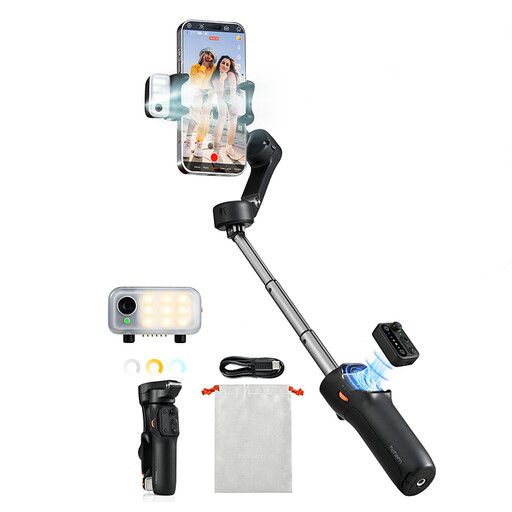
Why This Fits Their Persona: This is an all-in-one solution for someone serious about creating high-quality mobile video for platforms like YouTube or Instagram. It combines top-tier stabilisation with features that simplify the solo creation process, and its foldable design makes it perfect for vlogging on location across the UK.
It is a true 3-axis phone stabiliser, delivering on the core promise of smooth footage. The AI tracking works without an app, avoiding gimmicky software dependency, and its wide compatibility addresses the payload trap.
The integrated magnetic AI tracker and fill light is a standout feature, removing the need for extra gear. The 13-hour battery life supports a full day of shooting.
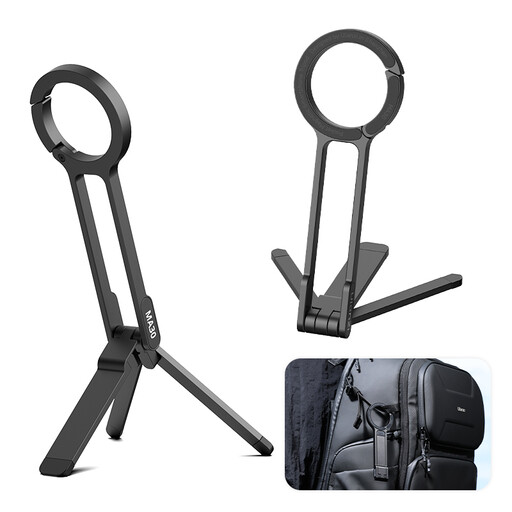
Why This Fits Their Persona: This is for the small business owner or marketer who needs to create quick, static content for TikTok or Instagram Reels. It's not a motorised stabiliser, but a highly portable magnetic tripod and grip. It's perfect for setting up a phone quickly on a desk to film a product or clipping it to a bag for immediate access.
It avoids the "fake gimbal" trap by being an honest, well-designed tool for a different purpose: providing a stable base and a secure grip. Its value is in its speed and portability, not motorised stabilisation.
The Maglock carabiner design is its main strength, allowing it to be clipped anywhere. The dual-sided magnets and aluminium build provide a secure and fast setup for compatible phones like a gimbal for iPhone models with MagSafe.
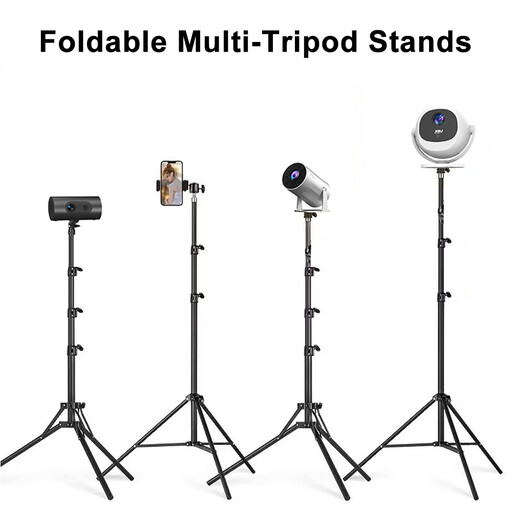
Why This Fits Their Persona: This is for the creator who films exclusively in a fixed location, like a home office or studio. It's ideal for shooting unboxings, art tutorials, or live streams where camera height and angle are more important than stabilising movement.
This product correctly identifies its "gimbal" as a 360° rotating universal joint, not a motorised stabiliser. This manages expectations perfectly—it's a tall, versatile tripod, not a device for stabilising walking shots.
Its primary advantage is the impressive height adjustment range (60cm to 160cm), allowing for everything from tabletop to standing-height shots. The sturdy aluminium tripod base ensures stability for static filming.
We have compiled a complete, real-time list of products that fully satisfy these strict selection criteria and UK safety regulations.
For basic stabilisation, most gimbals work straight out of the box using their physical controls. However, to access advanced features like motion-lapse, dolly zoom or specific object tracking modes, you will typically need to use the manufacturer's companion app. Some newer models are reducing this dependency, offering features like AI tracking that function without any app or Bluetooth connection.
Battery life varies significantly between models, but a good quality gimbal should offer between 8 to 13 hours of operation on a single charge. This is generally sufficient for a full day of shooting. Models with larger batteries or features like power bank functionality (to charge your phone) may have slightly different runtimes. Always check the manufacturer's stated battery life.
This depends on two factors: the gimbal's payload capacity and the width of its clamp. Always check the maximum weight and phone dimensions (width and thickness) the gimbal supports. A slim case on a standard phone is usually fine. However, a heavy, rugged case or the use of add-on lenses might exceed the payload or prevent the phone from being balanced correctly, requiring you to remove the case.