What matters when choosing?
Laptop
Choose it when: Forms, documents and sustained typing are regular tasks; Ofcom's 2022 findings point to the difficulty of doing these on a smartphone.
Trade-off: A laptop is less pocketable than a phone, and its keyboard, weight and accessibility controls still need to suit the user.
Smartphone
Choose it when: Calls, messages and short online tasks while away from home take priority.
Trade-off: A phone may be awkward as the only device for frequent forms or document work, as Ofcom's 2022 findings indicate.
Tablet
Choose it when: A larger touch screen than a phone is useful for reading, video calls and web access.
Trade-off: Long typing sessions or complex forms may call for a compatible keyboard; test the actual task before treating a tablet as a laptop replacement.
Once the device type fits your main tasks, check how you will use it, connect it and get help with setup. Refurbished describes a device's sourcing and condition, not a separate screen or input method.
| Concern |
What to check |
Who this matters to |
| Forms and documents |
Try a representative form or document on the intended screen. Check typing comfort and whether required websites or software work on that device. |
I need to complete lengthy forms or applications without struggling to read and enter information on a small screen; around 33% of consumers would put complex-task capability first. |
| Portable everyday access |
Try unlocking the device, reading its screen and using your essential calls, messages, apps and websites. |
If staying in touch and handling short tasks while out matters most to me, I need a device I can carry and use comfortably; roughly 25% of consumers would prioritise portable access. |
| Accessible use and setup |
Test relevant text, speech, caption and input settings with real tasks. Check compatibility before buying an external input device. |
I need to see, hear or control the device in a way that works for me, with help getting started if needed; about 25% of consumers would make accessible use and setup their primary concern. |
| Affordability and continued use |
For a refurbished device, confirm its condition and software-support schedule. Check connectivity and local support separately. |
Keeping the device usable and connected matters more to me than choosing a particular form factor; around 17% of consumers would put affordability and continuity first. |
Relevant brands to consider
These platform brands are useful references when checking controls and software support; their inclusion does not establish that a particular device will suit you.
Microsoft
Windows laptops are relevant when forms, documents and a conventional computer workflow are central to the decision.
- Microsoft documents Windows 11 controls including Narrator, Magnifier, contrast themes, Live Captions and voice typing.
- Check the exact laptop and any required hardware or software with the tasks and controls you intend to use.
Google
Chromebook devices provide a laptop route for buyers considering ChromeOS and its built-in controls.
- Google documents ChromeOS accessibility features including dictation and Select-to-Speak, alongside automatic updates.
- Check the exact Chromebook model's update schedule, particularly if it is refurbished; Google says security and browser updates end after the final update.
Apple
iPhone and iPad are relevant when comparing touch-first smartphone and tablet routes.
- Apple documents accessibility controls for vision, hearing, mobility, speech and cognitive needs on iPhone and iPad.
- Apple notes that feature availability can vary by country, region and language. Test the intended feature on the chosen device and configuration.
Joybuy product choices
These laptops, smartphone and tablet offer device types to compare against your main online tasks. Check each model's controls, required services and setup needs rather than treating one category as suitable for everyone.
 No image available
ASUS Vivobook 15 X1504VA, Core 5 120U, 24 GB, 1 TB SSD
Consider this laptop if regular forms and documents make a laptop-style workspace useful.
Its listed configuration includes a 15.6-inch display, Intel Core 5 120U, 24 GB memory and a 1 TB SSD. Check the keyboard layout and try the accessibility controls you need; confirm battery runtime for your intended tasks.
View on Joybuy
 No image available
Acer Aspire Go 15 AG15-71P, Core i5-13420H, 8 GB, 256 GB SSD
Consider this laptop when forms and document work call for a physical-keyboard device.
The listed configuration has a 15.6-inch Full HD screen, 8 GB DDR5 memory, a 256 GB NVMe SSD and Windows 11 Home. Its display is listed as non-touch TN and its keyboard as non-backlit; try the screen and input method if either matters to you, and confirm battery runtime for your tasks.
View on Joybuy
 No image available
ASUS Vivobook 14 X1407QA-LY003W Copilot+ PC, Snapdragon X, 16 GB, 512 GB SSD
Consider this 14-inch laptop if you want a laptop route for online forms and documents in a smaller format than the 15.6-inch models shown here.
The named configuration includes Snapdragon X, 16 GB memory and a 512 GB SSD. Check that any required apps or services work on this exact configuration. Its display is non-touch; also confirm the keyboard layout, preferred input method and battery runtime.
View on Joybuy
 No image available
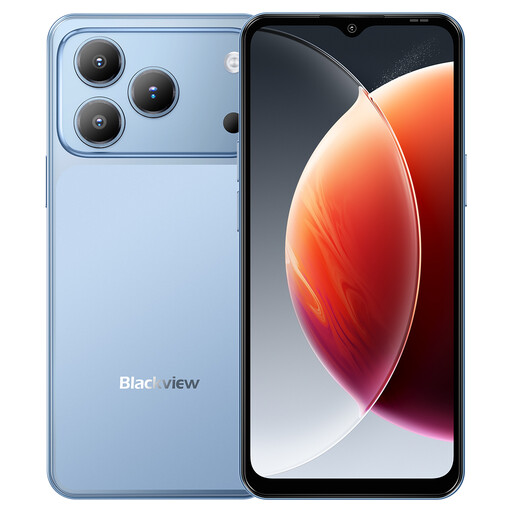
Blackview Wave 7C Android 16 smartphone, 128 GB, Blue
Consider this smartphone if portable communication and short online tasks matter more than frequent document work.
The product name lists a 6.56-inch display, 128 GB storage and 4G dual SIM. Try your essential forms on the phone before relying on it as your only device, and check its accessibility controls and battery runtime for your use.
View on Joybuy
 No image available
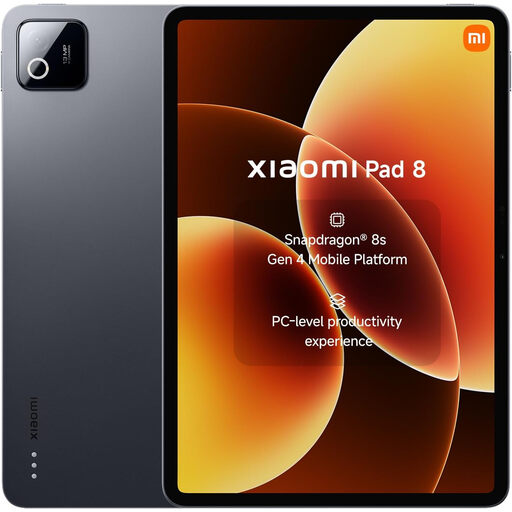
Xiaomi Pad 8 tablet, 8 GB, 128 GB, Wi-Fi, Gray
Consider this tablet if reading and web access on a touch screen are priorities, but test longer forms before making it your main device.
The named variant has 8 GB memory, 128 GB storage and Wi-Fi. If sustained typing matters, check whether a suitable keyboard is included or compatible; try the accessibility controls and confirm battery runtime for your tasks.
View on Joybuy
Questions about getting online
Is a smartphone enough for everyday online services?
A smartphone can suit communication and shorter tasks, but it may be awkward as the only device for regular forms or documents. Ofcom's 2022 adult media-use report found that a majority of smartphone users considered forms, document work and comparing products or services harder on a phone than on a laptop or desktop. Try your most demanding task before deciding.
Should I test accessibility settings before buying accessories?
Yes: try your actual tasks with the chosen device's built-in controls before deciding whether extra equipment is needed. UK Government guidance says phones, tablets and computers often include accessibility features; test the particular text, speech, caption or input controls you need, then check compatibility for any accessory.
What should I check on a refurbished Chromebook?
Check the exact model's automatic-update schedule as well as its condition. Google says that after a Chromebook's final software update, ChromeOS and browser updates, including security fixes, stop and some app support may end.
Can I get a device directly from the National Device Bank?
Good Things Foundation says its National Device Bank does not provide devices directly to individuals; it works through local organisations. Ask a participating organisation what help is available locally, rather than treating the scheme as a retail purchase option.
Where can I get help learning to use a device?
A local Digital Inclusion Hub may offer digital-skills help, devices or data, depending on the organisation and location, according to Good Things Foundation. GOV.UK also says local libraries provide free internet access. Check what your nearby service offers and whether it can help with the setup tasks you expect to find difficult.


