What matters when choosing
Try the tasks your relative needs to do, then decide whether portability, a larger touch display or familiar computer controls matter most. Settings and accessories may make an existing device easier to use without changing device type.
Smartphone
Choose it when: Calls, messages and internet access away from home are the main tasks.
Trade-off: A smaller touch display may be uncomfortable for detailed pages or long typing sessions.
Tablet
Choose it when: A larger touch display is wanted for reading, video calls or media at home.
Trade-off: It remains touch-led unless the intended keyboard or pointer works with the exact tablet.
Laptop or desktop
Choose it when: Regular typing, mouse use or a separately chosen larger monitor is central to the task.
Trade-off: A laptop needs carrying and charging; a desktop stays in one place and takes up more space.
| Concern | What to check | Who this matters to |
|---|
| Familiar controls |
Try the intended keyboard and pointer with the websites or forms they use; check how accessories connect. |
If I already know my way around a mouse and keyboard, I want online tasks to work without learning touch gestures. Around 36% of consumers put familiar controls first. |
| Accessible interaction |
Try the relevant text, contrast, spoken-feedback or caption settings on the exact device and software version. |
When seeing, hearing or operating the controls is difficult, I need to know whether adjustments make my usual tasks manageable. For around 29% of consumers, accessible interaction is the primary concern. |
| Portable communication |
Decide whether calls away from home are needed; try holding the device and reading its display. |
I mainly want to keep in touch, look at photos and browse without setting up a computer. That is the leading need for around 21% of consumers. |
| Refurbished-device support |
Check the seller’s condition description and the device’s operating-system support. |
If I am considering a refurbished device, I want it to run the services I use and remain supported. Around 14% of consumers place that concern first. |
Joybuy laptops and tablet
These laptops offer computer-style options for familiar online tasks; the tablet is a touch-led option for browsing and media. Try the controls, display and intended services with your relative before choosing between them.
 No image available
Lenovo IdeaPad Slim 3 83K7009MUK, 15.3-inch laptop
Consider this laptop for familiar computer-style browsing and typing; try the display and controls with the intended user.
15.3-inch WUXGA display; AMD Ryzen 5 7535HS; 24GB DDR5 RAM; 512GB PCIe SSD; Windows 11 Home.
View on Joybuy
 No image available
HP OmniBook X Flip 16-as0004na, 16-inch 2-in-1
Consider this model if both laptop and touchscreen interaction appeal; check that its convertible modes work as intended.
16-inch touchscreen; Intel Core Ultra 5 226V; 16GB RAM; 512GB SSD; Windows 11 Home.
View on Joybuy
 No image available
Lenovo IdeaPad 1, 15-inch Full HD laptop
Consider this laptop for computer-style online tasks, but check that the intended apps work with its supplied Windows setup.
AMD Ryzen 3 7320U; 8GB RAM; 128GB SSD; Windows 11 Home in S Mode.
View on Joybuy
 No image available
Acer Aspire Lite AL15-36P-C29Z, 15.6-inch laptop
Consider this laptop if familiar computer-style input and a larger display matter; try the screen and controls with the user.
15.6-inch Full HD display; Intel N150; 8GB DDR4 RAM; 128GB SSD; Windows 11 Home.
View on Joybuy
 No image available
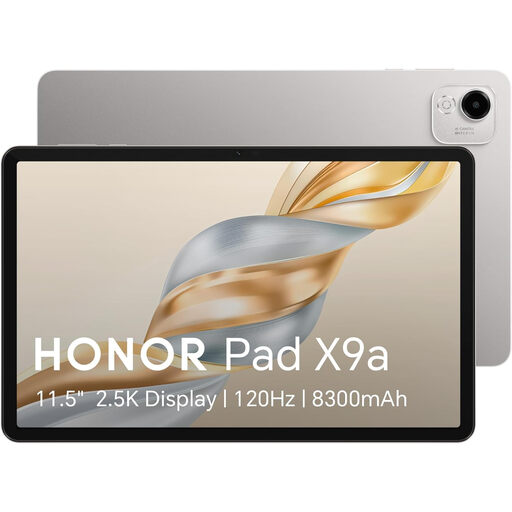
HONOR Pad X9a, 11.45-inch Wi-Fi tablet
Consider this touch-led option for browsing and media on a larger display than a phone. Check that Wi-Fi is available where it will be used, and try the intended settings and tasks.
11.45-inch display; 128GB storage; grey.
View on Joybuy
Common questions
Should I choose a smartphone, tablet or computer for an older relative?
Choose according to the tasks and controls they prefer, rather than age alone. A smartphone suits communication away from home, a tablet provides a larger touch display, and a laptop or desktop suits regular keyboard-and-mouse tasks. Try their usual activities on the device before buying.
Can a keyboard or mouse make a phone or tablet easier to use?
Yes, if the exact device and accessory work together and the person prefers those controls. Apple documents external-keyboard control and pointer-device use for iPhone and iPad; Google’s documented physical-keyboard accessibility features require Android 16.0 or later. Check the model, software version and connection method.
Which accessibility settings should we try?
Start with the adjustment that addresses the task the person finds difficult, such as larger text, zoom, contrast, spoken feedback or captions. Age UK describes display and read-aloud adjustments for phones and tablets, while Microsoft documents display, caption and input options in Windows 11. Test the relevant controls on the actual device.
Is a refurbished computer suitable for online services?
It can be, provided it runs the required services and has a suitable software-support route. Microsoft ended standard Windows 10 support on 14 October 2025, so check the installed version before choosing a refurbished Windows computer. Inspect the seller’s description of its condition and any faults as well.
Can someone help my relative get started?
AbilityNet says its UK-wide Tech Volunteers support older and disabled people with device setup, settings and online activities. Ask about help available locally through its support process; volunteer capacity may vary.


